Page 27
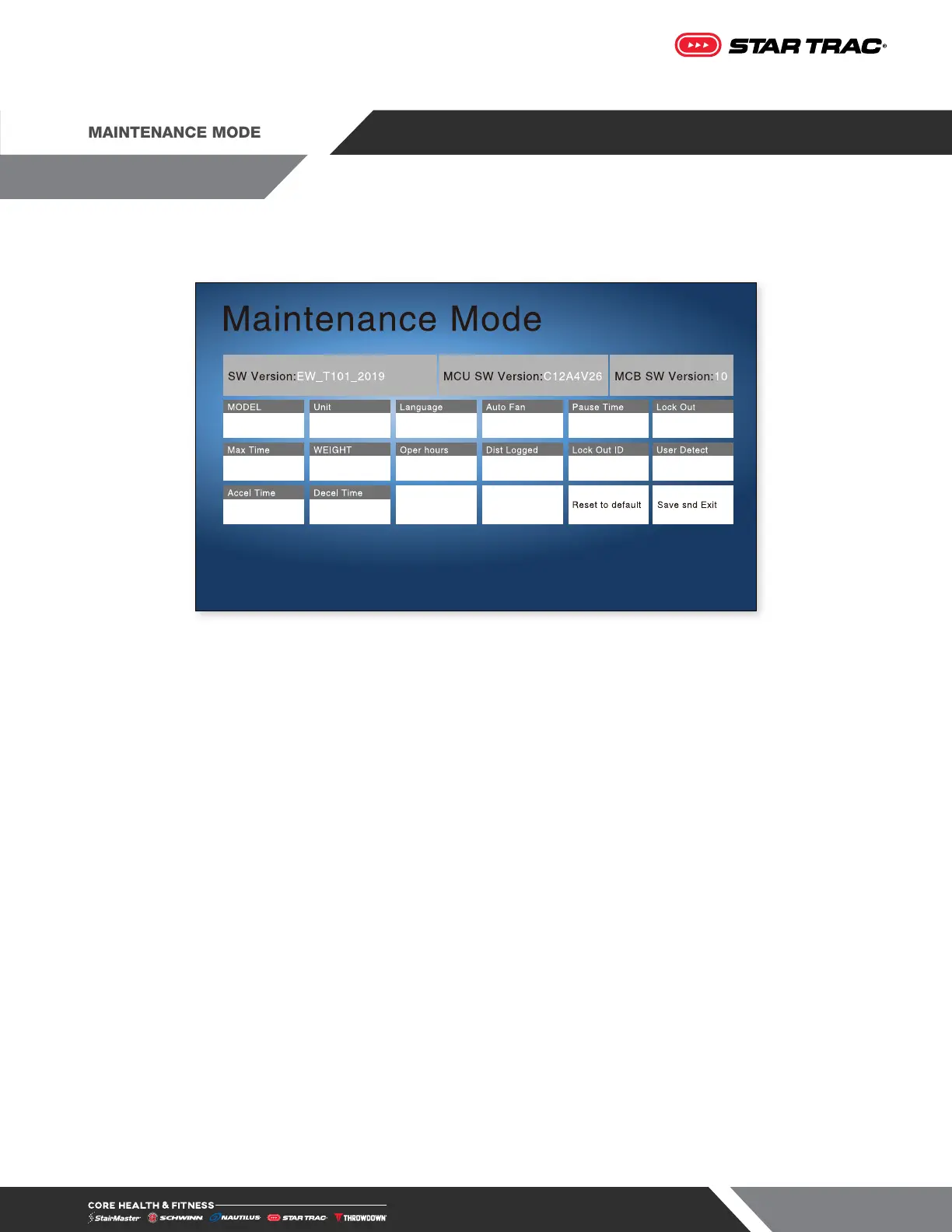
While in Maintenance Mode, the following information can be accessed and/or modified:
Fig. 27
• SW version The latest software version loaded in the system.
• MCU SW version Software version for the MCU
• MCB SW version Software version for the MCB
• Model The product type (treadmill, bike, etc.).
• Units The units of measurement (English or Metric).
• Language The language that the messages are displayed in.
• Auto Fan Allows the manager/owner to select the Auto Fans Functionality (ON or OFF).
• Pause Time Allows the manager/owner to select the length of the pause (30, 45, 60, 90, or 120
seconds).
• Lock Out Allows the manager/owner to select the Lock Out Function (ON or OFF).
• Max Time The maximum time allowed for a single workout.
• Weight The default user weight used for Quick Start programs.
• Oper Hours The cumulative amount of usage hours.
• Dist Logged The cumulative distance logged.
• Lock Out ID Allows manager/owner to set a password for the Lock Out feature.
• User Detect Allows the manager/owner to select the User Detect Functionality (ON or OFF).
• Accel Time Allows the manager/owner to set the AccelerationTime of treadmill (From 25 to 60
seconds).
• Decel Time Allows the manager/owner to set the DecelerationTime of treadmill (From 20 to 60
seconds).












 To Next Page