Page 33
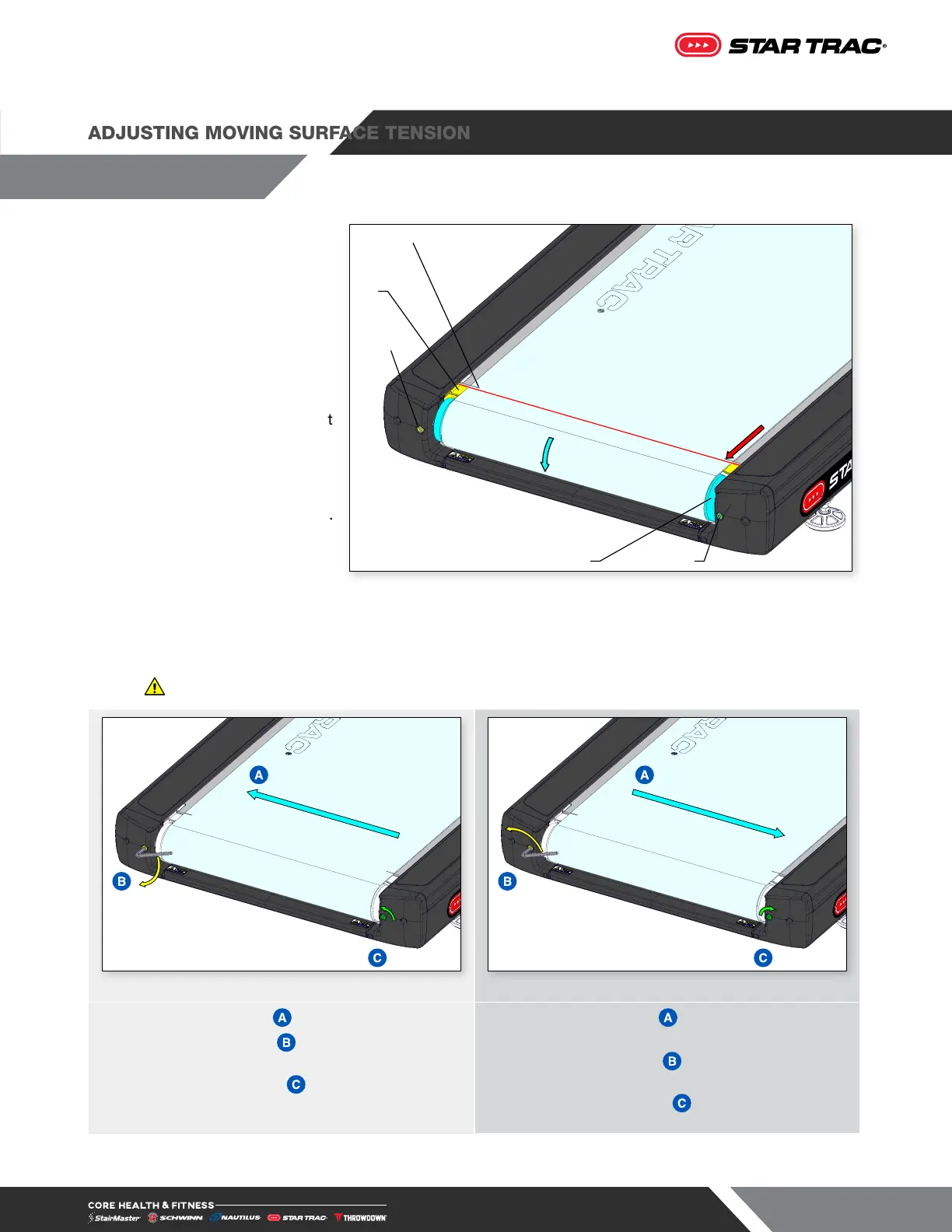
1. Turn off and unplug the
treadmill.
2. Align the tension
adjustment lines on the
moving surface to the tops
of stops (Fig. 43).
3. Use the two roller bolts to
tighten the roller, keeping
the two tension adjustment
lines on the moving surface
parallel to each other.
Caution: Do not over-
tighten the moving surface.
If the moving surface curls
up at the edges, loosen.
4. Plug in power cord.
5. Start the treadmill and set the speed to 3.0 mph (5.0 kph). Make sure the moving surface tracks to the
center of both rollers.
Warning: Do not stand on moving surface.
Fig. 44 Fig. 45
6. If the moving surface tracks to the LEFT side:
a. Turn the left bolt
¼ turn clockwise
b. Turn the right bolt
¼ turn counter-clockwise
7. If the moving surface tracks to the RIGHT
side:
a. Turn the left bolt
¼ turn counter-clockwise
b. Turn the right bolt
¼ turn clockwise
8. Repeat steps 6 & 7 until moving surface tracks to the center.
ADJUSTING MOVING SURFACE TENSION
Stop
Tension Adjustment Line
Left Roller Bolt
Rear Roller Right Roller Bolt
Fig. 43












 To Next Page