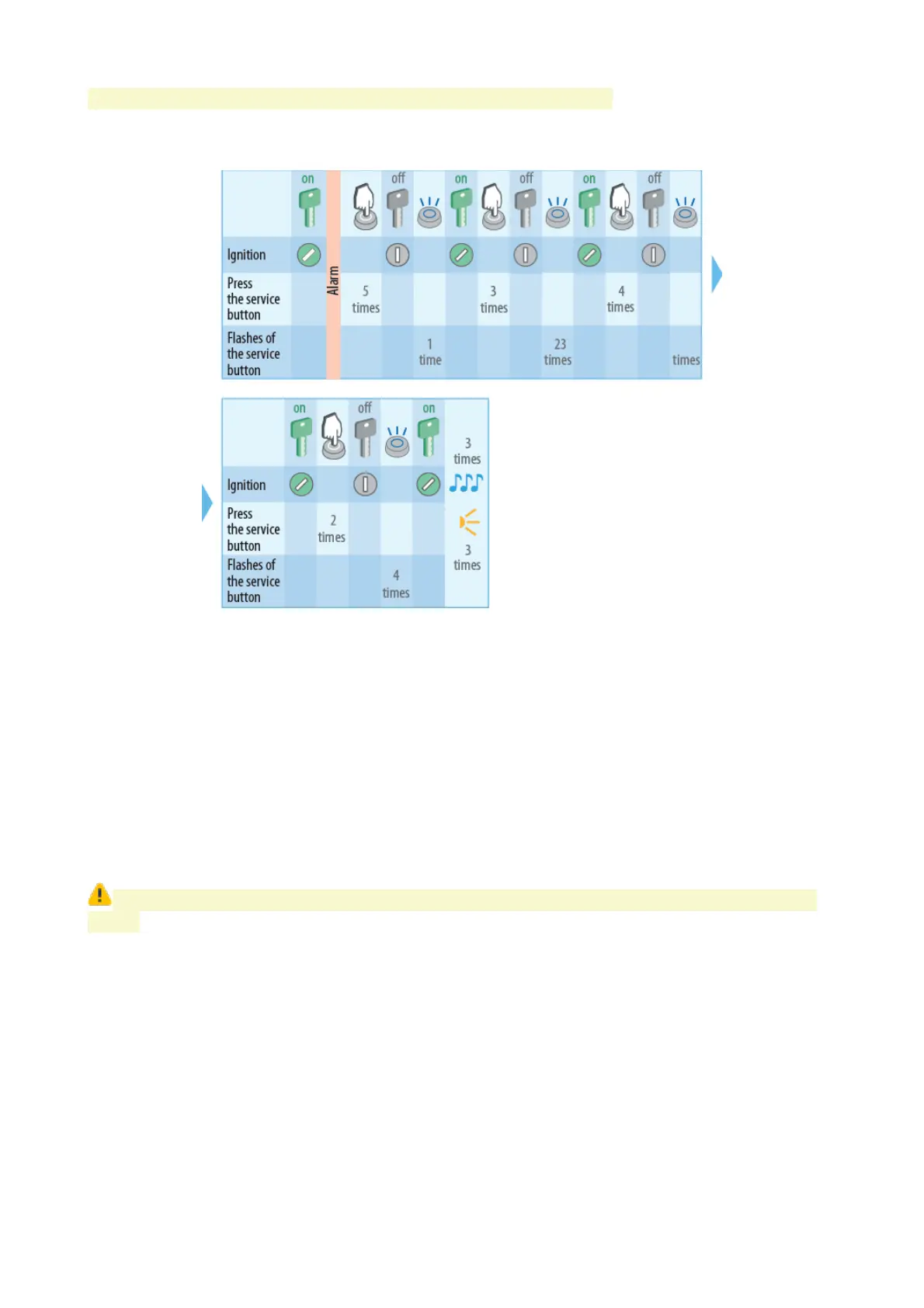
Each button push in this interval will be indicated with 5 flashes.
Sample code 5342 entry with service button
Emergency disarming with SMS text message
Send SMS text command 30 XXXX. where XXX – emergency disarm code from ID card
Changing emergency disarm code with service button (or external transceiver
button)
1. Switch system in disarmed mode if it is armed.
2. Push service button 4 times.
3. Switch ignition On. 4 LED flashes and 4 sounds shall follow.
4. Entry into code recording will be confirmed with 2 LED flashes and 2 sounds.
If nothing is done withing 5 sec system shall turn off from emergency code recording
mode.
5. Switch ignition Off.
6. Switch ignition On and push service button a number of times equal to a first digit of
existing emergency disarm code.
7. Switch ignition Off. Each digit entry will be confirmed with LED flashes equal to a
sequence number of corresponding digit entered (1,2, 3 or 4 times).
8. Repeat 6...7 steps for remaining digits.
9. Valid existing code entry will be confirmed with 2 LED flashes and 2 beep sounds.
10. Switch ignition On. Push service button a number of times equal to a first digit of a new
emergency disarm code.
11. Switch ignition Off. Each digit entry will be confirmed with LED flashes equal to a
51


 To Next Page