26
This process is carried out using the touchscreen LCD on the printer. Please ensure you have an SD card loaded
into the slot on the back of the printer before you start; and that the model you wish to print is saved on that card.
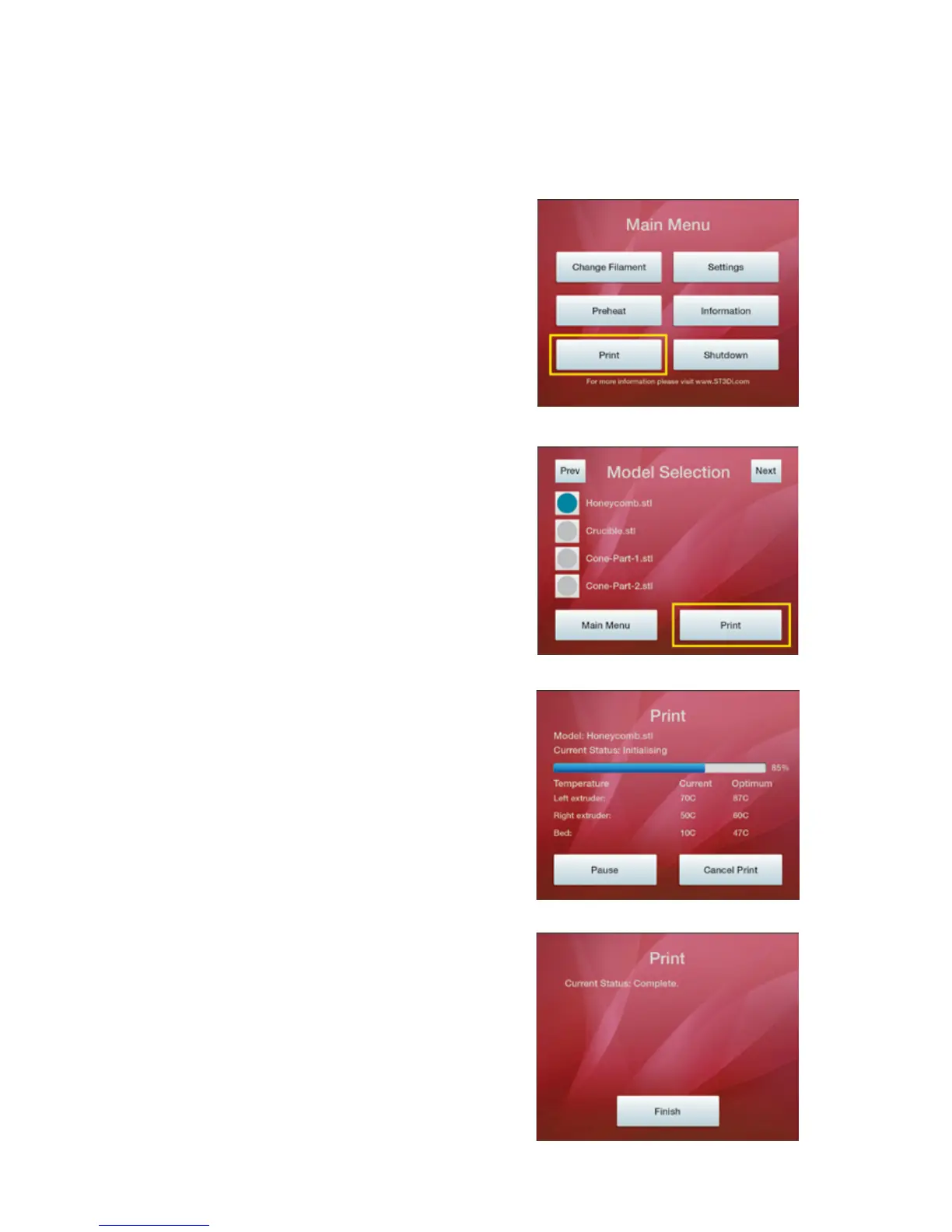
1. Please select ‘Print’ from the Main Menu
2. Select the model you wish to print from the list of
models that are shown (i.e. the models that you have
saved on your SD card). Please note that this screen has
an 8 character limit for le names; please bear this in
mind when saving models in order to ensure you can
locate them easily on the SD card when prinng via the
LCD.
Once you have selected the correct model, please press
‘Print’.
3. The on-screen display will then conrm the model
selecon, the status of print (inialising, prinng or
complete), the percentage of prinng complete, as
well as the current temperatures of the extruders and
prinng bed. Please note that if prinng via the ‘Transfer
and Print’ opon the model name will only be displayed
with the 8 character limit as menoned above.
At any me during prinng you are able to pause or
cancel your print.
4. Once your print is completed this on-screen message
will be displayed.
PRINTING VIA YOUR ST3DI 3D PRINTER
1.
2.
3.
4.



 To Next Page