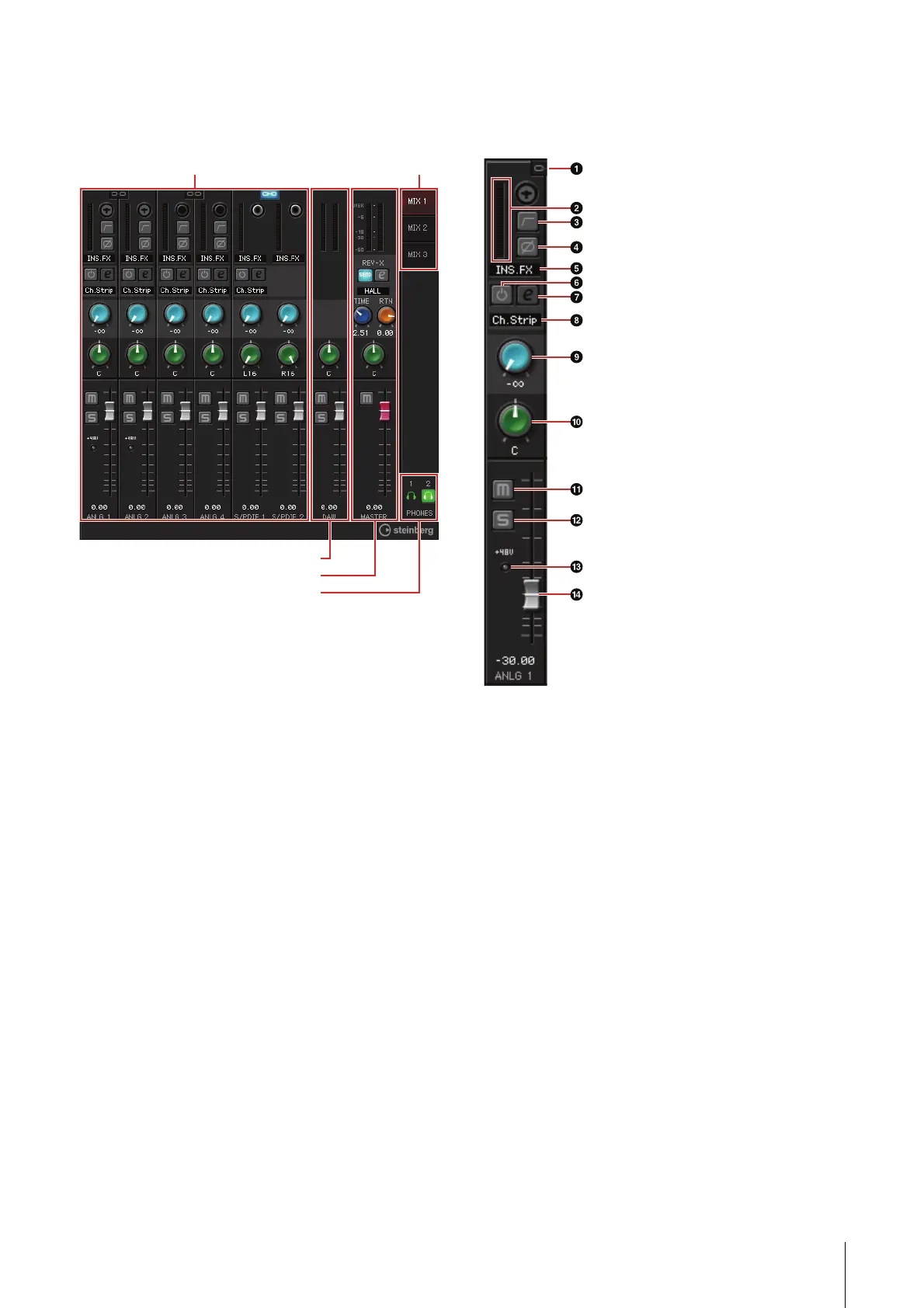
Panel Controls for the Software Programs
UR28M Operation Manual 13
Main Window
This is the window for configuring the entire signal
flow.
Channel Area
This is the area for configuring the input channel
settings.
1 Channel Link
Turns on (lit) and off (dark) the channel link of two
adjacent channels. When you turn this on, two
mono channels will become one stereo channel.
2 Level Meter
Indicates the signal level.
3 High Pass Filter
Turns on (lit) and off (dark) the high pass filter.
To select the cutoff frequency of the high pass
filter, use the “Setup Window” (page 16) in the
section “dspMixFx UR28M.”
4 Phase
Turns on (lit) and off (dark) the phase inversion of
the signal.
Channel Area (page 13) MIX Area (page 15)
DAW Area (page 14)
Master Area (page 15)
Headphone Area (page 15)



 To Next Page