Panel Controls for the Software Programs
UR28M Operation Manual 22
Sweet Spot Morphing Channel
Strip (Channel Strip)
Overview
The Sweet Spot Morphing Channel Strip (“Channel
Strip” for short) is a multi-effect that combines
compression and EQ. Advanced sound engineering
know-how is condensed into a number of
convenient presets that can be simply and instantly
recalled, for professional results.
Four channel strips can be used at a time, and it can
be assigned either to the monitor sound only, or to
both the monitor and recorded sound.
The Channel Strip equipped with the device and the
Channel Strip of the VST Plug-in version have the
same parameters. When using the Channel Strip on
Cubase series programs, you can share the settings
between the built-in Channel Strip and the Channel
Strip of the VST Plug-in version as a preset file.
When using the built-in Channel Strip on Cubase
series programs, turn on the “Direct Monitoring”
setting in the program. Also, when assigning the
Channel Strip of the VST Plug-in version to the effect
slot on Cubase series programs, select it from the
“Dynamics” category (in the case of the default
settings).
How to Open the Window
From Dedicated Windows for Cubase Series
Select the “Channel Strip” from the “Effect Type”,
then click “Channel Strip Edit” in the section “Input
Settings Window” (page 17).
From the dspMixFx UR28M
Select the “Channel Strip” from the “Effect Type”,
then click “Channel Strip Edit” in the section
“Channel Area” (page 13).
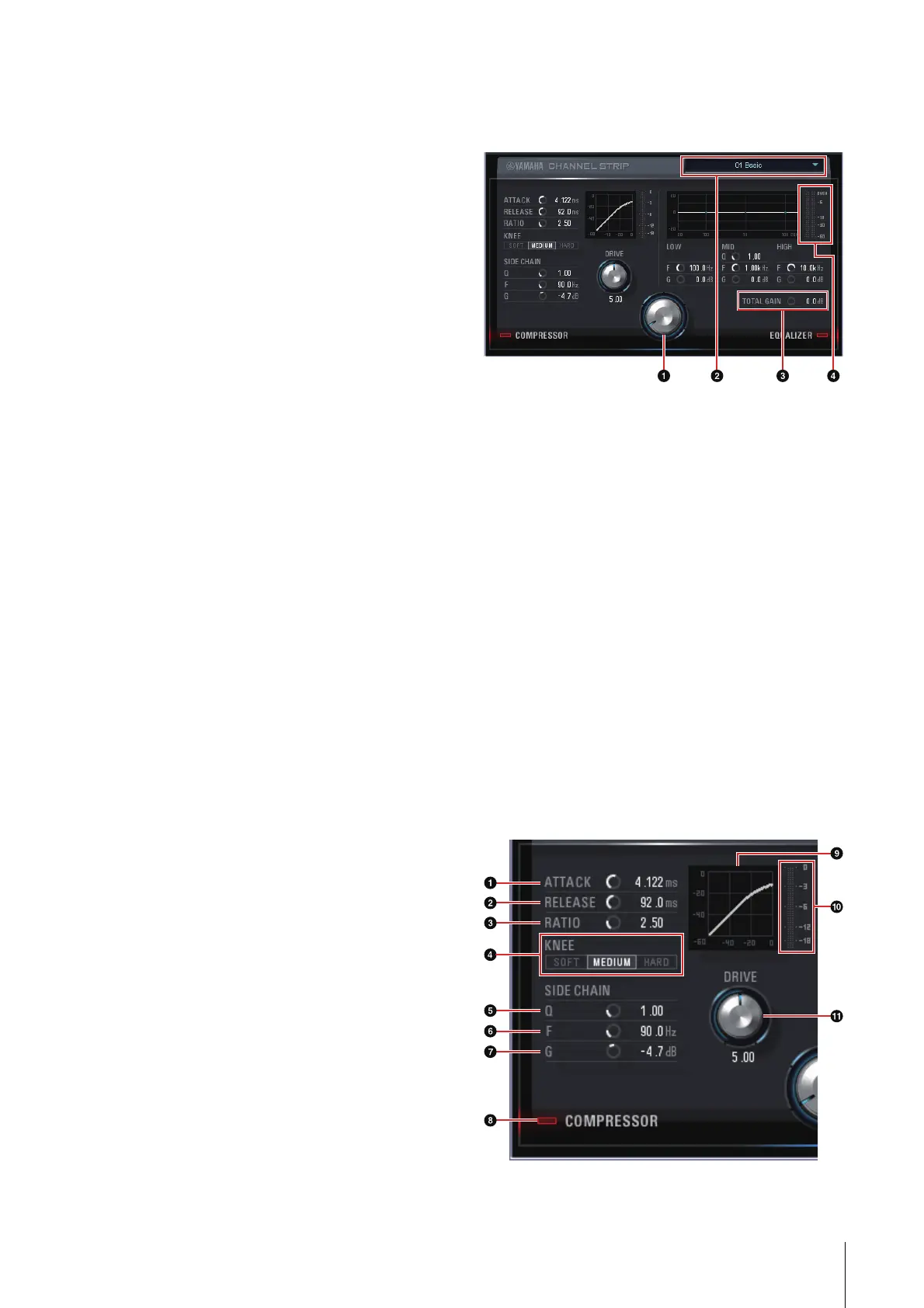
Panel Controls
Common to Compressor and Equalizer
1 MORPH
Adjusts the parameter of the Sweet Spot Data.
You can simultaneously adjust the compressor
and equalizer settings which are set to five points
around this knob by turning this knob. When you
set the knob to the middle of adjacent two points,
the compressor and equalizer settings will be set
to an intermediate value.
2 Sweet Spot Data
Selects the Sweet Spot Data (page 33).
3 TOTAL GAIN
Adjusts the total gain of the Channel Strip.
Range: -18.0 dB – +18.0 dB
4 Level Meter
Indicates the output level of the Channel Strip.
Compressor



 To Next Page