5Operation 5
Crane Precautions
1. Movement of the control levers should be
slow and smooth to meter oil flow for safe
operation. Avoid jerky and sudden
movements.
2. The crane controls should be clearly marked
with decals. If these are missing or
illegible,replace immediately. (See Chapter
5: Decals)
3. Lift load slightly off the ground to check the
safety of the cargo. Do not use stability to
determine the safety. Consult the capacity
charts and strictly adhere to them.
4. Be constantly aware of the boom position
when operating the controls.
5. The boom tip should be centered directly
over the load before making the lift to
avoid swinging.
6. Do not drag loads with the crane.
7. Do not attempt to lift fixed loads.
8. Do not load boom in a sideways direction.
9. Know the weight of the rigging and load to
avoid overloading the crane.
10. Do not extend or rotate a load over
anyone.
11. Wear protective gear such as hard hat,
safety glasses, steel-toed boots, and gloves.
12. Maintain a minimum of 5 full wraps of wire
rope on the winch drum at all times.
Hook Precautions
1. Hooks are designed and manufactured to
lift specific loads. The specified rated load of
a hook applies to loads held unifor
mly in
direct tension and does not take into
account shock loads, hook tip loading, side
loading, bending, torsional, or related loads.
2. Do not attempt to lift a load that is larger
than the load rating of the hook.
3. Never use a hook’s yield point as an
indicator of its capacity.
4. Do not use a hook to lift personnel.
5. Know the rated load of the hook in use.
6. Never weld attachments to a finished hook
in field applications. This will alter and
destroy the design properties of the hook
material.
7. Keep fingers, hands, body, and loose
clothing from between the hook and the
load.
8. Avoid shock loading.
9. Inspect the hook regularly for excessive wear
and maintain it in safe operating condition.
Manual Operation
If the remote control malfunctions, follow
these steps to operate the crane manually:
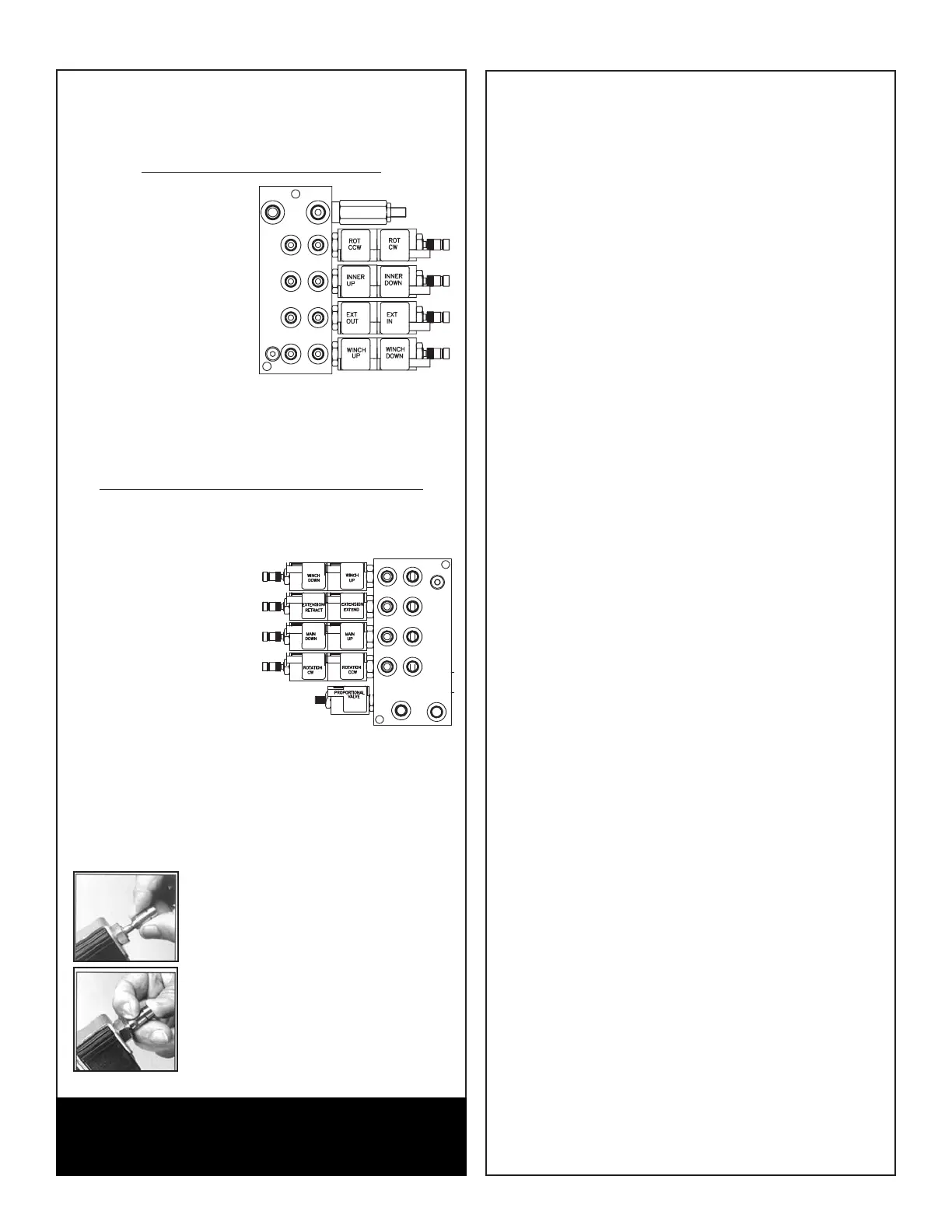
Standard 4420 Manual Override
1. Operate Solenoids.
Slide the knurled
sleeve out and then
push or pull to
operate, as shown
below. Be sure the
sleeve is in the center,
locked, position before
returning to remote
operation. Note: 12V
Power Units must push
the manual override button to allow oil to flow to
the valve banks.
2. Have unit serviced immediately to restore remote
control functionality.
Proportional Version 4420 Manual Override
1. Activate Flow Control.
Turn the override screw on flow control counter-
clockwise.Full adjustment is between three and
fiveturns.
2. Operate Solenoids.
Slide the knurled
sleeveout and then
push or pull to
operate, asshown
below. Be sur
e the
sleeve is in thecenter,
locked, position before
returning toremote
operation.
3. Deactivate flow control. Turn the overridescrew
clockwise until stopped. Fulladjustment is
between 3 and 5 turns.
4. Have unit serviced immediately to restoreremote
control functionality.
Manual Override Pull Function
The knurled sleeve is pulled all the way
out together with the knob to manually
override the pull solenoid function.
Manual Override Push Function
The knurled sleeve should first be pulled
to unlatch the ball latching mechanism
and then, while holding the sleeve
back, the override knob should be
pushed all the way in to override the
push solenoid.
WARNING
Failure to return the valve bank manual overrides to the
neutral position can result in unexpected crane
movement.




 To Next Page