Stability Procedure
Definition of Stability for the Stellar Telescopic Crane Products:
A truck is stable until the load cannot be lifted off the ground with the winch, without tipping over the
truck. Every Stellar crane installed must be tested for stability to determine the actual load capacity
of the final truck package. The actual test data must be recorded and supplied with the truck at the
time of in-service and should be kept with the truck at all times. The following procedure will test
the truck package for stability and will provide a stability capacity chart. The load limit information
shown on the stability capacity chart is formulated on 85% tipping.
Set Up:
1. Locate the truck on a test course in position for loading and engage travel brakes.
2. Set outriggers so that they make contact with firm, level footings.
3. Operate the crane under partial load to assure operator proficiency and proper machine function.
Chapter 6 - Installation
6-5
9628 Stability Data
Max Horizontal Reach: 339” (From the center of roation to boom tip)
Stability Test Weight: 2270 lbs.
Test Procedure
1. Rotate the crane into Zone 1 position.
2. With the crane fully retracted and the boom horizontal, winch the test weight off the ground. Note:
Keep weight within six inches of the ground at all times.
3. Extend the boom outward until full extension has been reached or until the truck becomes
unstable (Again, use the winch to keep the weight within six inches of the ground.)
4. If the boom goes full extension without becoming unstable, the crane is termed stable for this
zone and 100% can be written in the Zone 1 data box.
5. If the truck becomes unstable prior to going full extension, retract the boom until the truck
becomes stable and measure the horizontal reach in this position (center of rotation to boom tip).
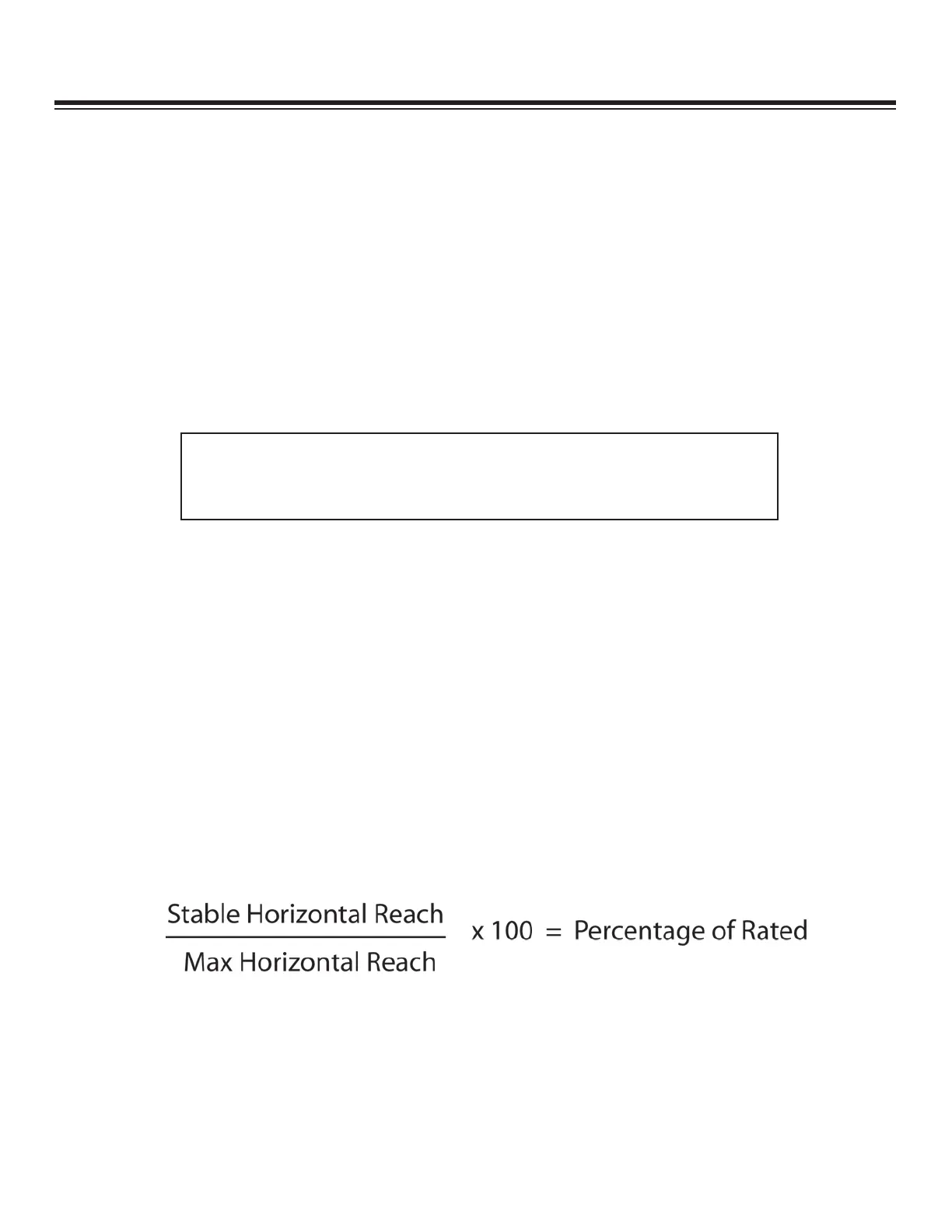
This is the stable horizontal reach for this zone. Stable horizontal reach divided by Maximum
horizontal reach multiplied by 100 equals the percentage of rated capacity for this zone. Use the
following formula to determine the percentage of rated capacity:
6. Record this number in the data box for Zone 1. This is the revised capacity due to stability for
this zone.
7. Repeat this procedure for each zone until the worksheet is completed.
8. This is the revised capacity based on stability of this package.



 To Next Page