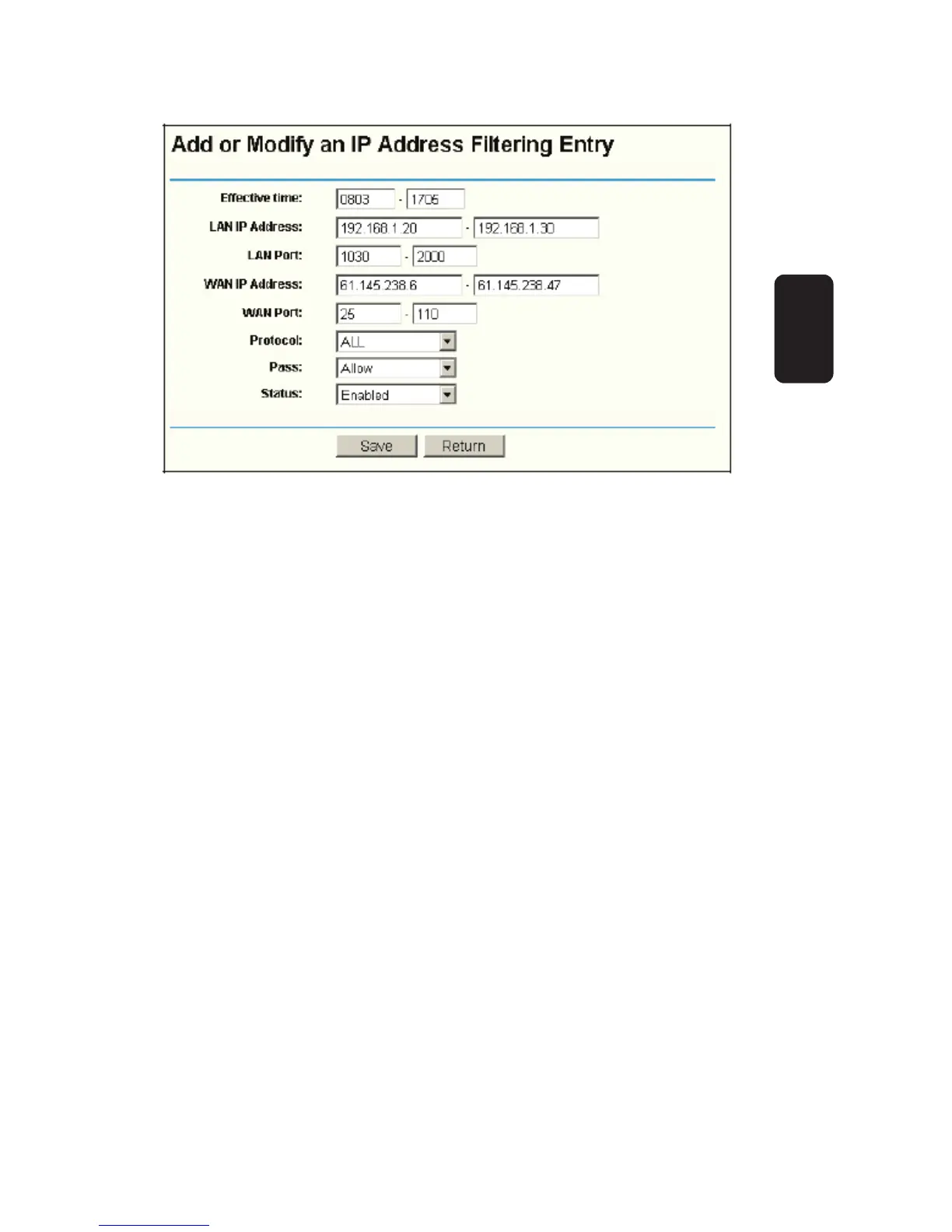
To create or modify an IP Address Filtering entry, please
follow these instructions:
1. Effective Time - Enter a range of time in HHMM format, which
point to the range time for the entry to take effect. For example,
0803 - 1705, the entry will take effect from 08:03 to 17:05.
2. LAN IP Address - type a LAN IP Address or a range of LAN IP
addresses in the fi eld, in dotted-decimal notation format.
For example, 192.168.1.20 - 192.168.1.30.
Keep the fi eld open, which means all LAN IP Addresses have
been put into the fi eld.
3. LAN Port - type a LAN Port or a range of LAN ports in the
fi eld. For example, 1030 - 2000. Keep the fi eld open, which
means all LAN ports have been put into the fi eld.
4. WAN IP Address - type a WAN IP Address or a range of WAN
IP Addresses in the fi eld, in dotted-decimal notation format. For
example, 61.145.238.6 – 61.145.238.47.
Keep the fi eld open, which means all WAN IP Addresses have
been put into the fi eld.
5. WAN Port - type a WAN Port or a range of WAN Ports in the
fi eld. For example, 25 – 110. Keep the fi eld open, which means
all WAN Ports have been put into the fi eld.
Fig. 43
ENGLISH
ENGLISH-52


 To Next Page