7.1.9 BATTERY LEVEL
This indicates the average amount of charge you have in
the batteries. Green indicates fully charged batteries with
reducing charge to the red indicator. Red indicates
warning and less than half-charged batteries,
(Label.7.1.9). Please be aware that the meter reading will
fluctuate when accelerating from start or travelling uphill,
this is normal. The reading is more accurate when the
scooter is operating on flat level ground.
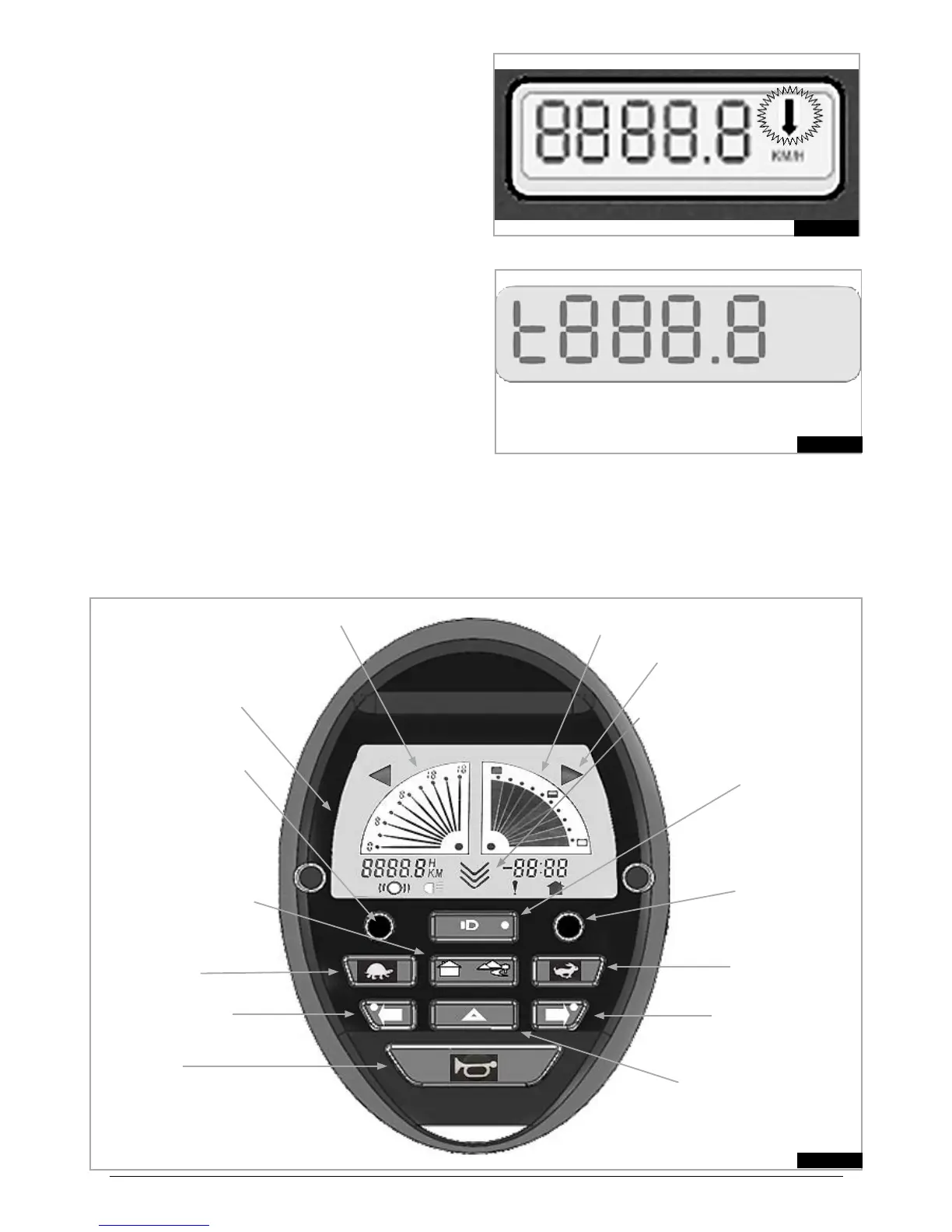
7.1.10 LCD DISPLAY (7.1.10)
The backlit LCD display can display:
Speed in Kilometres per hour (km/h) or Miles per •
hour (m/h).
Total distance in Kilometres (km) or Miles (m), •
Trip distance – reset by holding down MODE button, •
7.1.7, (Fig.7.1).
Total Hours the scooter has been used (h).•
Fault display – see troubleshooting section.•
When used with an optional foot or twist grip handcontrol
the flashing arrow indicates travel in reverse direction,
(Fig 7.1-Label 7.1.10A), (also see section 7.13).
TOTAL DISTANCE MODE
Fig.7.1.2
TRIP MODE
Fig.7.1.3
7.2 ELITE
2
PLUS CONTROL SYSTEM – FIG 7.2
Fig.7.2
7.2.7 MODE BUTTON
7.2.6 LIGHTS
7.2.5 INDICATORS
7.2.4 HAZARD LIGHTS
7.2.3 HORN
7.2.11 BATTERY LEVEL INDICATOR
7.2.14 LCD DISPLAY
7.2.8 SPEED CONTROL
FAST
7.2.10 TIME/TEMP
BUTTON
7.2.9 PROFILE BUTTON
INDOOR/OUTDOOR
7.2.8 SPEED CONTROL
SLOW
7.2.12 CURRENT SPEED INDICATOR (LINE)
PRESET SPEED INDICATOR (DOT)
7.2.5 INDICATORS
7.2.13 INDICATOR ICONS
7.2.15 DIRECTIONAL ARROWS



 To Next Page