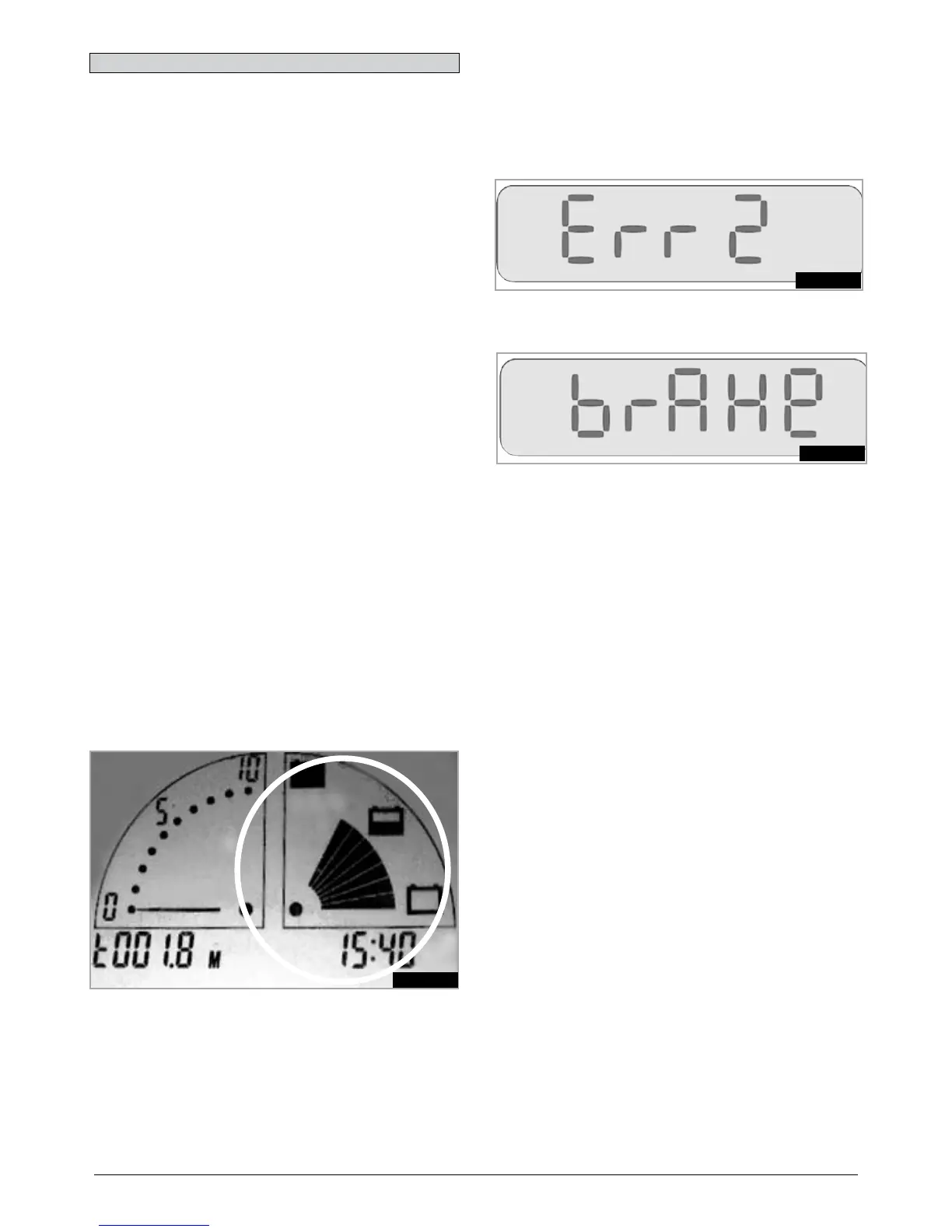
8.1 ELITE
2
PLUS DISPLAY
(Fig.8.1.0).
Always consult your Sunrise Medical authorised dealer
when a diagnostic fault has appeared on your scooter
display.
Elite
2
PLUS Fault- The battery gauge shows the status of
the control system, and the fault graphic ! on the display.
Battery Gauge is steady
This indicates that everything is OK.
Battery Gauge flashes slowly
The control system is functioning correctly but the
batteries need charging as soon as possible.
Battery Gauge steps up
The scooter batteries are being charged. You will not be
able to drive the scooter until the charger is disconnected
and you have switched the control system off and on
again.
Battery Gauge flashes rapidly
The control system safety circuits have operated and the
control system has been prevented from moving the
scooter.
This indicates a system trip. i.e. the power module has
detected a problem somewhere in the scooters electrical
system.
Switch the scooter off.
Check that none of the plugs and sockets have become
loose or disconnected.
Check the condition of the battery.
If you can’t find the problem, try the self help guide on the
next page.
Switch the scooter on again and try to drive the scooter.
If the safety circuits operate again, switch off and do not
try to use the scooter.
Contact your Sunrise Medical authorised dealer.
8.0 Troubleshooting Using the LCD
Fig.8.1.0
8.2 ELITE
2
XS, RS DISPLAY
Always consult your Sunrise Medical authorised dealer
when a diagnostic fault has appeared on your scooter
display
Elite
2
XS,RS Fault- The LCD displays the fault bar
number, (Fig.8.2.0).
Incase of a brake fault (4 bar) the display will show,
“brake” and the horn will sound, (Fig.8.2.1).
The displays above indicate the control system safety
circuits have operated and the control system has been
prevented from moving the scooter.
This indicates a system trip. i.e. the power module has
detected a problem somewhere in the scooters electrical
system.
Switch the scooter off.
Check that none of the plugs and sockets have become
loose or disconnected.
Check the condition of the battery.
If you can’t find the problem, try the self help guide on the
next page.
Switch the scooter on again and try to drive the scooter.
If the safety circuits operate again, switch off and do not
try to use the scooter.
Contact your Sunrise Medical authorised dealer.
NOTE: Taking the scooter from a warm indoor
environment to very cold outside surroundings may cause
the display to mist for a short time. This is harmless and
will clear quickly.
Fig.8.2.0
Fig.8.2.1



 To Next Page