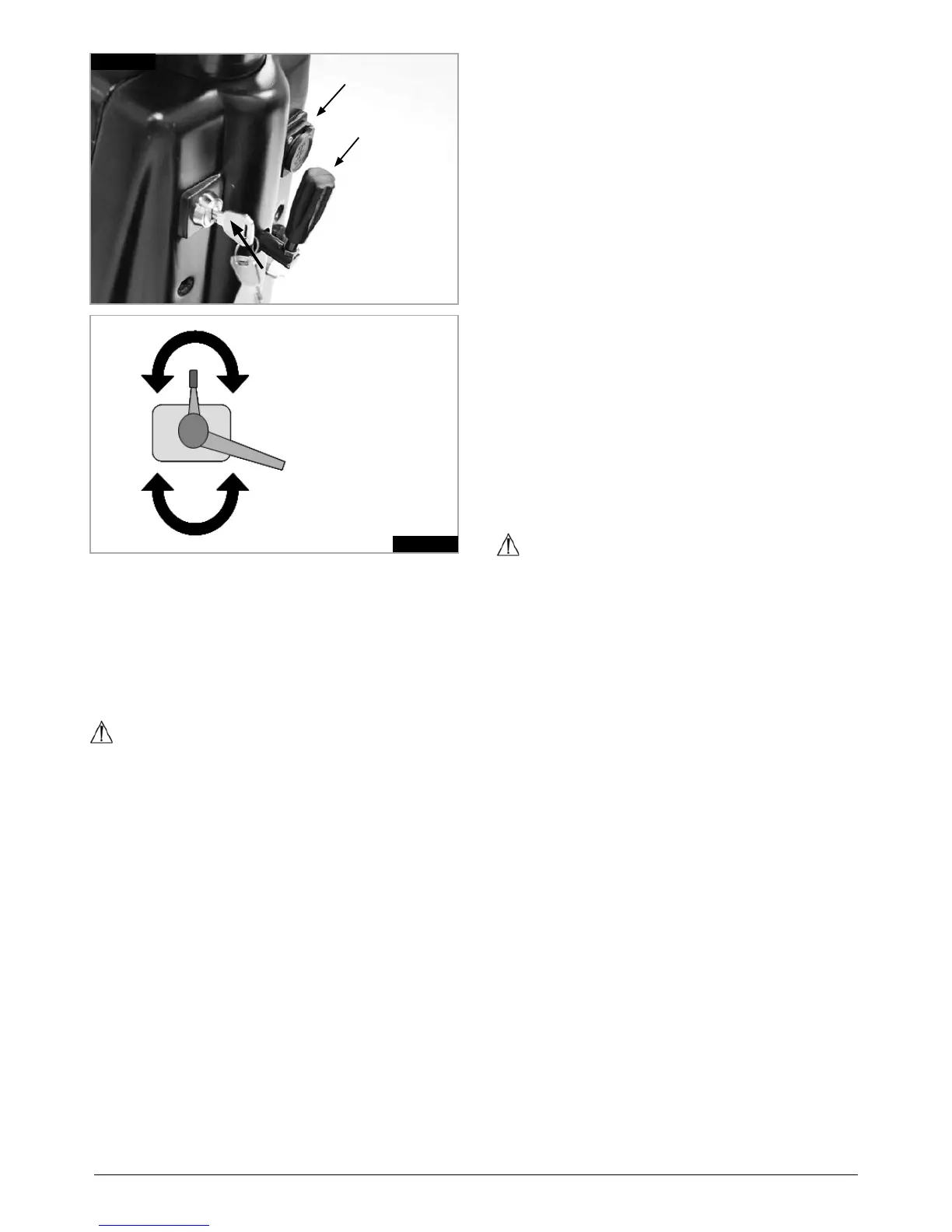
Fig.7.2.2
7.2.2 CONTROL SIDE
LEVER
Fig.7.2.1
7.2.1 ON/OFF KEY SWITCH
CHARGER SOCKET
TILLER
ADJUSTER
7.2.1 ON/OFF KEY SWITCH
The On/Off key switch applies power to the control
system electronics, which in turn supply power to the
scooter motors.
To turn ON Insert the key vertically and turn 90 degree
clockwise.
To turn OFF scooter, turn key back to vertical position
and remove, (Fig.7.2.1).
WARNING!
Do not use the on/off key switch to stop the scooter •
unless there is an emergency. (If you do you may
shorten the life of the scooter drive components).
To avoid unexpected or unintentional movement of •
the scooter and to conserve battery power, it is
recommended that the key switch is switched Off
when stationary or not being used.
7.2.2 CONTROL LEVER (SIDE THROTTLE)
Located by handle bar grips. Your speed as well as
forward and reverse motion is controlled via the control
lever or side throttle.
Gently pull up on the lever to move the scooter in a
forward motion. The amount of movement applied to the
lever also proportionally controls the speed of the
scooter.
Pushing down on the knob at the top of the lever will
move the scooter in reverse and also proportionally
controls the speed of the scooter in reverse.
Alternatively pushing down on the lever will also move
the scooter backwards. Again the rate of speed is
controlled by the amount of the movement of the lever.
The lever will return by itself when released, and you will
stop gently. Braking is engaged when the lever is
released
When stopping the high visibility rear LED braking lights
will illuminate. These also function when the scooter
lights are turned on.
A programmable audible reversing alarm is available to
warn other vehicles or pedestrians when you are
reversing.
NOTE: The audible reversing alarm is turned off by
default but it can be activated by your Sunrise Medical
dealer or supplier. It is not recommended to deactivate
this feature if it is a statuary requirement of your country/
state.
NOTE: The control lever can be mounted on either side
of the handle bars.
WARNING!
It is important that you stop the scooter before you
change direction from forward to reverse.
Always turn the scooter control system off via the
keyswitch before you transfer in or out of the scooter.
7.2.3 HORN
The horn will sound while this button is depressed.
7.2.4 HAZARD LIGHTS
With the scooter ON the front and rear LED indicators will
flash simultaneously when this button is pressed.
The corresponding indicator icons on the LCD will also
illuminate, (7.2.13).
Press the button again to switch the hazard lights off.
7.2.5 INDICATORS
Pressing the button will illuminate the front and rear LED
indicators in a flashing pattern indicating you are turning
the scooter. The corresponding indicator icons on the
LCD will also illuminate, (7.2.13), and the scooter will
emit a beeping tone.
To turn off the indicators press the button again.
Alternatively the direction indicators will automatically turn
off after a distance of approximately 30 meters.






 To Next Page