7.2.14 LCD DISPLAY
(Fig.7.2)
The backlit LCD display can display the following
functions:
Battery gauge.•
Time and ambient temperateure.•
Speed in Kilometres per hour (km/h) or Miles per •
hour (m/h),
Total distance in Kilometres (km) or Miles (m),•
Trip distance. This can be reset by holding down the •
MODE button.
Total Hours the scooter has been in use (h).•
Directional Arrows. When used with an optional foot •
or twist grip hand control the arrow indicates travel in
reverse direction, (see section 7.13).
Fault display, (see troubleshooting section).•
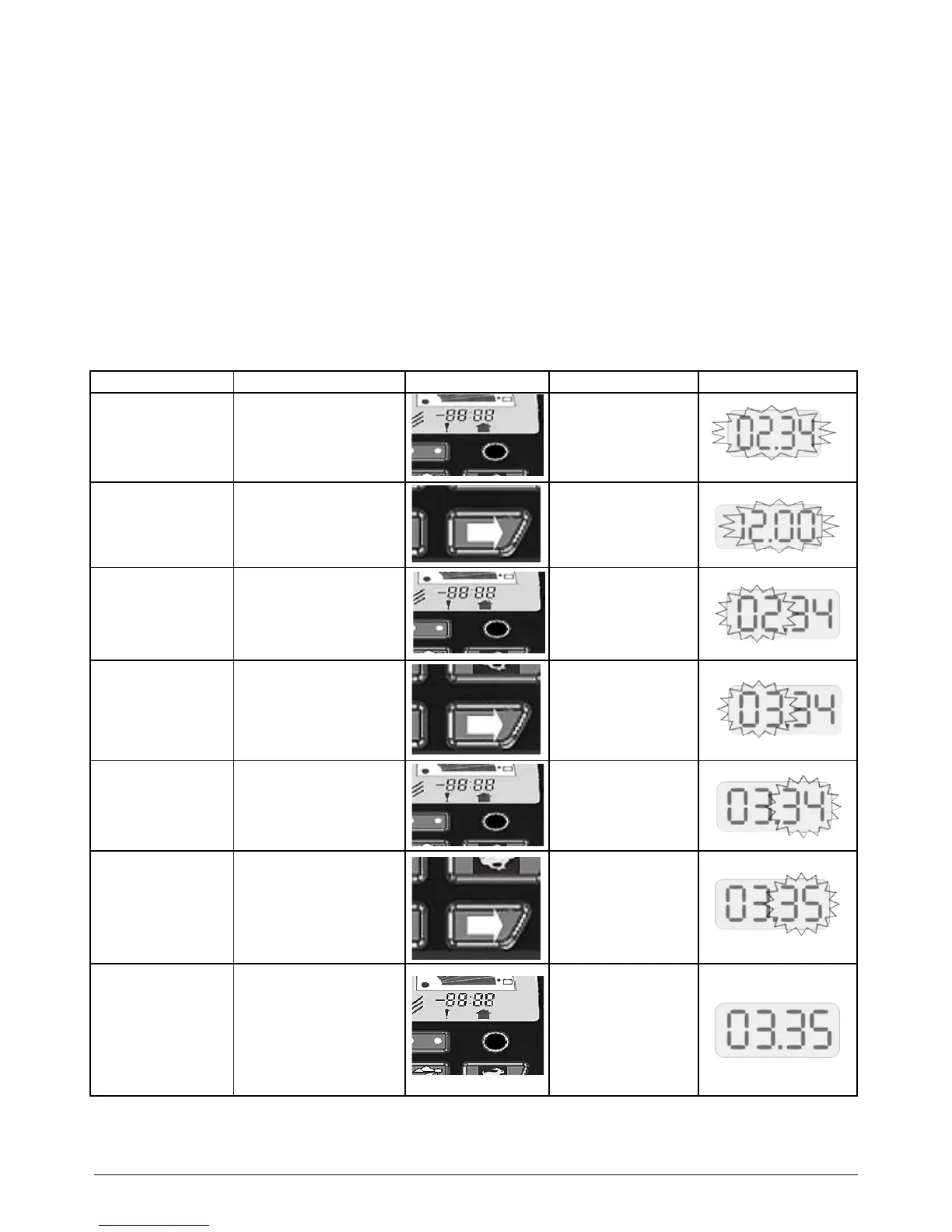
7.3 CLOCK SETTING
To set the clock please follow the instructions below:
MODE OPERATION DISPLAY
To enter Clock Set
Mode
Press and hold the round
button below the clock
display for more than 10
seconds
The current time
display flashes
Choosing the 12 or
24 Hour Clock Mode
Press and release the
right-hand indicator
button to switch between
12 or 24 hour clock
display
12:hr Flashes
or
24:hr Flashes
Press and release the
round button to confirm
your selection and move
to the next step
The hours part of the
time display flashes
Setting the Hours Press and release the
right-hand indicator
button once to move up
One Hour at a time
The Hour display is
changed by 1 hour
per press and
release
Press and release the
round button to confirm
the hours setting and
move to the next step
The minutes part of
the time display
flashes
Setting the Minutes Press and release the
right-hand indicator
button once to move up
One Minute at a time
The Minutes display
is changed by 1
minute per press and
release
To Finish Press and release the
round button to confirm
the minutes setting. This
will automatically save
your settings and exit the
Clock Set Mode
The clock shows your
new time setting.



 To Next Page