Knowledge of the Truck 3
Instrumentation and Controls
OM1762
6
4
5
7
2
3
2
3
1
1
A
A
B
B
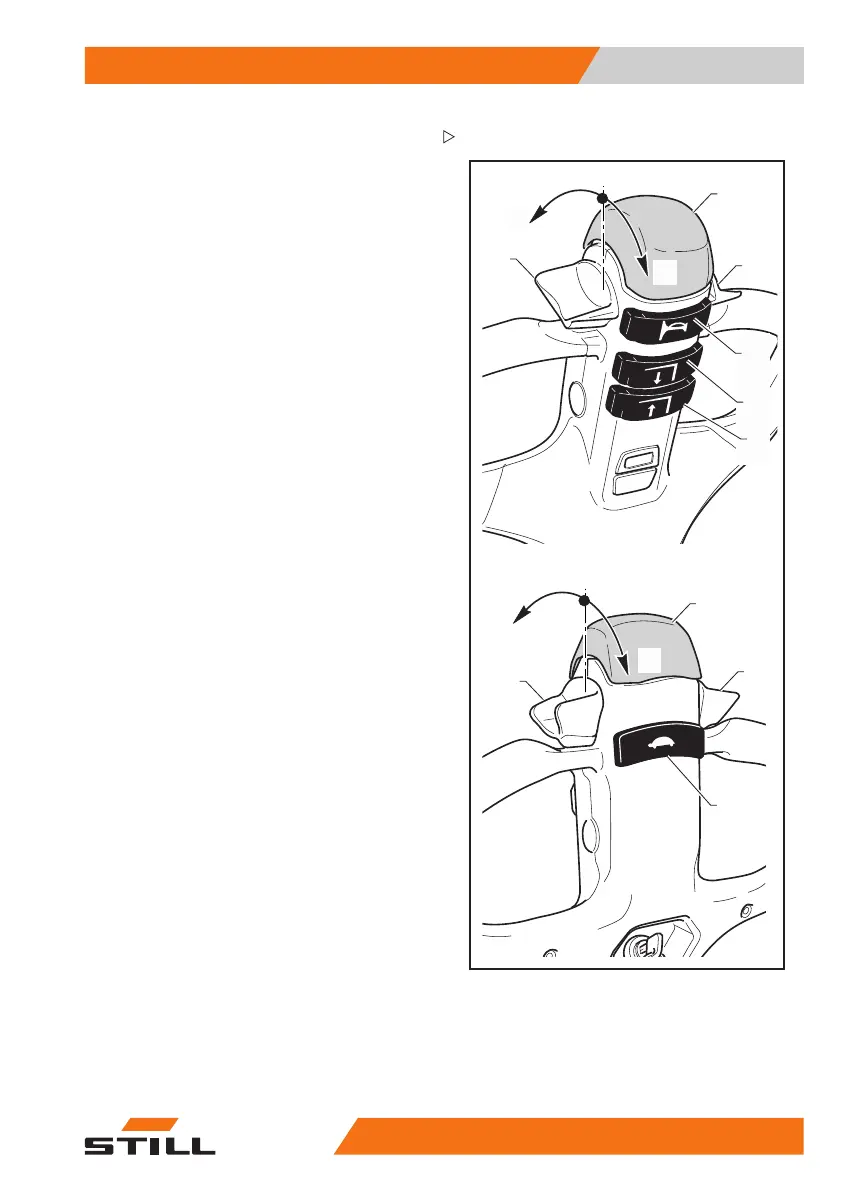
Tiller controls
Anti-crush button (1)
• Pressing the button (1) while
the truck is
travelling towards the opera
tor will reverse
the direction of travel and, a
fter six seconds,
stop the truck.
• If the button (1) is released after the direc-
tion of travel is reversed the truck will stop.
Traction control throttle (2 - 3)
• When the throttle (2 -3) is turned in direction
(A), the truck starts moving in the direction
of the fork arms.
• When the throttle (2 -3) is t
urnedindirection
(B), the forklift starts m
ovinginthedirection
of the operator.
• The truck speed increases according to the
angular position of the throttle.
• Releasing the throttle causes braking and
subsequently the stopping of the truck.
Fork lowering button (4)
• Press push-button (4) t
o lower the fork
arms; when the push-but
ton is released, the
fork arms will stop in th
e position attained.
Fork raising button (5)
• Press push-button (5) to raise the fork arms;
when the push-button is released, the fork
arms will stop in the position attained.
• The fork lifting pushbutton (5) is active only
when the tiller is angled to the working
position.
Horn button (6)
• Press push-button (6
) to operate the horn.
This device allows th
e driver to signal his
presence when necess
ary.
Slow-speed button (
7) (optional)
• The forklift is equipped with the optional
"tiller always active" pushbutton (7).
• Keeping the button (7) pressed while
turning the throttle (2 - 3) activates the slow
speed only if the tiller is in vertical position.
• Keeping the button (
7) pressed while
pressing the fork l
ifting button (5) activates
45
588043482 EN - 04/2016 27



 To Next Page