11
StingerElectronics.com
®
Bluetooth PHONE
6
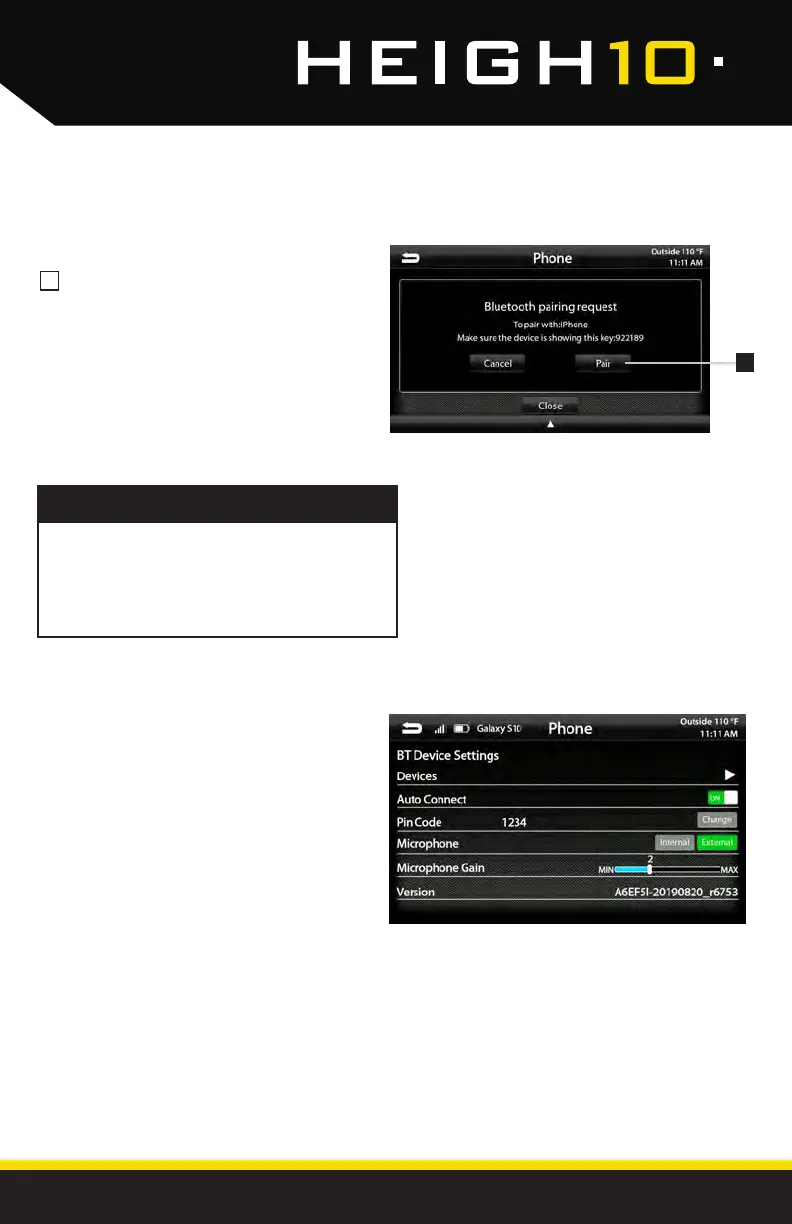
Select Pair when prompted.
Conrm Key Code on device and
select Pair on device.
If prompted, select Allow to share
contacts
6
BT Device Settings
Once a device is paired and connected,
settings can be set on the BT Device
Settings page.
Devices
Access list of all devices in memory.
Connect/Add/Delete devices.
Auto Connect [ON/OFF]
Set to ON if you want the device to
automatically connect when the system is
turned on.
Pin Code [CHANGE]
Change the pin code for Bluetooth
connection. The default pin code is "1234"
Microphone [Internal/External]
Set to External if external microphone is
installed. Set to Internal to use the microphone
located on the front of the display.
Microphone Gain [0-6]
Adjusts the volume (sensitivity) of the
microphone when using hands free phone.
Once a device is paired, it will automatially
connect whenever the system is turned on
and the device is within range. To manually
connect or connect to a different device go
to Phone > Settings > Devices
NOTE!



 To Next Page