24
StingerElectronics.com
®
CAMERAS
Press the HOME BUTTON > Cameras
to access Cameras
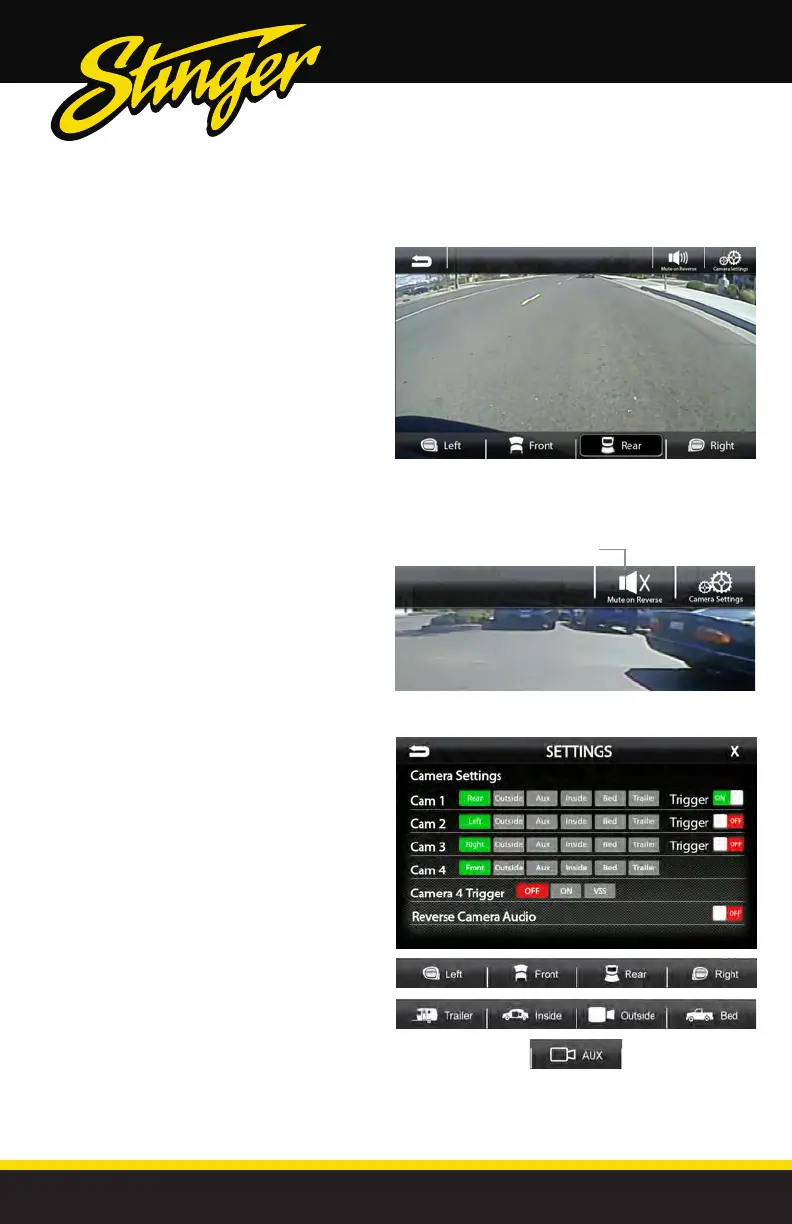
If there are optional cameras installed,
you may view them at anytime using the
camera selection bar at the bottom of
the screen.
To Exit camera view, touch the Back
Arrow.
Note: For trigerred side cameras that turn
on automatically with the turn signals, you
can override and close the camera view
by touching the screen.
Mute On Reverse
The Mute on Reverse feature will mute
all audio while in Reverse, touch the
speaker icon to toggle between mute
ON/OFF.
Mute On Reverse Active
Settings > Camera Settings
Cam1-4 Label
[REAR-OUTSIDE-AUX-INSIDE-BED-TRAILER]
Allows custom labeling for muliple cameras
Cam 1-3 Trigger [ON-OFF]
Set individual camera triggers ON/OFF
Cam 4 Trigger [ON-OFF-VSS]
Set Camera 4 trigger ON, OFF or Vehicle Speed Sense.
Use VSS Mode when parallel parking aid is
desired (front camera and VSS wire need to be
connected).
On VSS Mode, the front camera will turn on after
shifting from Reverse gear and remain On until
the speed reaches above 5MPH or the display
is touched.
Reverse Camera Audio [ON-OFF]
When set to ON and a microphone is connected,
back up camera audio will be heard through the
vehicle's speakers.



 To Next Page