6
StingerElectronics.com
®
GETTING STARTED
POWER UP!
With vehicle ignition in the ON or ACC
position, Press and Hold the knob for 2
seconds to power ON/OFF.
The source will automatically default to
the last source used prior to powering
down.
You can adjust the audio volume at
start-up in Sound Settings on page 34.
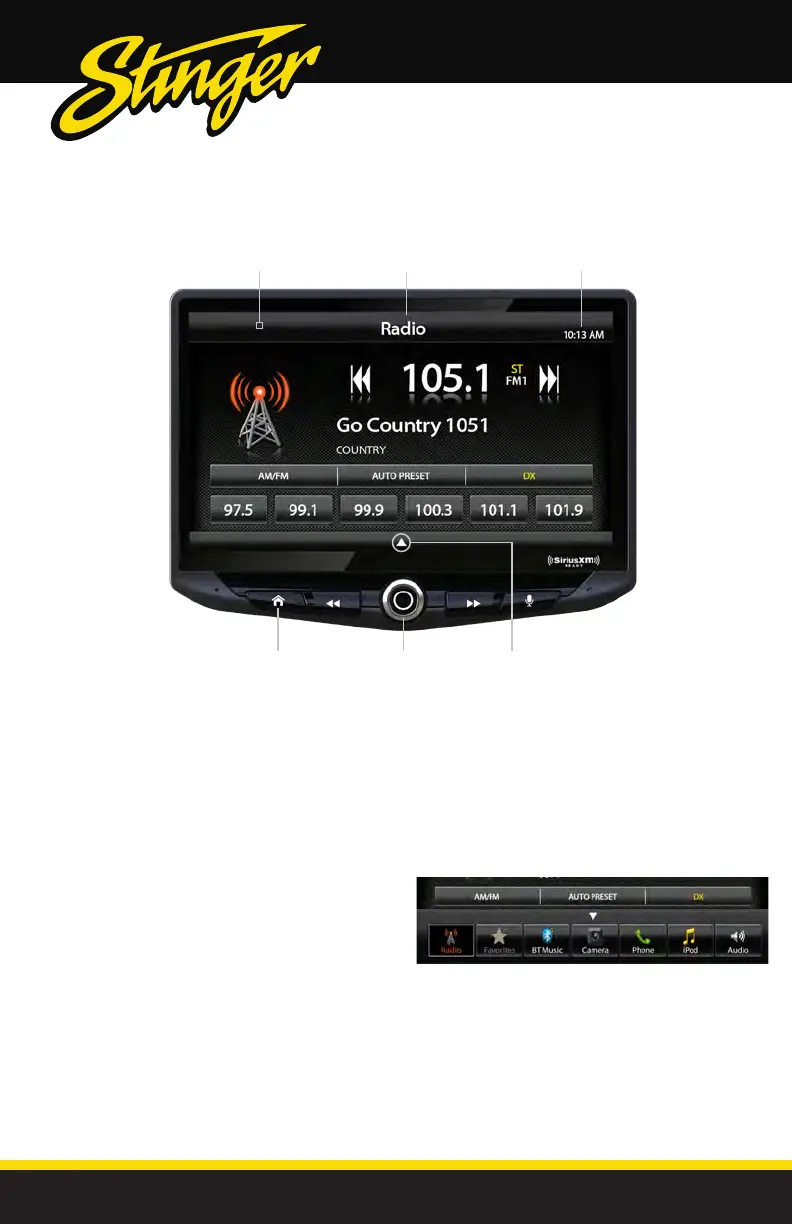
The Information Bar is located at the
top of the screen. Depending on the
SOURCE, it will provide information
or content sensitive controls. Also,
displays time, phone info and may
contain BACK ARROW and EXIT
buttons.
Customizable TABS can be accessed by
swiping the up arrow at the bottom
of the screen. Tabs give direct access to
sources/settings and can be customized
in Settings > Tabs on page 28.
The active Tab will be highlighted and
sources that are not available will be
dimmed out. Once the Tabs are opened,
the will auto-close after 5 seconds or press
the down arrow
to close the tabs.
Information Bar
Source/Info
Time
Power
ON/OFF
Swipe Up
To Open TABS
HOME
Button



 To Next Page