34
StingerElectronics.com
®
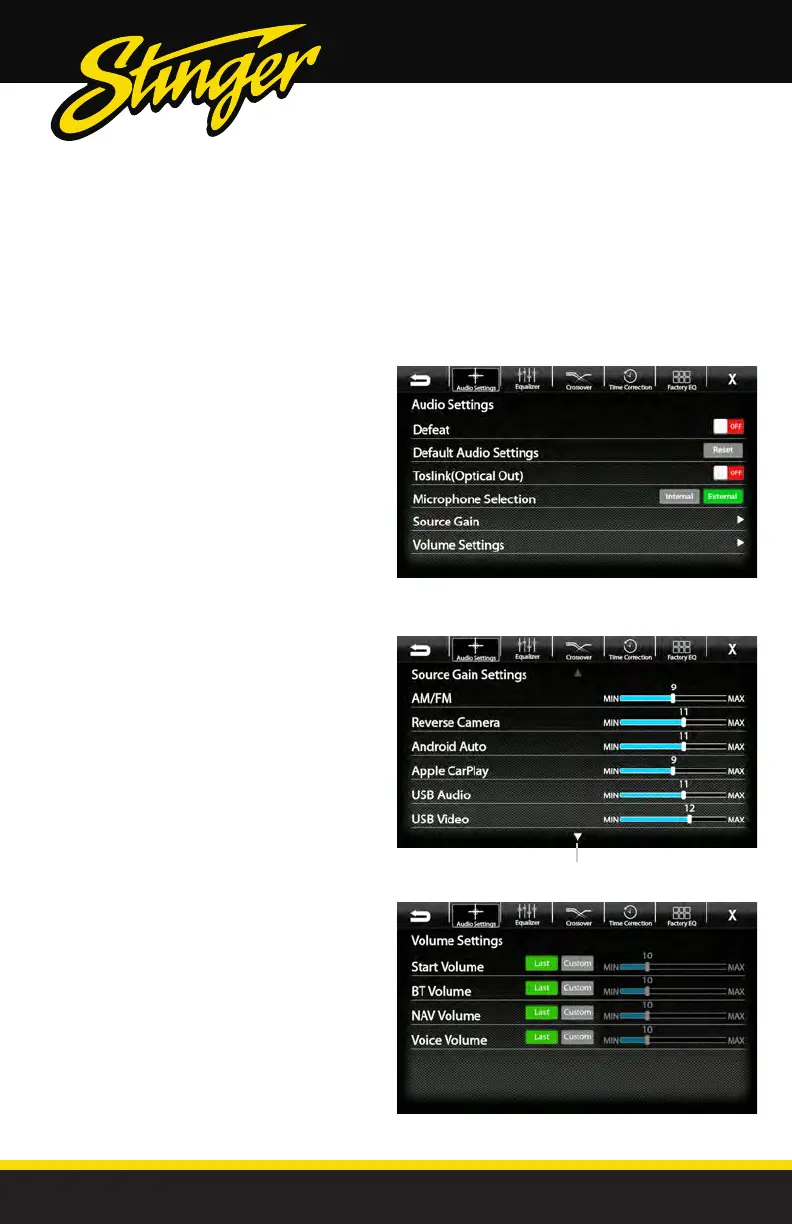
Settings > Sound Settings > Advanced Settings
SOUND SETTINGS
Selecting Advanced Settings from
the Audio Settings screen will access
the following settings:
Defeat [ON-OFF]
When set to ON, this will defeat/bypass all
equalizer, crossover, speakers settings. This is
useful when connecting to a DSP.
Default Audio Settings [Reset]
Press to Reset all audio settings to default.
Toslink(Optical Out) [ON-OFF]
Turns variable digital output ON/OFF
Microphone Selection [INTERNAL-EXTERNAL
]
Select External if external microphone
is installed. Select Internal to use built-in
microphone.
Arrow down for additional sources
Source Gain Settings
Selecting Source Gain from the Advanced Audio
Settings will allow gain/volume adjustments for
individual sources. For example, if AM/FM is much
louder than BT Music, lower AM/FM and/or raise BT
Music to even out volume levels.
Volume Settings
Selecting Volume Settings from the Advanced Audio
Settings will access the following Volume settings:
Start Volume [LAST-CUSTOM]
LAST will be same level as when unit was shut off.
CUSTOM will be a preset level adjusted below.
Volume Slider [0-40]
Adjusts CUSTOM volume level to specic level.
The Volume Mode is adjustable for Bluetooth(BT),
Navigation(NAV) and Voice using the same
procedure.



 To Next Page