28
StingerElectronics.com
®
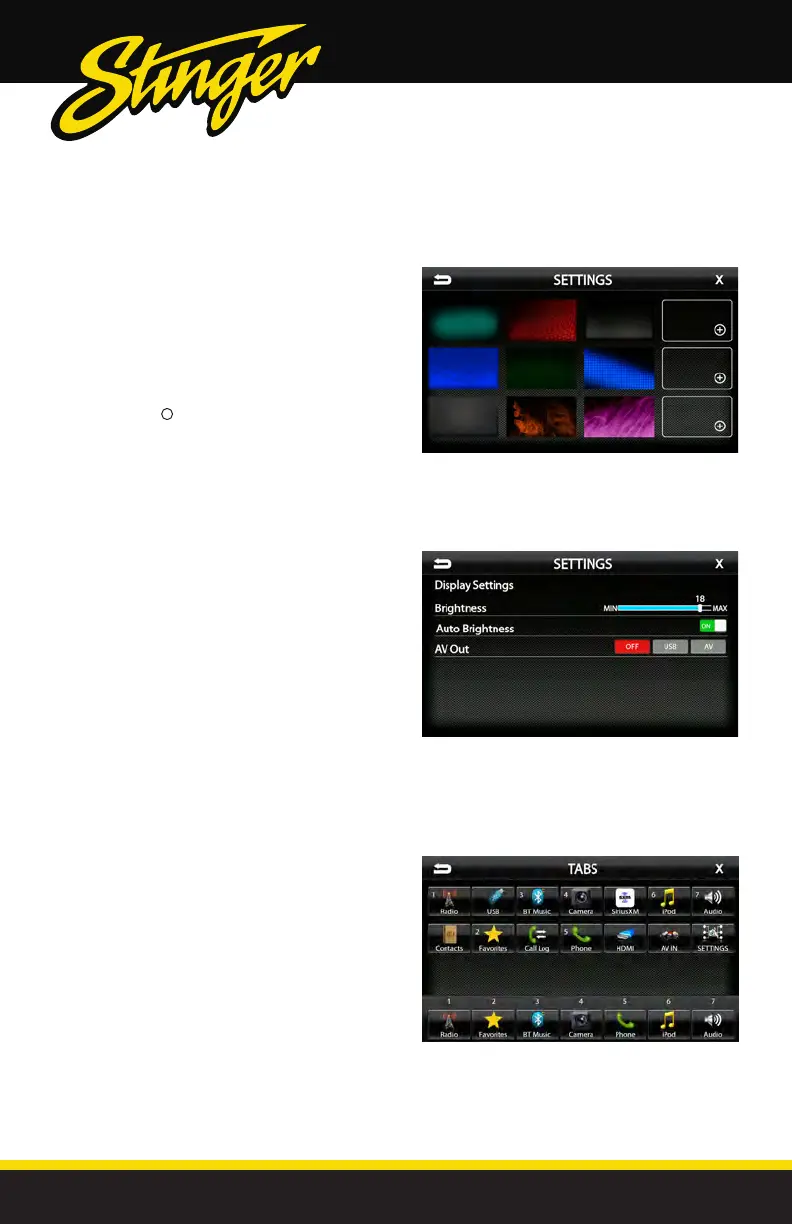
Settings > Background
Allows you to change the background
image. Touch image thumbnail to
select. You can upload up to 3 of your
own images. To upload an image(s),
copy images onto a USB thumb drive
and connect drive to one of the USB
ports. Touch the + symbol and select
le. Images should be JPG or PNG le
format and 1024*600 resolution
SETTINGS
Settings > Display Settings
Brightness [0-20]
Adjust Day and Night brightness of LCD display.
To adjust Night brightness level, turn on vehicles
lights and then adjust brightness.
Auto Brightness [ON-OFF]
When set to ON, display screen will automatically
dim when vehicle lights are turned on.
AV [OFF-USB-AV]
Determines which source is routed to the AV
outputs.
Settings > Tabs
The Tabs are customizable and can be
congured to include favorite sources or
settings.
To Program a Tab:
1) Select a Tab postition (1-7) on the bottom row
2) Select the desired source or setting from the
options on the top rows.



 To Next Page