19
StingerElectronics.com
®
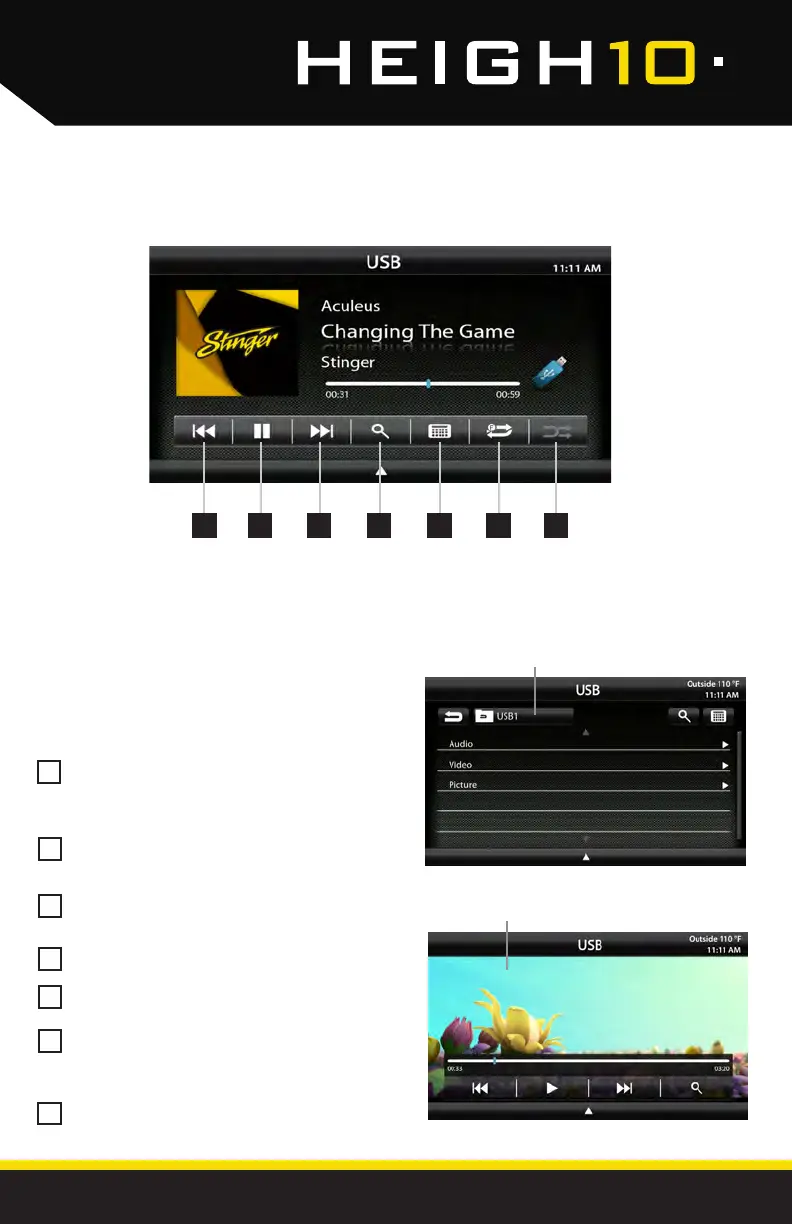
USB Root Menu
Video / Image Files
USB Media
Previous Track - Touch once to restart
current track, touch again for Previous
track.
Play/Pause - Touch to play or pause
the audio.
Next Track - Touch to advance to the
Next track.
Browse - browse artist, album or songs.
Keyboard - direct input song search
Repeat - Press once to repeat the
current track (1), press again to repeat
album/folder (F).
Shufe - Plays tracks in random order.
1
5
6
7
2
3
4
With a USB drive plugged in - press the HOME BUTTON > USB to select USB.
1 2 3 4 75 6
From the USB Root Menu you can
browse Audio, Video and Image les.
See page 39 for a list of supported le
types.
Touch to select a le to view/play.



 To Next Page