30
StingerElectronics.com
®
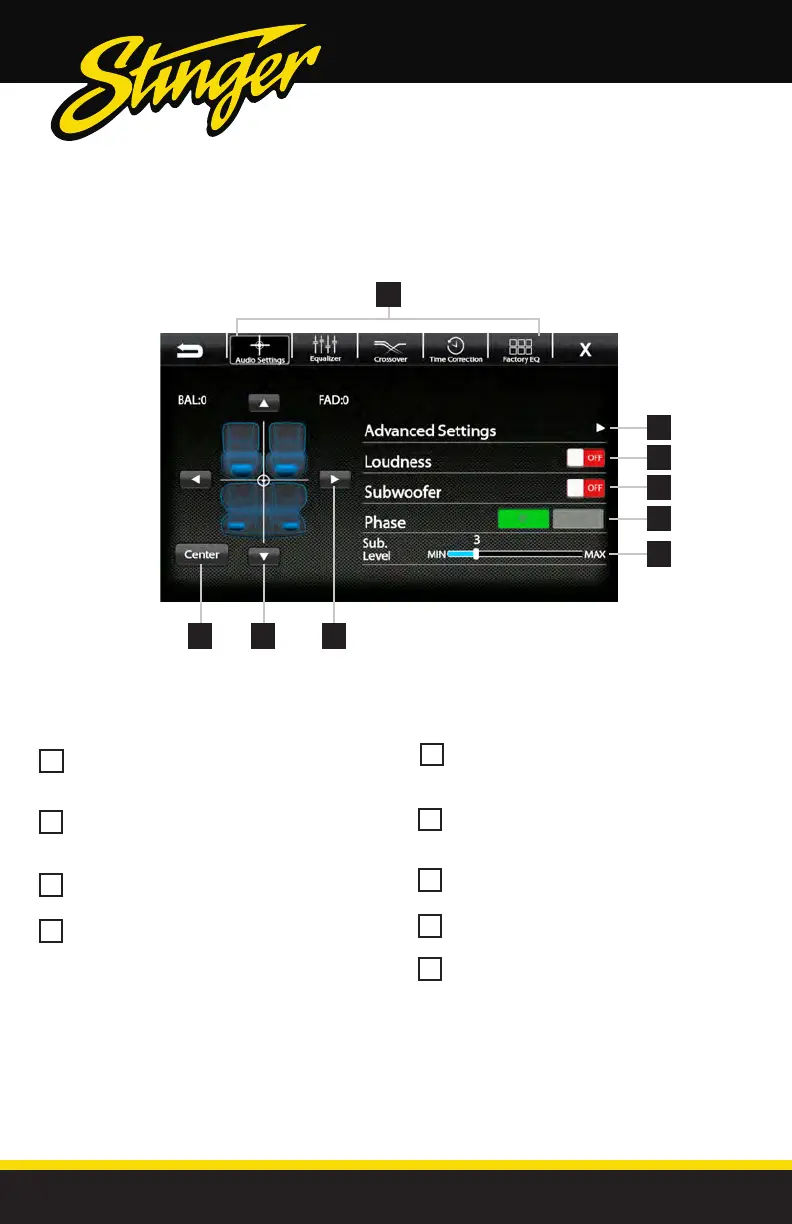
SOUND SETTINGS
Balance [-9 - 0 - 9]
Using the Left and Right arrows, adjusts the
speaker balance Left/Right.
Fader [-9 - 0 - 9]
Using the Up and Down arrows fades the
speakers Front/Rear.
Center
Press to set balance and fade to zero (0)
Audio Menu Bar
Access to Equalizers, Crossovers and Time
Correction
123
7
8
9
5
6
4
Advanced Settings
Access to gain/volume settings, Toslink,
microphone settings. (See page 34)
Loudness [ON-OFF]
When ON, boosts low and high frequencies
when listening at lower volume
Subwoofer [ON-OFF]
Turns subwoofer output ON/OFF
Phase [0°-180°]
Changes phase of subwoofer signal.
Sub Level [0-15]
Adjusts volume level of subwoofer output.
1
5
2
6
3
4
6
7
9
8
Settings > Sound Settings



 To Next Page