32
StingerElectronics.com
®
SOUND SETTINGS
Sound Settings > Crossover
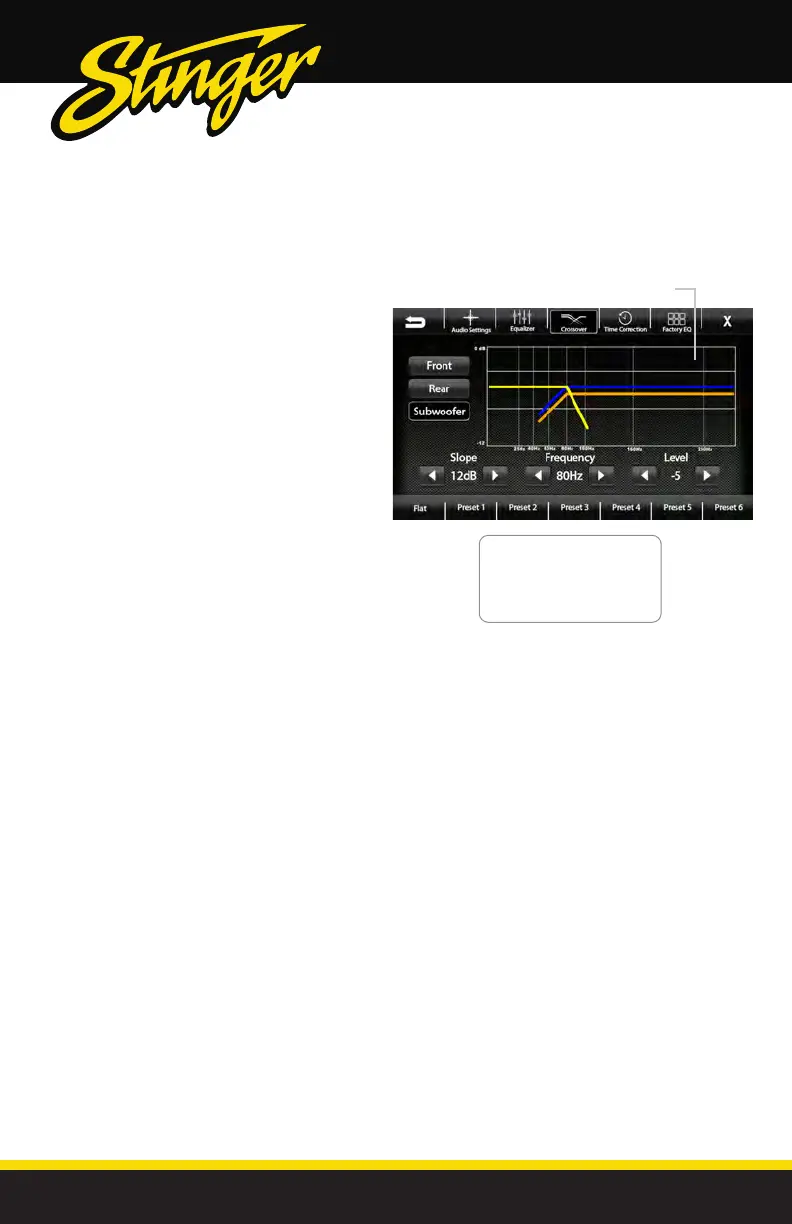
Selecting Crossover from the Audio
Menu Bar will access the internal
electronic variable crossover. Crossover
settings can be saved and recalled via
Presets.
Front / Rear / Subwoofer Channels
Select Front, Rear or Subwoofer to set
crossover.
Slope [6dB-12dB-18dB]
Adjusts the slope of the crossover.
Frequency
[BYPASS-25-40-63-80-100-160-250Hz]
Adjusts crossover frequency. Front and Rear
channels are High Pass and Subwoofer is
Low Pass.
Level [-12 - 0]
Adjusts signal level. Channel levels can be
adjusted regardless of crossover settings.
Saving Crossover Settings
There are 6 user Presets that can be
used to save Crossover settings.
When you are done adjusting the
Crossover, touch and hold a Preset
location to save the settings. The Preset
will highlight.
Graphical representation of crossover
Slope, Frequency and Level.
Front Channel = Blue
Rear Channel = Orange
Subwoofer = Green
Active(Selected) = Yellow



 To Next Page