AIRmove
2
- Perfect Protective Packaging 9
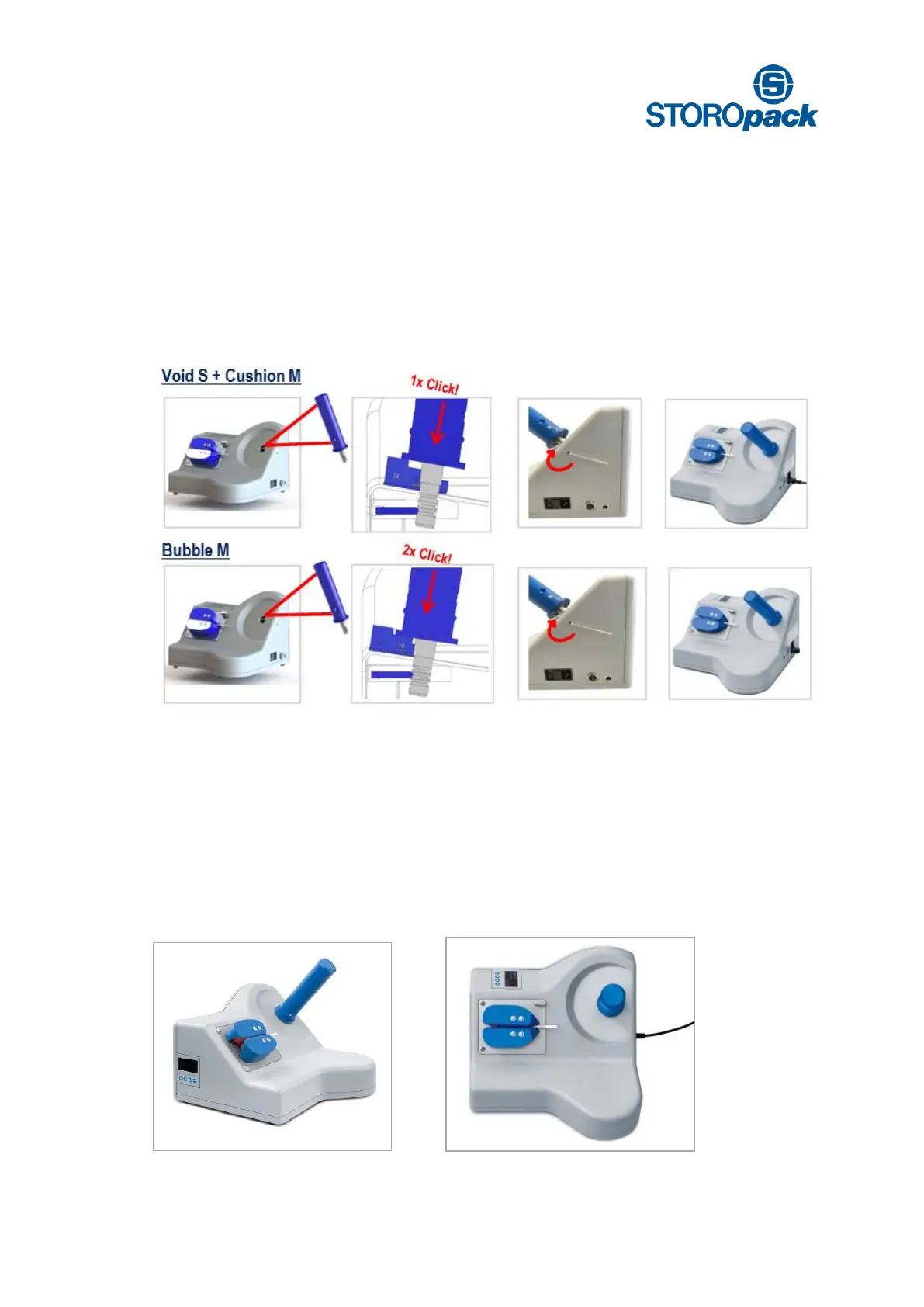
Therefore you must choose between two film roll holder positions. By loosening the screw in the cover on
the right side of the machine, you can adjust the film roll holder.
You will hear and feel a “click” when the shaft arrives at each position. Alternatively you can use the spacing
gauge to find the right setting.
Cushion M + Void S = 24 mm (15/16”)
Bubble M = 18 mm (11/16”)
The screw needs to be tightened again afterwards.
7.3 Display and Keypad Location
With your Airmove
2
machine there are two possible display positions. To change keypad position, first make
sure you disconnect from the power supply.
Remove the four screws in the cover of the machine with the provided allen key in the box. Insert the display
into the desired position (see picture 1 and 2). Then replace the cover and tighten the four
screws. Reconnect to the power supply to continue.
1.) Keypad front position 2.) Keypad top position


 To Next Page