AIRmove
2
- Perfect Protective Packaging 13
8.2 How to Adjust Air Settings
The chosen AIRmove² film type menus automatically run on the correct air and temperature settings. You do
not need to adjust machine settings manually, but if the automatic settings are not optimal for some reason,
the keypad allows you to change the following settings:
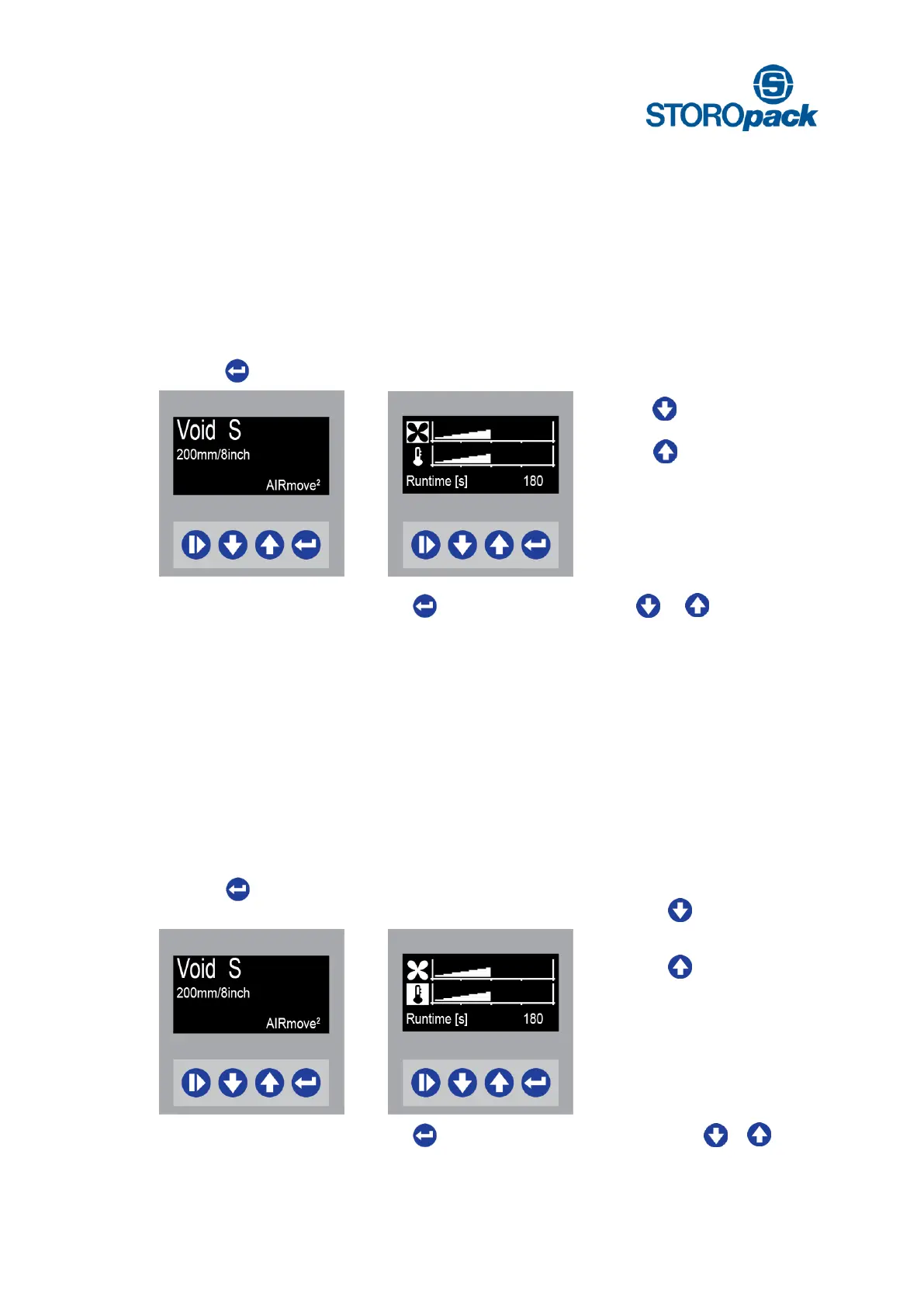
Display Void S
ready to start
Press 1 x for air settings
Display Air Settings
Amount of air is now adjustable
Press to decrease air
Press to increase air
Even while the machine is running press to change air settings by using or . While the machine
is running the Runtime sign will not show up.
8.3 How to Adjust Sealing Temperature
The chosen AIRmove² film type menus automatically run on the correct air and temperature settings. You do
not need to adjust machine settings manually, but if the automatic settings are not optimal for some reason,
the keypad allows you to change the following settings:
Display Void S
ready to start
Press 2 x for temperature
settings
Display Temperature Settings
Sealing temperature is now
adjustable
Press to decrease
temperature
Press to increase
temperature
Even while the machine is running press to change temperature settings by using or .
While the machine is running the Runtime sign will not show up.


 To Next Page