p. 14
Adjustment for converting the strap width
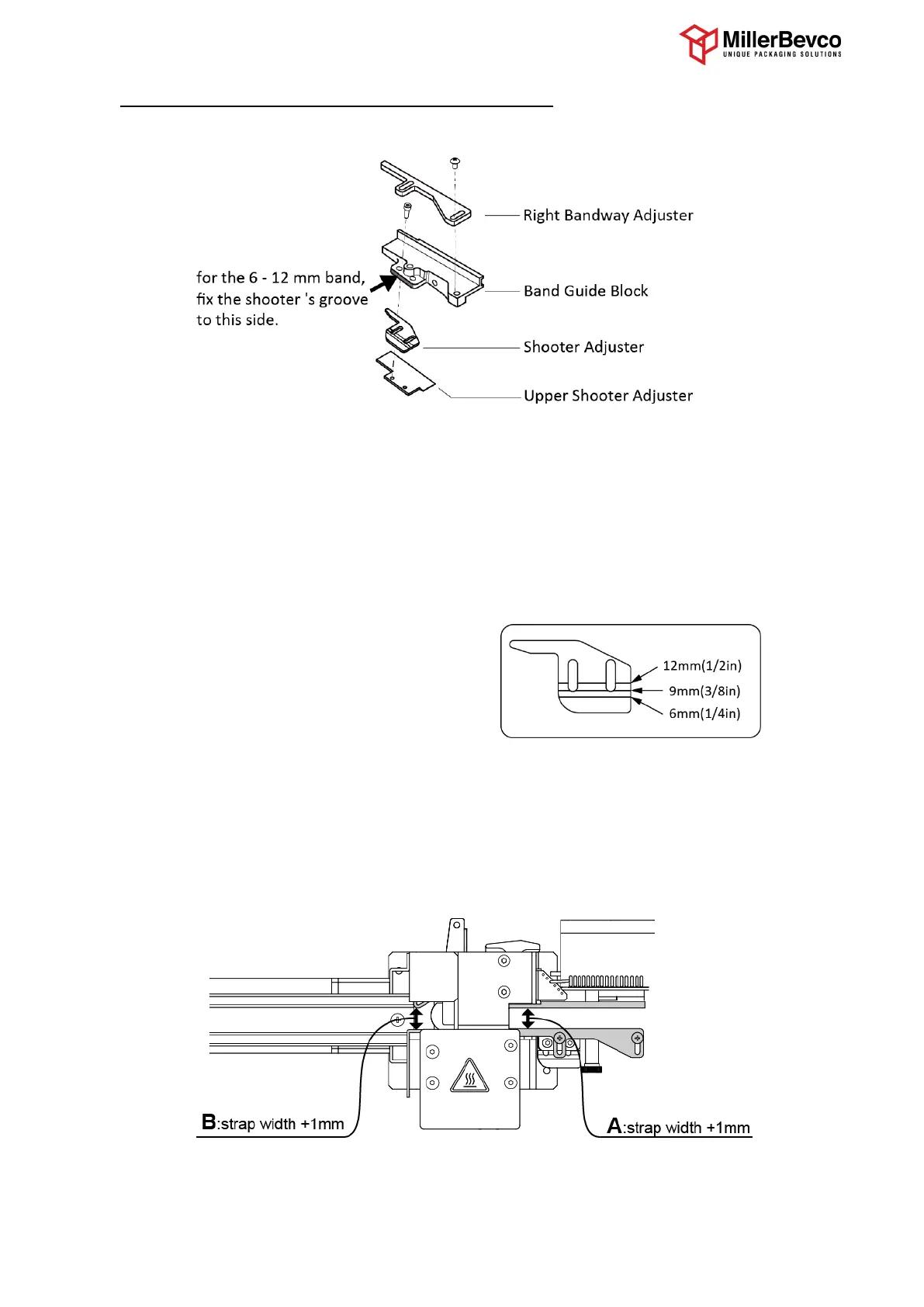
Adjustment of the band width is 3 places.
1. Remove the Right Bandway Adjuster.
2. Loosen the bolts with fix the Shooter Adjuster, and adjust the Shooter Adjuster according the
strap width.
Case of 15.5mm (5/8in) : Pull the Shooter Adjuster all the way out.
Case of 6-12mm ( 1/4-1/2in) : There are three lines on Shooter Adjuster as guidance.
The line of Shooter Adjuster should align with the side of Band
Guide Block.
Case of 5mm : Push the Shooter Adjuster to the end.
3. Replace the Right Bandway Adjuster, and adjust the distance “A” as the strap width plus 1mm.
4. Loosen the bolt that fixes Band Width Plate, and adjust the distance “B” as the strap width
plus 1mm.
800-821-2177
Service@MillerBevco.com or
Parts@MillerBevco.com
www.MillerBevco.com


 To Next Page