p. 8
CHAPTER 4 MACHINE INFORMATION
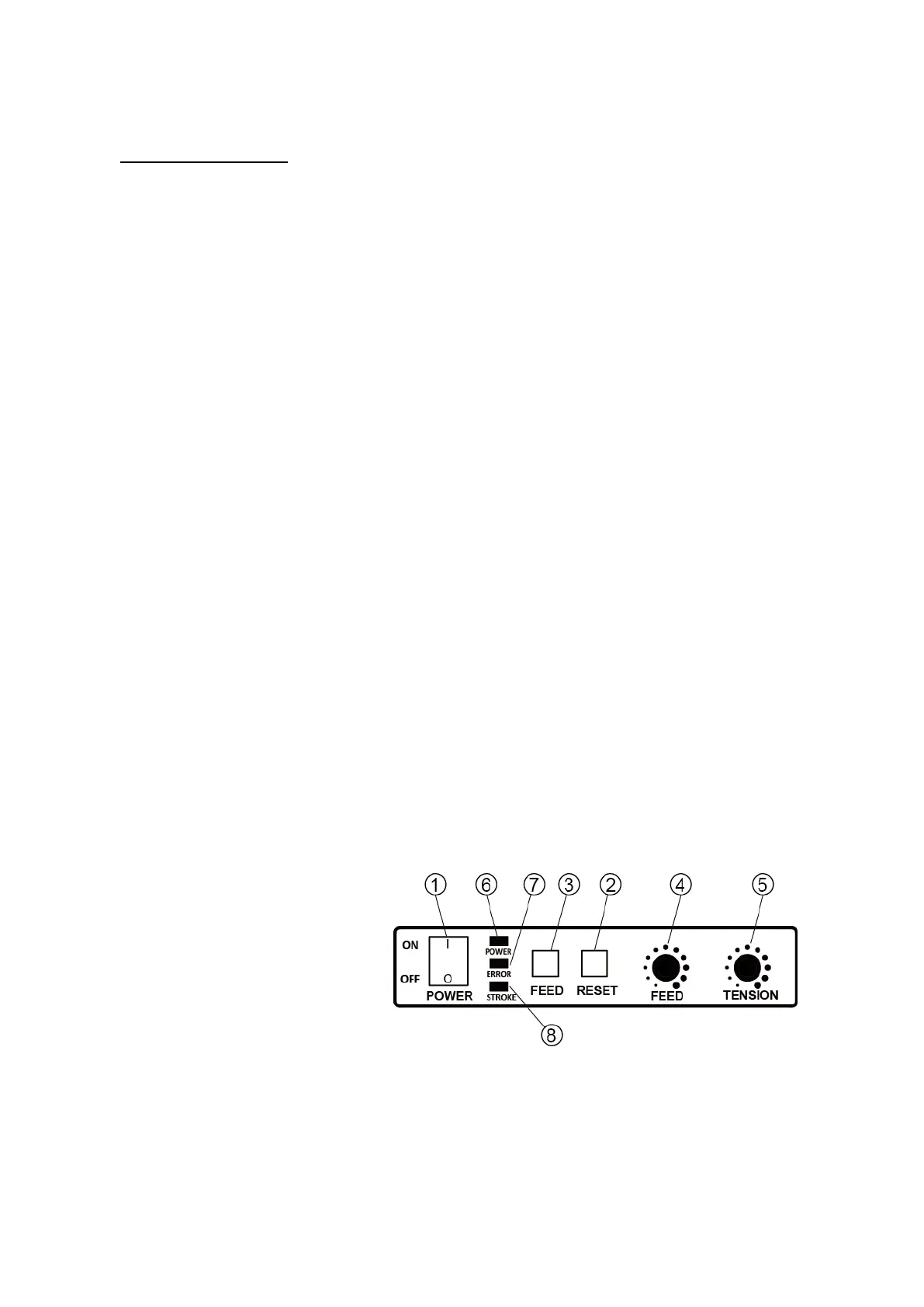
Operation Panel
1
Power Select Switch
This is the Power Supply Switch for the machine.
Green Lamp⑥ by
the switch will be lit when the switch is at ON position. This Lamp⑥
indicates the connection of power supply. The Green Lamp starts to blink when the Power
Select Switch is turned on. The blink turns into a firm light when the heater temperature
goes up an appropriate temperature (approx. 45 sec.) and informs the machine is ready for its operation.
2
Reset Switch
By pressing this Reset Switch, the Sealing Unit will cycle one time and stop at Home position.
The strap will feed forward according to the setting on the Feed Dial④.
3
Feed Switch
This is a jog switch that feeds the strap forward as long as the switch remains depressed.
If the strap length available is insufficient, press this switch to feed more strap until you have
the desired amount.
4
Feed Dial
This dial setting determines the length of strap fed off the Reel at the end of each cycle. Adjust
this dial to set the length of strap desired. Turning the dial clockwise will increase the length
of strap to be forwarded. Turning counterclockwise will shorten the amount of strap fed.
Set according your package size.
5
Tension Dial
Turning this dial clockwise makes the strap tension tighter, turning counterclockwise makes the
tension softer.
6
Power Indicator Lamp <Green>
Light while energizing
7
Error Indicator Lamp <Red>
Lighting : Sealing Motor (M1) Overload
Flashing : Feed/Reverse Motor (M2) Overload
8
Stroke Lamp <Yellow>
※Factory setting : Torque mode
Light off : Torque mode Lighting up : Stroke Mode


 To Next Page