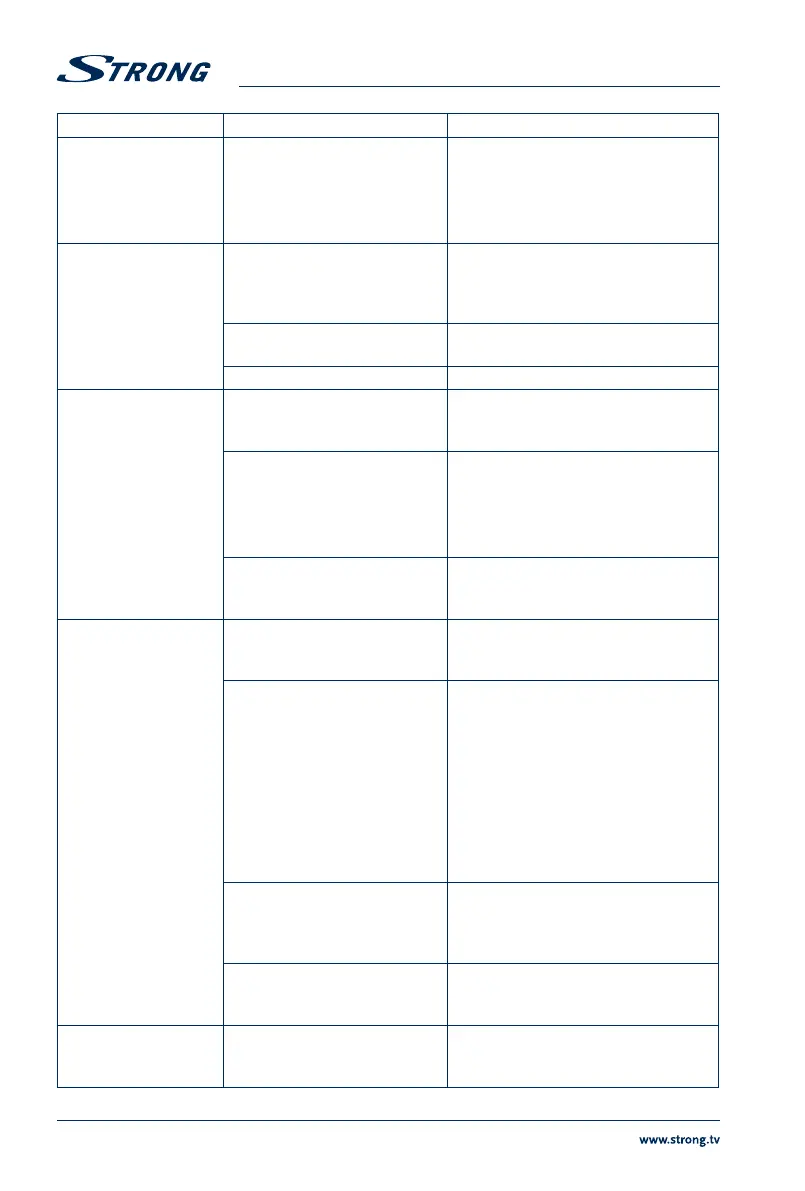
Symptom Cause Remedy
The display on front
panel does not light up.
The power adapter is not
plugged in or power of an
extension is switched OFF.
Check that the power adapter is
plugged in to the wall outlet. Make sure
power switch on the extension cable/
distributor is in ON position.
No picture or sound Wrong connection or setting of
the Audio/Video output of the
receiver to TV.
Connect the Audio/Video output of the
receiver to TV correctly and check the
adjusted settings in the menu Settings>
System Settings.
Audio muted. Press the ! button on TV or receiver
remote control.
TV power off. Switch TV on.
No picture The receiver can't receive the
signal.
Check the antenna cable, replace the
cable, or connect the cable to the
receiver tightly.
Incorrect values of some tuner
parameters (e.g. one/some
channel(s) changed to another
TP).
Set the values of tuner parameters
correctly in menu Installation >
Channel Search. Helpful websites are:
http://de.kingofsat.net/
http://www.lyngsat.com/
Wrong direction of the antenna. Check the signal with a spectrum
analyser and adjust your antenna
correctly or consult a specialist.
No access to scrambled
services
Expired subscription. Check your current subscription status in
CA Menu> Product Status together with
your service provider.
ORF-DIGITAL-DIREKT not
subscripted/activated.
To enjoy the complete range of
channles and to watch your preferred
scrambled services, please register with
the enclosed registration form at ORF-
DIGITAL-DIREKT.
If you have further questions about your
registration, you can directly contact
the ORF-DIGITAL-Service-Hotline (0800
700 600). Please have your Device-ID
(Gerätenummer) ready.
Receiver awaiting activation
respectively new authorisation.
When receiver was switched off/
disconnected from signal for longer
it can take about 1-2 h until a valid
subscription is activated again.
No subscription for the selected
channel or activation not
possible
Switch to another channel respectively
remove channels (which cannot be
activated) from the channel list
The remote control
does not work
The batteries of the remote
control are not inserted, wrongly
inserted or exhausted.
Check whether the batteries are inserted
correctly or exhausted, if so replace the
batteries in the remote control.
26


 To Next Page