Riverside - Multistage Drive
®
pg 19
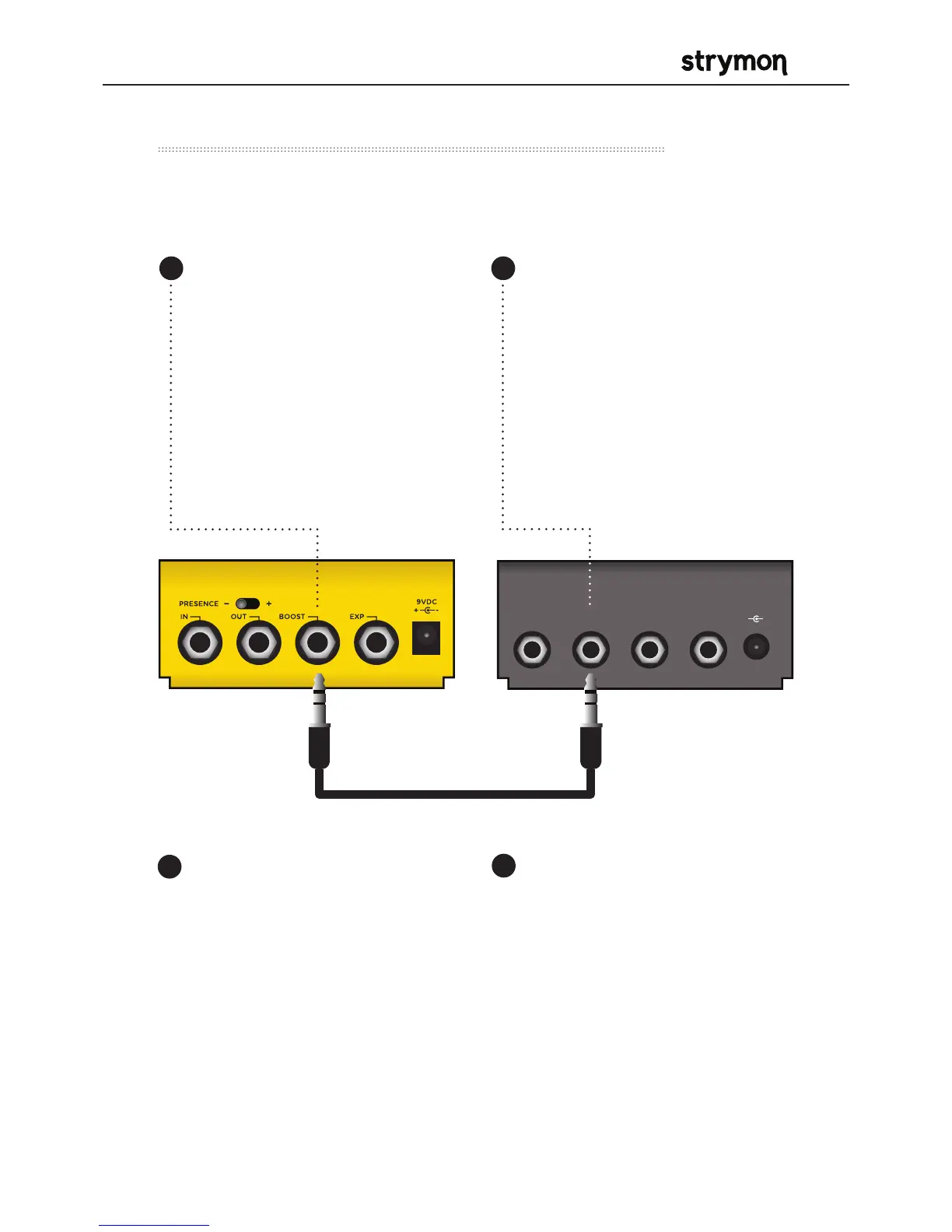
Use Riverside to recall the Favorite setting of another connected
Strymon pedal.
External Control – Using Favorite Output
EXP
INPUT
9VDC
+
-
RIGHT OUTLEFT OUT
Configure the BOOST jack to
send Favorite Out messages.
(See page 14 for more detail
about configuring the Boost
jack.)
Connect the BOOST jack of
Riverside to the EXP input of
another Strymon pedal with a
TRS cable.
Make sure the connected
pedal is set to Favorite EXP
mode.
Please refer to the favorite
switch setup section of
the connected pedal’s
owner’s manual for details.
All manuals available at
strymon.net/support.
Save a Favorite setting on the
connected Strymon pedal.
OPTIONAL STEP: Store a new
Favorite setting on Riverside
to go along with the Favorite
setting on the connected
Strymon pedal.
Pressing the FAVORITE switch
on Riverside will toggle the
Favorite setting on both
Riverside and the connected
Strymon pedal as well.
1 2
3
4



 To Next Page