BA C7000 for EC Tower | EN | 01-2019 | 1000755
36
t/sec
➌
%
100
90
nMax
80
70
65
55
t/sec
➋
➊
100 %
nmax
T/°C
➑b
➑a
➒
DXmax/
CWmax
.../special/more
➊
➋
➌
➍a
➍b
➎
➏a
➏b
➐
➑a ➑b
➒
Config
Components/Air
Fan/... (Part 2)
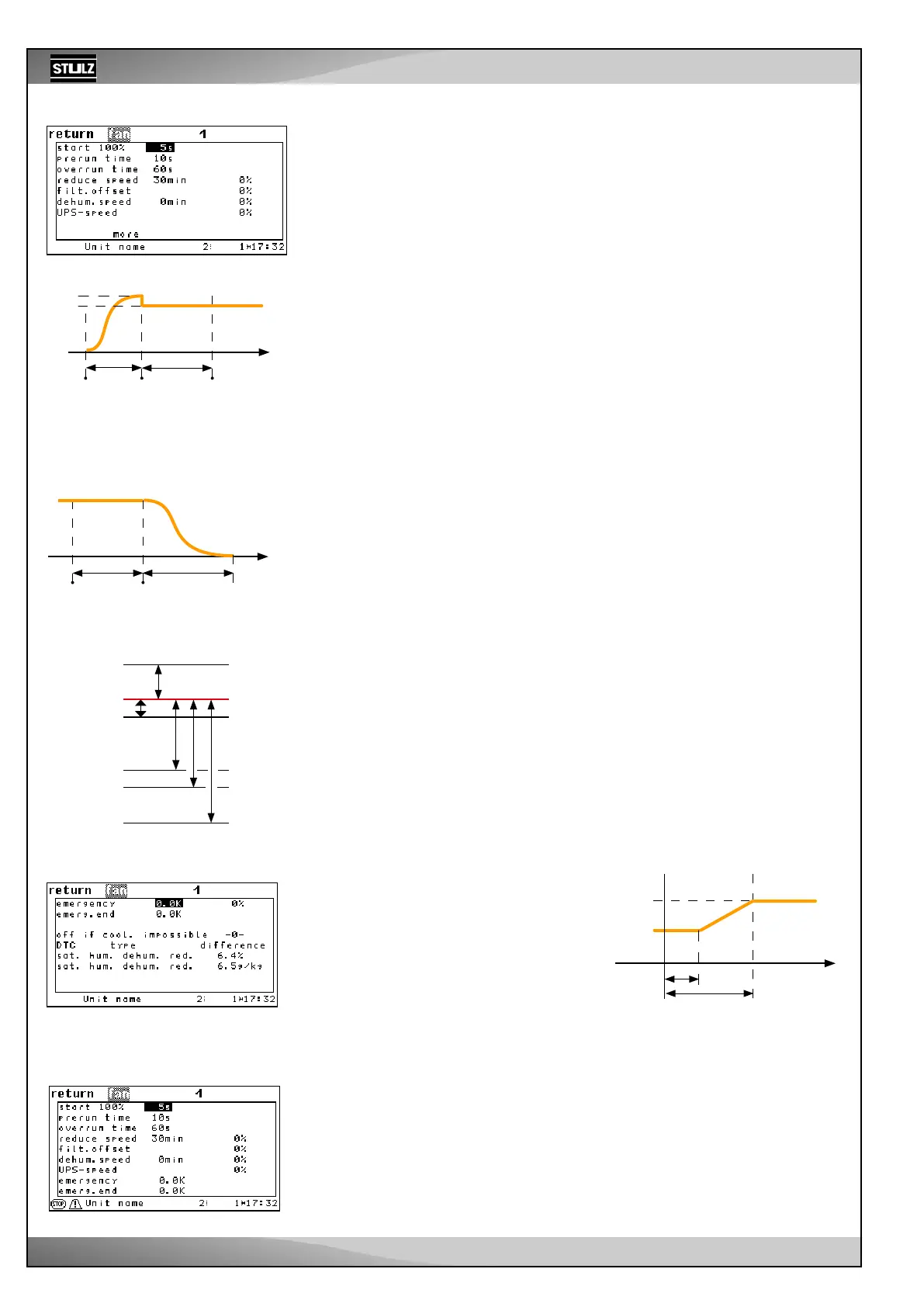
Using the “START 100 %” parameter ➊, you set a time that has to elapse before the
fan control begins. This prevents an airflow alarm that could occur due to the fan rotor
inertia. During this time, the fan runs at 100 % speed.
Using the “PRE-RUNTIME” ➋ parameter, you set the start delay of all other components
in relation to the beginning of the control with alarm monitoring, with the exception of
the glycol pump, which can also be started beforehand.
Different pre-runtimes for different units prevents the most current consuming compo-
nents starting simultaneously and prevents the power supply of the building becoming
overloaded.
The run-on time ➌ serves to dissipate hot or cold air in the unit and to avoid a build-up
of heat at the heater or a build-up of cold at the evaporator.
If no functions (cooling, heating, humidifying, dehumidifying) have been requested
during a period of time that you define in the fourth line ➍a, the speed decreases by
the percentage that you adjust with “RED. SPEED.” ➍b.
The “FILTER OFFS.” ➎ is entered as a positive difference to the maximum speed. If
a filter alarm is triggered, the maximum speed is increased by the filter offset value in
order to overcome the higher air resistance of a clogged filter.
If there is a dehumidification request during the time up to the dehumidification reduction
➏a and beyond, the dehumidification is introduced by reducing the fan speed. This time
gives the unit the opportunity to regulate the humidity via dehumidification through the
expansion valve. This parameter should be at 0 for units without an electronic expan-
sion valve.
The “DEHU. SPEED” ➏b is entered as a negative difference in % to the maximum
speed. This is the speed for the first dehumidification method.
The “UPS SPEED” ➐b is also entered as a negative difference in % to the maximum
speed. If the controller receives a UPS signal, it uses this speed to carry out a backup
operation.
If the unit is operated in nominal operation at a low airflow rate, the fan speed can
be raised when the temperature setpoint is exceeded depending on the temperature
difference to the setpoint.
For this you set a positive temperature difference (EMERGENCY START) ➑a to the
setpoint, which represents the start point of the speed increase.
In addition, you set a maximum speed (EMERGENCY SPE.) ➑b for overload operation
and a temperature difference (EMERGENCY END) ➒ to the setpoint, which marks the
end point of the proportional speed increase. When reaching this second temperature
difference, the fan is operated with the maximum speed for the overload operation. This
speed is also kept when the temperature rises again.
Control
start
Fan start phase
Compon.
start*
Fan
start
*Start all control-relevant components except
for the glycol pump that can be started
beforehand.
Unit
stop
Fan stop phase
Fan
stop
Run-on
because of
fan inertia
Filter offset ➎
Offset *
Speed reduction ➍b
Dehum.speed ➏b
UPS speed ➐
* The meaning of the offset is explained
on the previous page.
Speed level
In the last line, you can stop the fan opera-
tion by setting a “1” if cooling is not possible
because the compressor is in an alarm state.
The type of differential temperature control is
set using the parameter “DTC type”.
The “DTC type” parameter is not relevant for
the EC tower.
Setpoint
Fan speed
.../special
.../special/more
EC tower:
Recommended values in the Config main menu Components/Air/Fan:



 To Next Page