41
➊
➋
➊
➌
BA C7000 for EC Tower | EN | 01-2019 | 1000755
Operate Components/humidity
Humidifiers
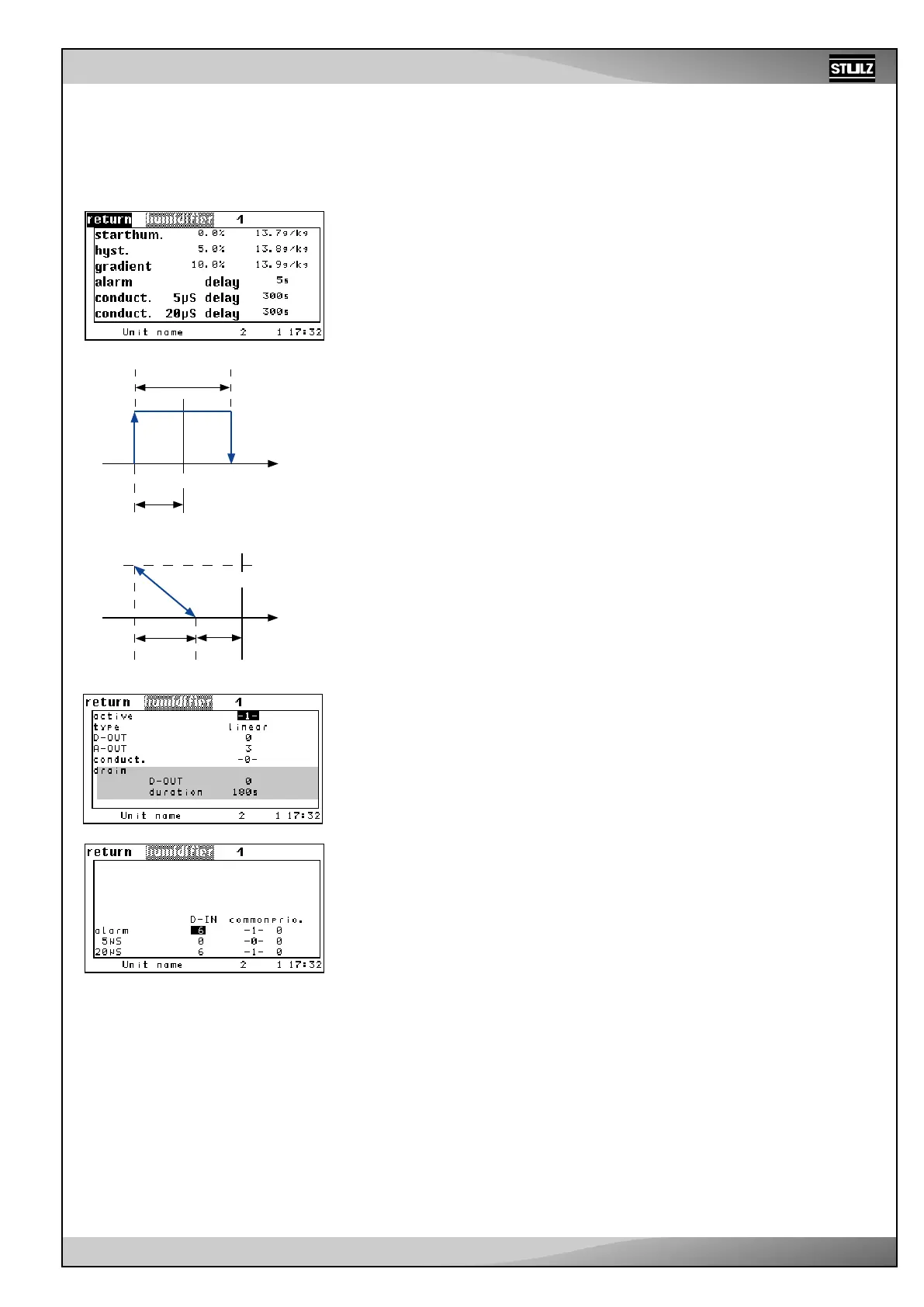
Depending on the configured humidifier type, different parameters are decisive.
The start humidity for the humidifier is entered as a negative difference to the room
humidity setpoint. ➊
The corresponding hysteresis for the humidifier stop is only valid for humidifiers with 2
step control.➋
For proportional humidifiers, you can set a gradient, which determines the humidity
range in which the humidifying output increases from 0 to 100 %.➌
Alarm parameters:
Humidifier alarm time delay ➍
Conductivity alarm time delay at 5µS ➎ and at 20µS ➏
The conductivity alarms are available when conductivity measuring equipment is used,
which is required for monitoring the water conductivity for ultrasonic humidifiers.
On-off control (type 1)
Humid.
ON
OFF
Proportional (type 2)
Humid.
100 %
0 %
Setpoint
Setpoint
%r.h
%r.h
Humidifiers
You add a humidifier to the configuration by setting the “ACTIVE” parameter to 1. You
deactivate the humidifier with “0”. ➊
You define the humidifier type in the following lines (2 step: humidifier with on/off control,
linear: humidifier with proportional regulation). ➋
You determine the digital output for a 2 step humidifier using the “D-OUT” parameter. ➌
You determine the analog output of the proportional signal for the humidifier using the
“A-OUT” parameter. ➍
You can configure conductivity measuring equipment ➎ in the fifth line. This is necessary
for monitoring the water conductivity for ultrasonic humidifiers.
Alarm parameters of the humidifier alarm in the sixth line:
Digital input ➏a, common alarm actuation ➏b, alarm priority ➏c.
In the seventh line, these parameters can be adjusted for the conductivity alarm at 5µS
➐a-c and in the eighth line for the conductivity alarm at 20µS ➑a-c.
These alarms are available when conductivity measuring equipment is used.
Config
➊
➋
➌
➍
➎
➏
➊
➋
➌
➍
➎
➏a-c
➐a-c
➑a-c



 To Next Page