Introduction 17
Before Use
NOTE
• Insert the map SD card without locking it.
• If you insert an SD memory card that contains image data, you can preview
the images, play a slideshow, or set an image as the Opening screen. (See
Page 276.)
About SD memory cards
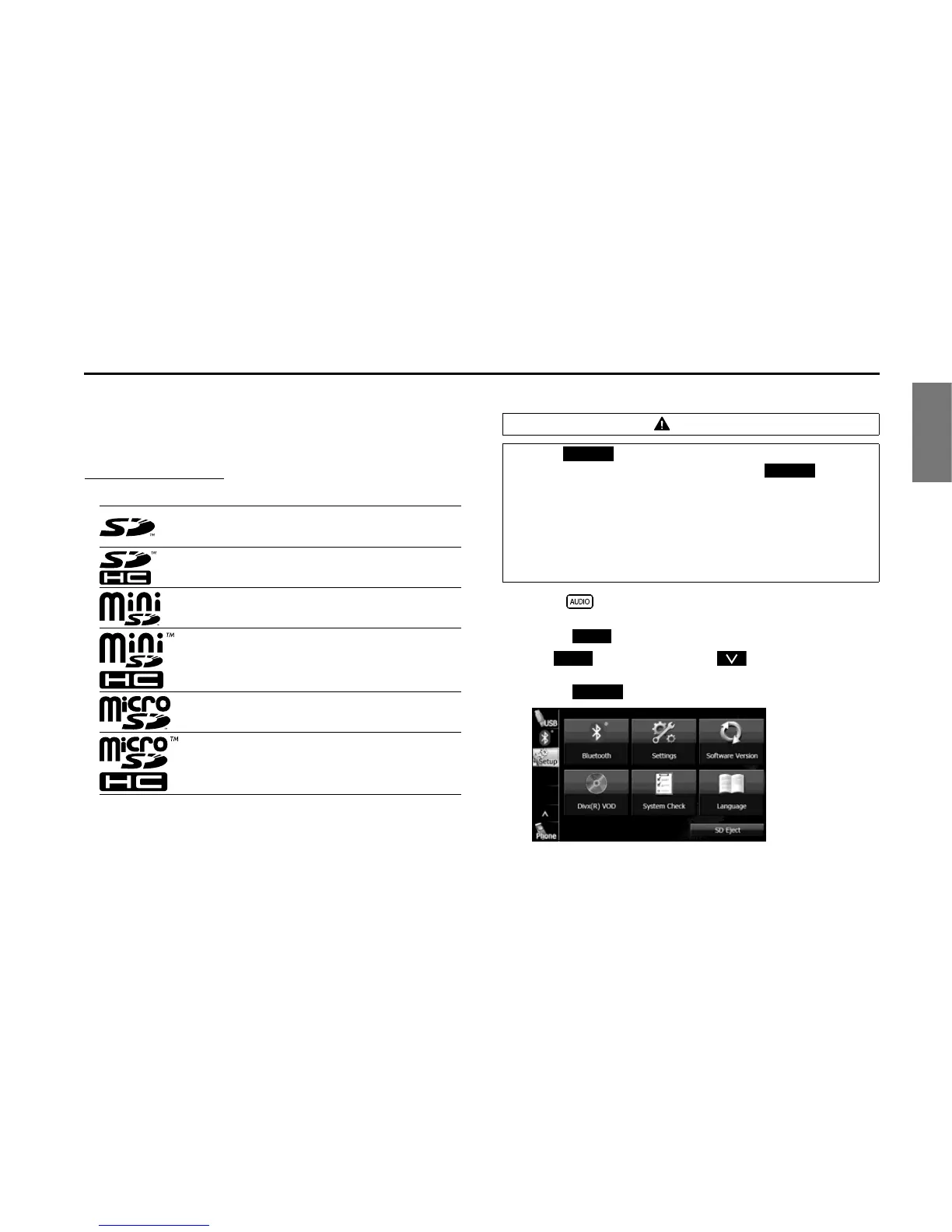
• SD memory cards that are marked as follows can be used.
• Multi Media Cards (MMC) cannot be used.
• Supported capacities: 512 MB to 8 GB
• Supported speed class: Class 2 to Class 10
■ Unloading an SD memory card
1 Press .
2 Touch .
• If is not displayed, touch .
3 Touch (SD Eject).
SD Logo is a trademark of SD-3C, LLC.
SDHC Logo is a trademark of SD-3C, LLC.
miniSD Logo is a trademark of SD-3C, LLC.
miniSDHC Logo is a trademark of SD-3C, LLC.
microSD Logo is a trademark of SD-3C, LLC.
microSDHC Logo is a trademark of SD-3C, LLC.
CAUTION
• Touch (SD Eject) before removing the map SD card.
Removing the card without first touching (SD
Eject) may damage the data. No compensation will be given
for any damaged data.
• When removing a disc or SD memory card from the unit, pull
it out horizontally. Do not strongly pull to the right side.
Also, do not strongly push to the left side while removing it.
Doing so may damage the SD memory card.
SD Eject
SD Eject
Setup
Setup
SD Eject














 To Next Page