246 Audio and Visual
Visual Operations
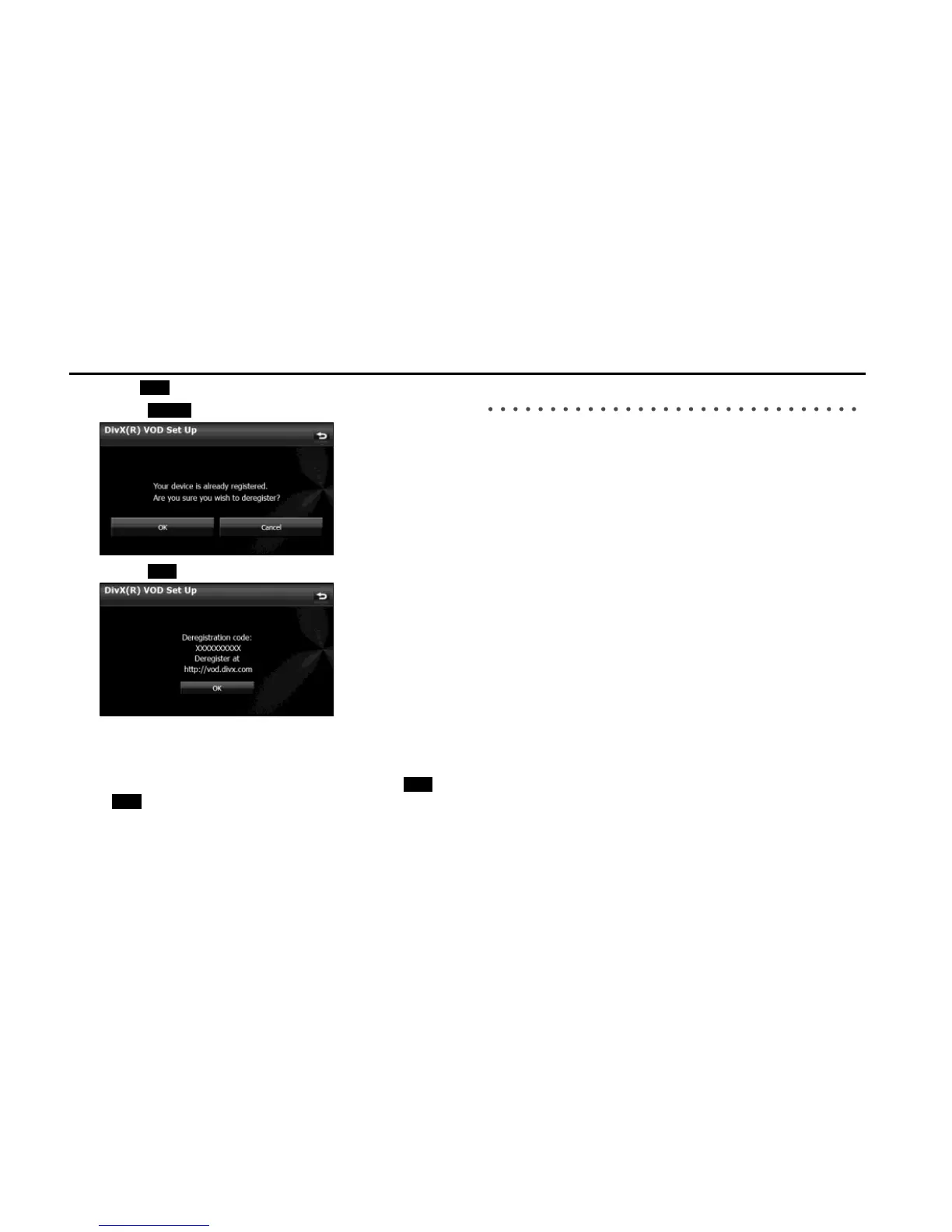
5 Touch (OK).
• Touch (Cancel) to return to the previous screen.
• Touch (OK) to return to the Setup screen.
■ Caution display while playing VOD rental files
A message is displayed on the screen when DivX VOD rental files are
played. Read the displayed contents carefully, and touch either
(Yes) or (No).
About USB Devices
■ Supported DivX standards
• Supported extensions:
DivX, Div, AVI (single-byte characters only, not case-sensitive)
• Maximum number of directory layers:
8 layers (including the root folder)
• Number of folders that can be stored in the USB memory:
3000 (including the root folder)
• Number of files that can be stored in the USB memory:
9999
• Standard level:
DivX Certified
* Only title 1 can be played in the DivX media format. The menu is not
displayed.
• Codec support:
DivX Ver. 4.x, 5.x, 6.x (supports NTSC/PAL)
• Profile:
DivX Home Theater 3.0
• Maximum resolution:
720×480 (30 fps), 720×576 (25 fps)
• Supported audio codec:
MP1, MP2, MP3, AC3
- Supported sampling frequencies (kHz):
AC3: 32 - 320
* For the other audio codec, see “About USB Devices” on Page 235.
- Supported channel modes:
Stereo, Monaural
OK
Cancel







 To Next Page