14
System and operation
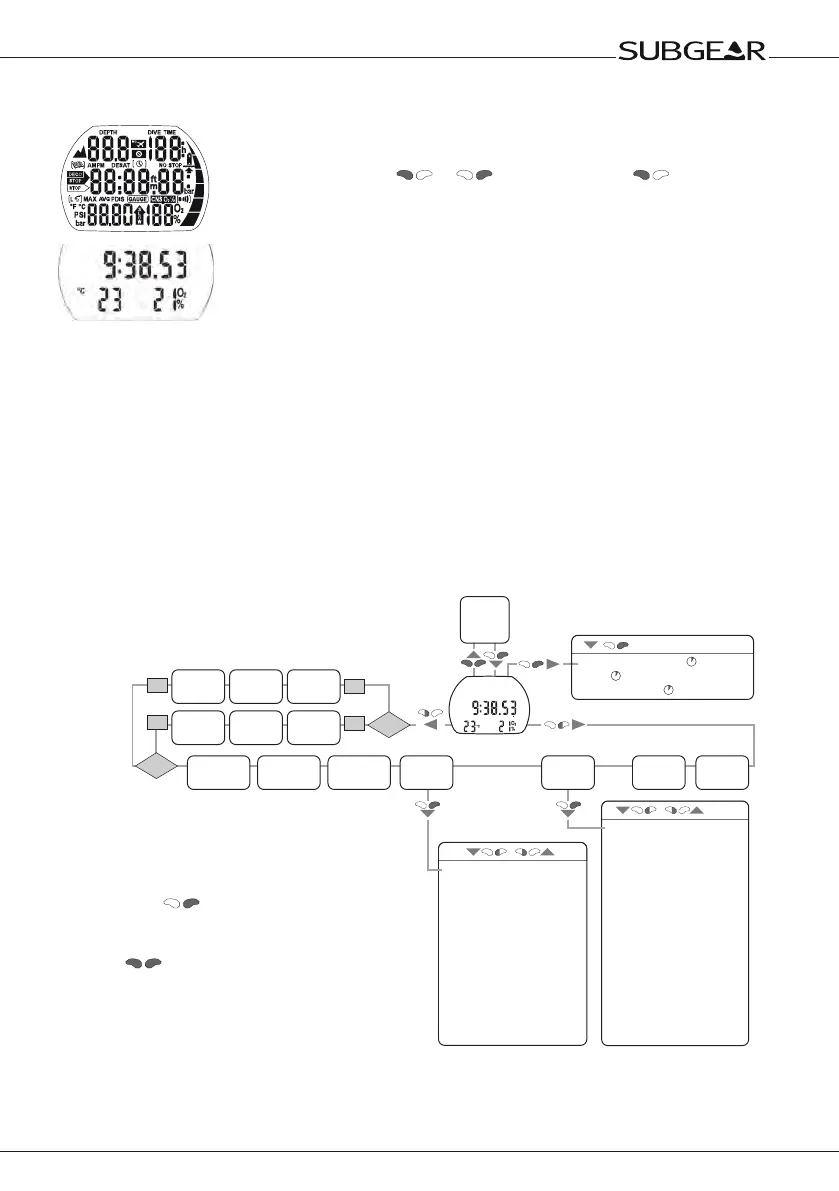
2.6 Switching on the display
• Automatically, on submerging in water* or when adaptation to atmospheric
pressure is necessary;
• Manually, by pushing
or . If switched on with all segments
light up for 5 seconds.
Afterwards the display shows the time of the day, the O
2 mix and the
temperature.
This display is called time of day display. Most navigation descrip-
tions start from this display. At the surface Subgear XP-3H returns
automatically to this display.
If there is a remaining saturation from the last dive or from a change of altitude,
Subgear XP-3H also displays the "do not fly" time, the "do not fly" icon, the
current altitude range and the prohibited altitude range (->30).
When Subgear XP-3H is in state of rest no information is displayed
but the atmospheric pressure is continuously monitored. If a change
in altitude range is detected, Subgear XP-3H switches on for 3 min-
utes automatically ->30.
* Only if the option
"
Water contacts on
"
(
"
set 1
"
, ->70) is chosen. See warning ->10.
2.7 How to navigate Subgear XP-3H at the surface
Starting from the time of day display you can enter into different menus.
on
off
CCR
/
/
on
off
CCR
• Enter with into the
function or sub menu.
• With
you can switch
to the time of day display.
• After 3 minutes without
operation Subgear XP-3H
returns to the time of day
display.
Time of day display
• CCR on / off -> 68
• Depth alarm -> 68
• Dive time alarm -> 69
• Safety stop time -> 69
• ppO2 max -> 69
• Tank pressure alarms -> 69
• Reset to air -> 69
• PDIS -> 69
• Unit system -> 70
• Unit system, tank -> 70
• Salt water -> 70
• Light time -> 70
• Attention beep -> 70
• Water contacts -> 70
• Reset desaturation -> 71
• Alarm clock ->72
• UTC time zone ->72
• Time of day ->72
• Date ->72
• 24h / AM PM ->72
• LCD contrast ->73
• IrDA speed ->73
• Sound on / off ->73
• Electronic ID ->73
Off
SP1
ppO
2
->52
Gas 1
O
2
%
->22
SP2
ppO
2
->52
Gas 2
O
2
%
->->45
Bail
O
2
%
->52
Gas d
O
2
%
->45
MB Level
L0-L5 ->34
Gauge mode
->32
Altitude
adjustment
->30
Set 2
->71
Set 1
->68
Dive
planner
->62
Logbook
->65
• (Desat. time CNS O
2
% ) ->15
• Date
->15
• Battery condition
->15
Time of day display


 To Next Page