68
Settings
7 SETTINGS
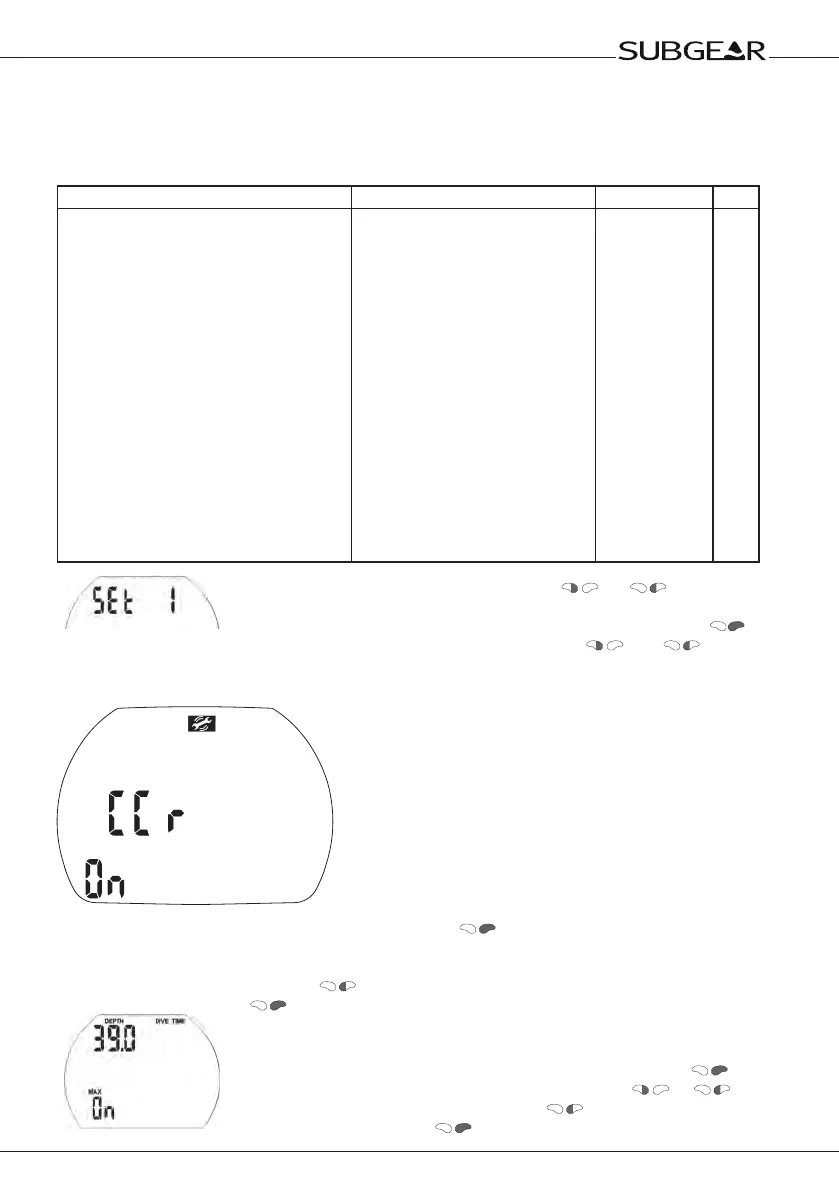
7.1 Menu "set 1"
With menu "set 1" or Dive.Log you can configure the following items (dive functions):
Setting Range Default Page
• CCR mode
• Depth alarm
• Dive time alarm
• Safety stop time
• Maximum partial pressure of oxygen
(ppO2max)
• Tank pressure warning and alarm
• Time limit to reset the O2% mix to air
• PDIS
• Unit system
• Tank pressure unit
• Salt water
• Backlight duration
• Audible attention signals
• Water contacts
• Reset desaturation
on / off
5-100m / 15-330ft
5-195 min
off, 1-5 min
1,2-1,6bar/off
warning 50-200bar / 750-3000psi,
alarm 20-120bar / 300-1750psi
1-48h/no reset
on / off
metric/imperial
bar / psi
on / off
2-12s / push on/off
on/off (Dive.Log: selective)
on/off
on/off
off
40m/130ft
60min
3min
1,4bar
100bar/1450psi
40bar/600psi
no reset
off
(depends on
region)
bar
on
6s
on
on
no reset
68
68
69
69
69
69
69
69
70
70
70
68
70
70
71
Starting from the time of day display push
or until "set 1"
appears.
Confirm that you wish to enter into the menu of "set 1" by pushing
.
Once entered into the menu you can scroll with and through
the menu.
Enabling CCR
1. Confi rm that you wish to enable CCR diving by pushing
. “On” or “off” starts to fl ash.
“On” indicates the deco gas is active, “off” indicates that only gas 1 will be used for decompression
calculations.
2. Switch between “on” and “off” with .
3. Confi rm your choice with .
Setting the dive depth alarm
1. Confirm that you wish to change the depth alarm by pushing
.
2. Change the value in increments of 1m (5 ft) by pushing or .
3. Switch between 'on' or 'off' by pressing .
4. Confirm the setting with .


 To Next Page