37
ENGLISH
Diving with microbubble (MB) levels
4.8.4 Functions during the dive with MB levels
Level stop information
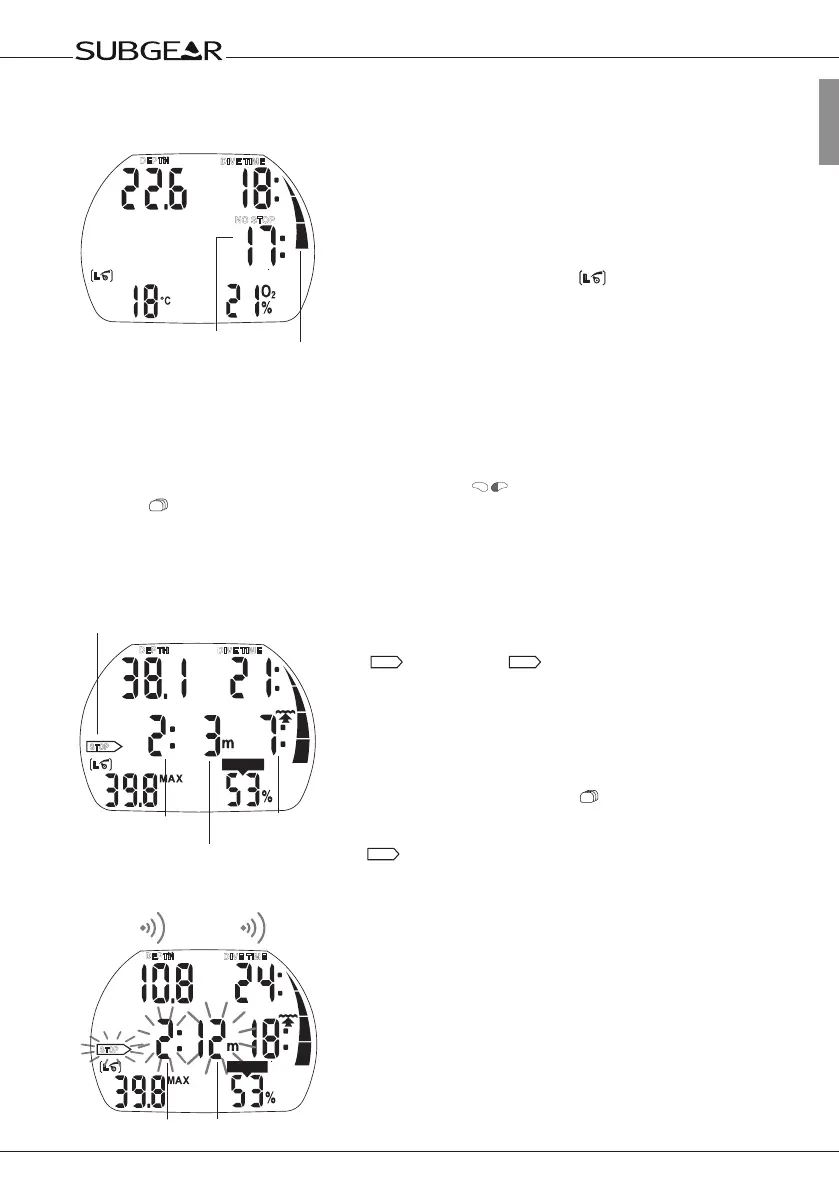
MB no-stop time
While diving with MB levels L1 to L5 Subgear XP-3H will display the
MB no-stop time instead of the ordinary no-stop time. Within the
MB no-stop time no level stops are required.
“NO STOP” and the MB level symbol
are visible. The remaining
MB no-stop time is shown in minutes.
NOTE:
• Information and alarms for MB no-stop time and ordinary no-stop time are the same.
• No-stop time relative to L0 is shown by pressing 3x
.
(see )
• Regardless of the MB level, we generally recommend to perform a slow ascent during the last few
metres/ feet.
Level stop
On entering the level stop phase, “NO STOP” disappears and the
arrow
STOP
appears. The
STOP
arrow fl ashes for 8 seconds and
an audible attention beep goes off. To complete the dive without
cascading to a lower MB level, all requested level stops must be
observed.
The deepest level stop is displayed in metres (feet). The display “2:
3m “ (“2: 10ft”) means that a level stop of 2 minutes at a depth of 3
metres (10 feet) has to be observed. Deco information relative to L0
is shown on an alternate display (see ).
When a level stop has been fi nished, the next higher level stop – if
present – is displayed. When all level stops have been observed, the
arrow
STOP
extinguishes and “NO STOP” reappears. The indication
of time shows the MB no-stop time again.
S
L
O
W
DEPTH
NO STOP
DIVE TIME
MB no-stop time
Nitrogen loading bar
relative to L0
STOP
NO
CNS O
2
%
DEPTH
DIVE TIME
Deepest level
stop depth
Total
time of
ascent
Level stop
duration
Level stop icon
STOP
CNS O2%
DEPTH
DIVE TIME
4s
Level stop ignored


 To Next Page