46
Diving with 2 or 3 gas mixtures
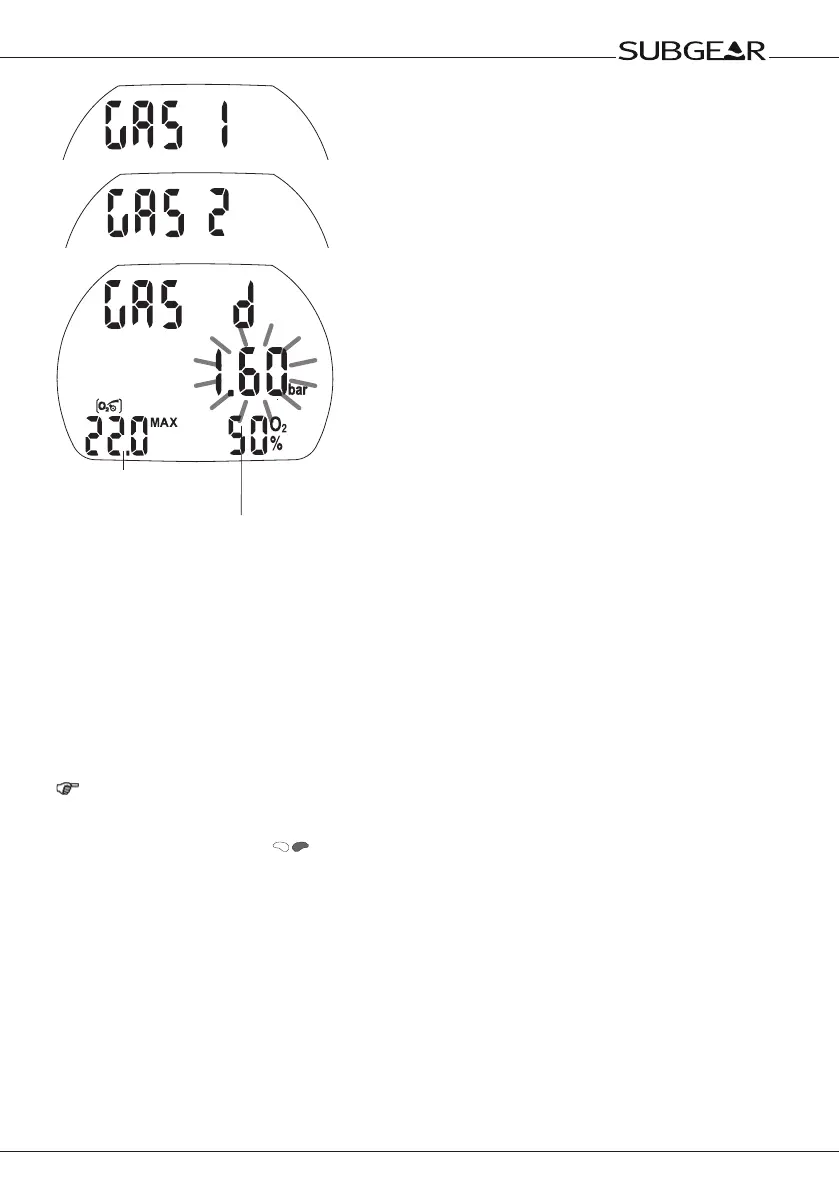
Depth for change of
gas mixture, MOD
ppO
2
max
Procedure:
1. Enter the setting for the fraction of oxygen and the ppO
2
max (MOD) for gas 1 (bottom mix) accord-
ing to the instructions on page 22 (points 1-6).
2. Repeat the process in the Gas 2 O
2
and the Gas d O
2
menu to set the oxygen fraction and
ppO
2
max for gas 2 and gas d. Note that in this cases the resulting MODs correspond to the
depths at which you plan to switch from gas 1 to gas 2 and from gas 2 to gas d during the ascent
phase (switch depths).
3. If you set gas 2 and gas d to “– – O
2
%”, Subgear XP-3H will compute the dive considering gas 1
only.
Subgear XP-3H will only accept gas switch depths (MOD gas 2 / gas d) as input where the maximum
partial pressure of oxygen (ppO
2
max), as pre-set manually (->22 point 5) or by means of Dive.Log, are
not exceeded.
NOTE:
• During the ascent an audible and visual attention message will indicate that you have reached
the depth which requires the change to gas 2 or gasd.
• Without confirmation with the display will disappear after 3minutes and your entries will
not be accepted.
• If the deco gas option is turned on and the oxygen fraction of gas2/ gasd is set to a value
other than “--O
2
%”, in surface mode and up to a depth of 0.8m Subgear XP-3H will display “2G”
or “3G” in the lower right corner of the display instead of a percentage value.


 To Next Page