ST4500 User Manual
27
4. Trouble Shooting (LED Indicator)
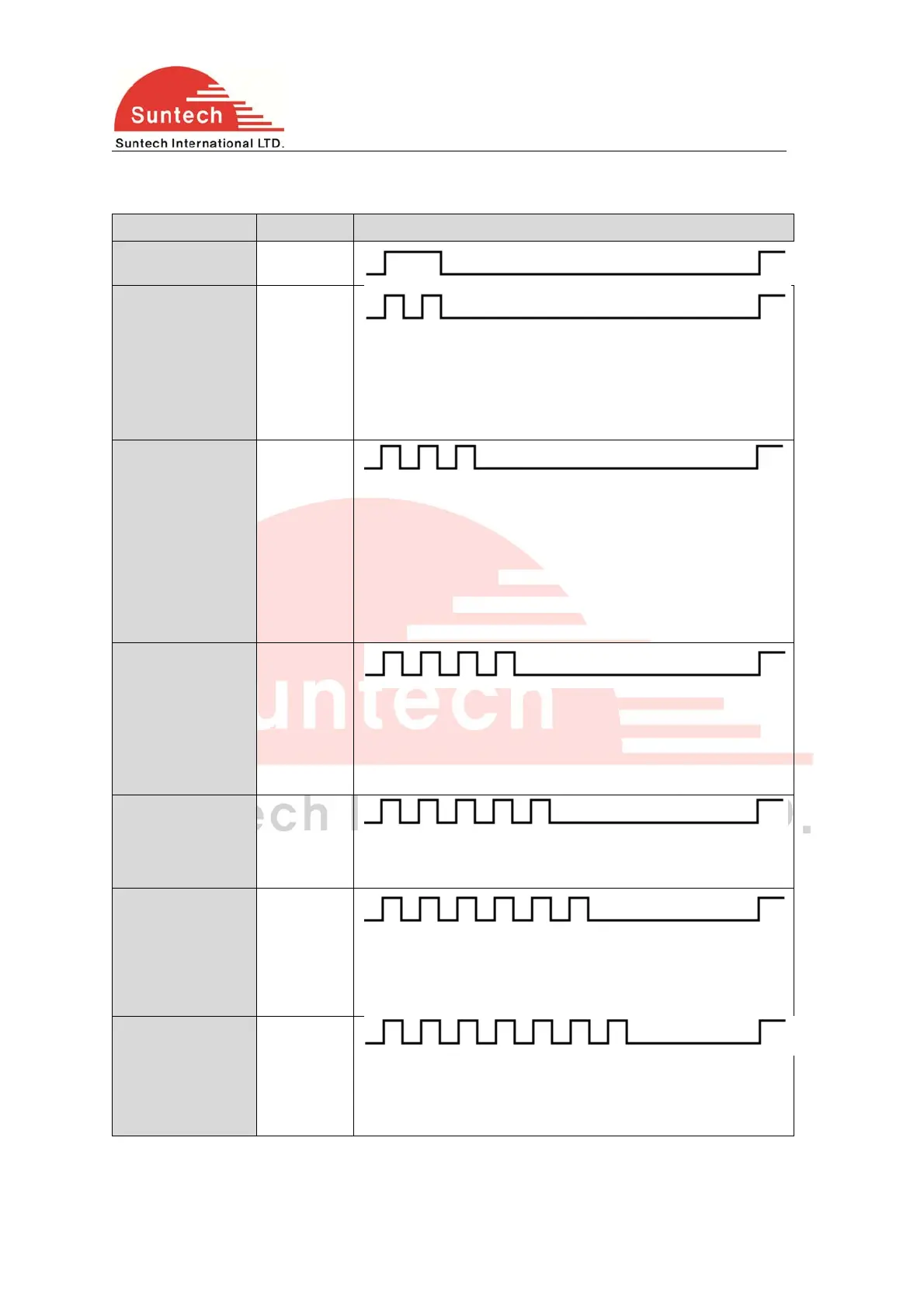
4.1 Blue LED: Indicates LTE-M1 status.
LTE-M1 Blink Count Remarks
Normal 1
Server Com. Error 2
<Possible Cause>
1. Server or network parameter is wrong.
2. Server is closed.
3. Temporary network barrier
LTE-M1 Com.
Error
3
<Possible Cause>
1. Network parameter is wrong.
2. SIM is blocked about LTE-M1 using.
3. Temporary network barrier
4. Weak LTE-M1 signal
5. LTE-M1 antenna connection is not firm.
No Network 4
<Possible Cause>
1. LTE-M1 antenna is disconnected.
2. LTE-M1 antenna or socket of LTE-M1 antenna is broken.
3. Device is broken.
SIM PIN Locked 5
<Possible Cause>
1. SIM PIN is enabled.
Cannot Attach
NW
6
<Possible Cause>
1. Weak LTE-M1 signal.
2. LTE-M1 antenna connection is not firm.
No SIM 7
<Possible Cause>
1. There is no SIM or SIM is not inserted properly.
2. SIM or SIM socket is broken.



 To Next Page