33
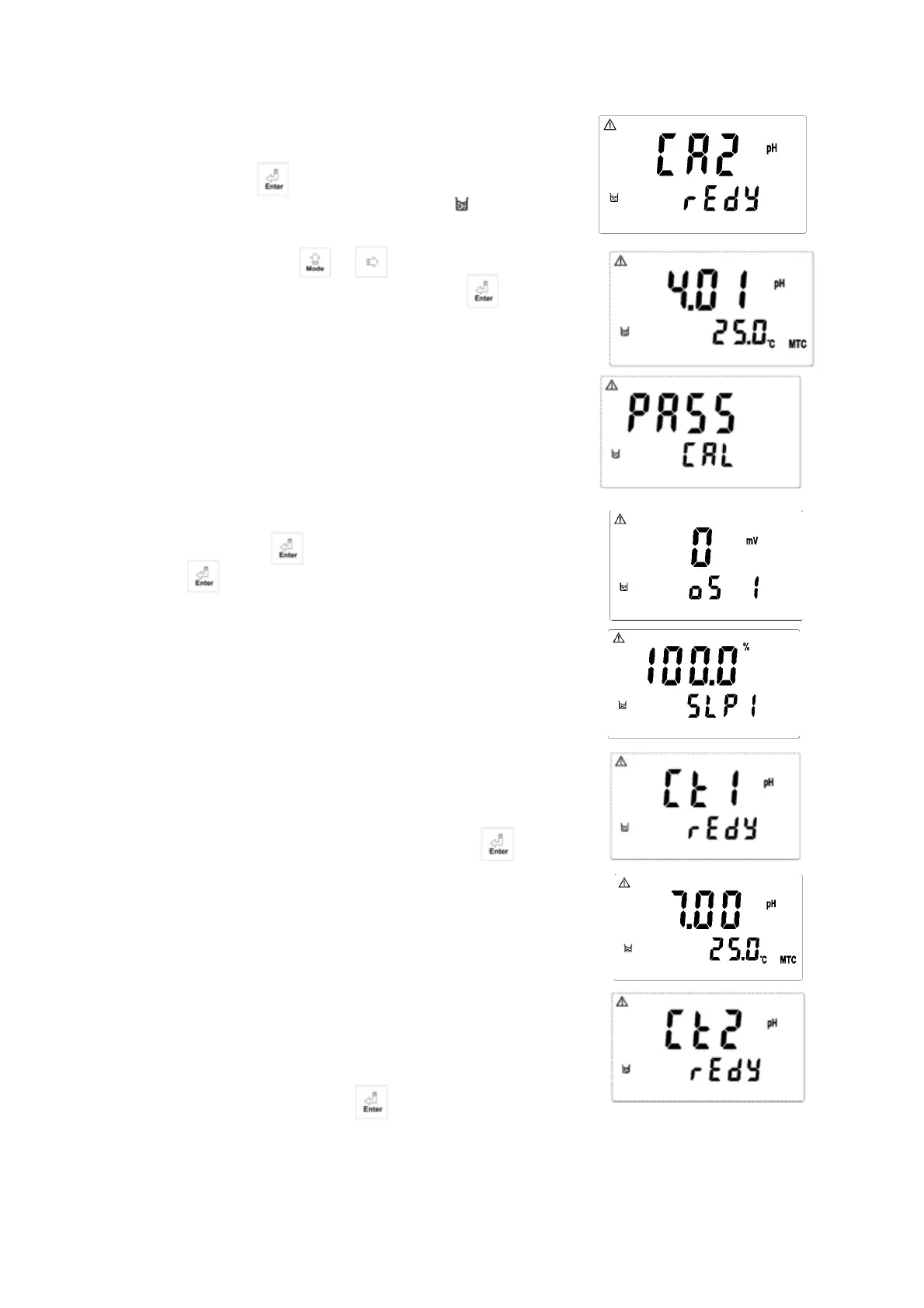
2. When entering CA2 calibration mode, clean the
electrode with distill water before putting it in the buffer
solution. Press to start the calibration. Then display
will show the mV value of the buffer and begin to
twinkle. After showing a similar number of pH value to the
buffer solution, push or to set the digit until it is
equal to the buffer’s standard. Then, push to ensure it.
3. When being calibrated successfully, it will show “CAL
PASS”. If the calibration is unsuccessful, it will show
“CAL Err”. (See chapter 10 for Error messages and
solutions).
4. The display will automatically show the oS1 (zero-point
mV) Value. Push bottom to see SLP1 (slope) value.
Push again to back to measurement mode.
8.4 Calibration of Pre-set buffer (TECH.)
8.4.1 Dual-point Calibration:
1. Enter Ct1 calibration mode. Clean the electrode completely.
Put it into the first buffer solution. Then, push bottom to
start the first-point calibration.
2. The display will show mV value while being calibrated.
After the value becomes stable, the display will show the first
pH value of calibration. Then, it will enter the second
calibration (Ct2).
3. Clean the electrode completely, and put it into the second
buffer solution. Then, push bottom to start the
second-point calibration.


 To Next Page