Operation
68 NT 10000...NT 12000
NOTE
Please note that time settings should only be made with caution, as they directly
affect data logging. For example, if you set the time back by 1 hour, then the
existing data will be overwritten.
Software update The software update is used to expand functions on your Solar Inverter. The
communication software (responsible for LCD display, interfaces, communica-
tion and Sunways Browser) and the control software or the monitoring soft-
ware can be updated.
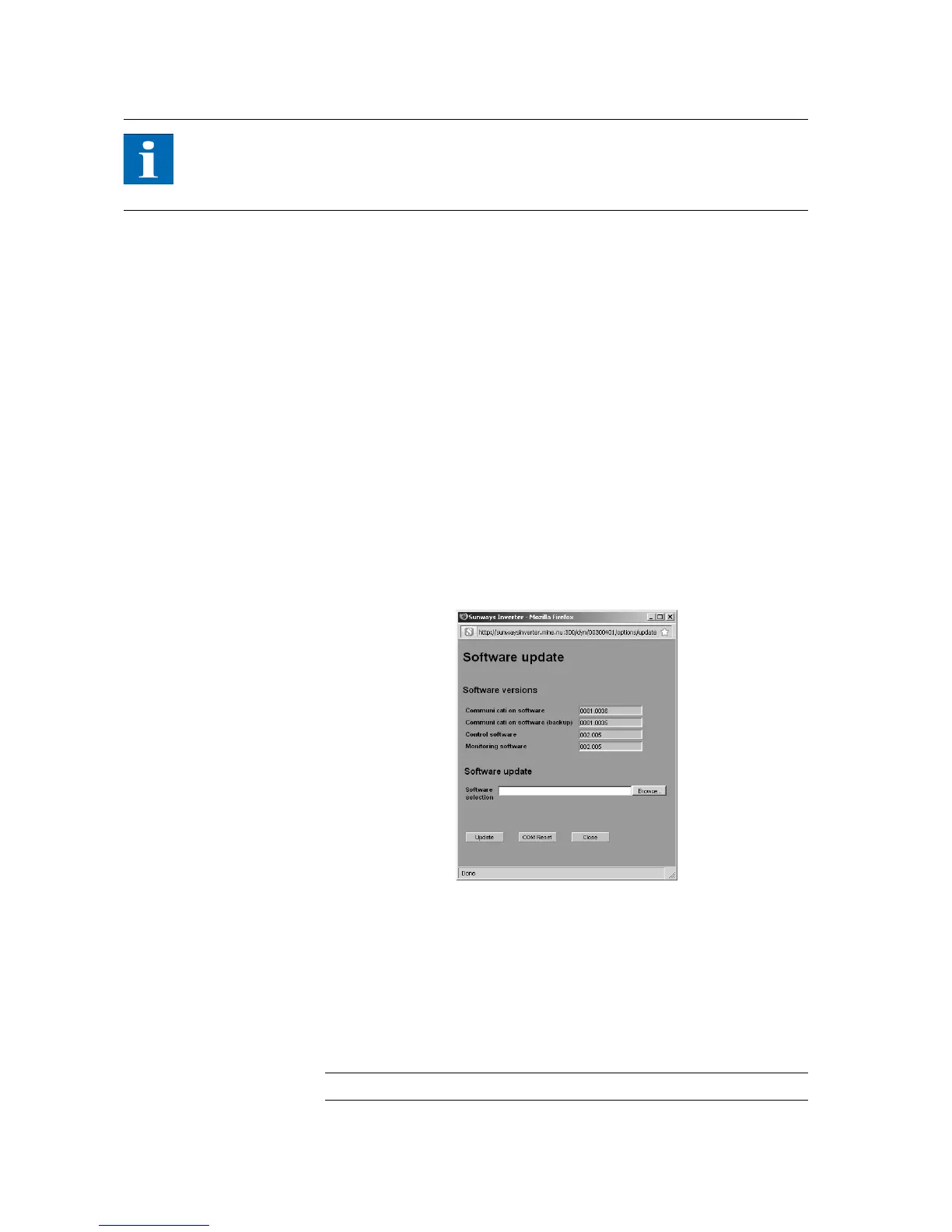
1. Call up the function Settings – Software Update for this purpose. This func-
tion requires entry of a password (default: ******** = 8 asterisks or the
your own customer password).
2. The upper screen section shows the current software versions. If a new ver-
sion is made available on our website (http://www.sunways.eu/en) you can
download this file and load it via the Sunways Browser. Select the file on
your hard disk in the File field with the Browse… button and confirm the
file dialogue with OK.
3. Select a software package.
4. The current software is copied to the Solar Inverter with the Update button.
5. Use the COM Reset button to restart the communication unit and load the
new software.
Devices networked via CAN can be updated via the network. In this case the
software is distributed to the secondary units via the main unit. Please contact
our Technical Hotline for further information. The phone number is provided on
the back of the manual.
During the update process, update information is displayed in the status indica-
tor in the standard window of the Solar Inverter's LCD display. The display mes-
sages have the following meaning:
Display text Update type
Reg.Upd. Control software



 To Next Page