36 37
The maximum distance between the inverter at the end of the daisy chain and the Data
logger should be within 1000m.
Export limitation & control or power limit solution, wiring instructions and conguration,
please contact Sunways after-sales at service@sunways-tech.com.
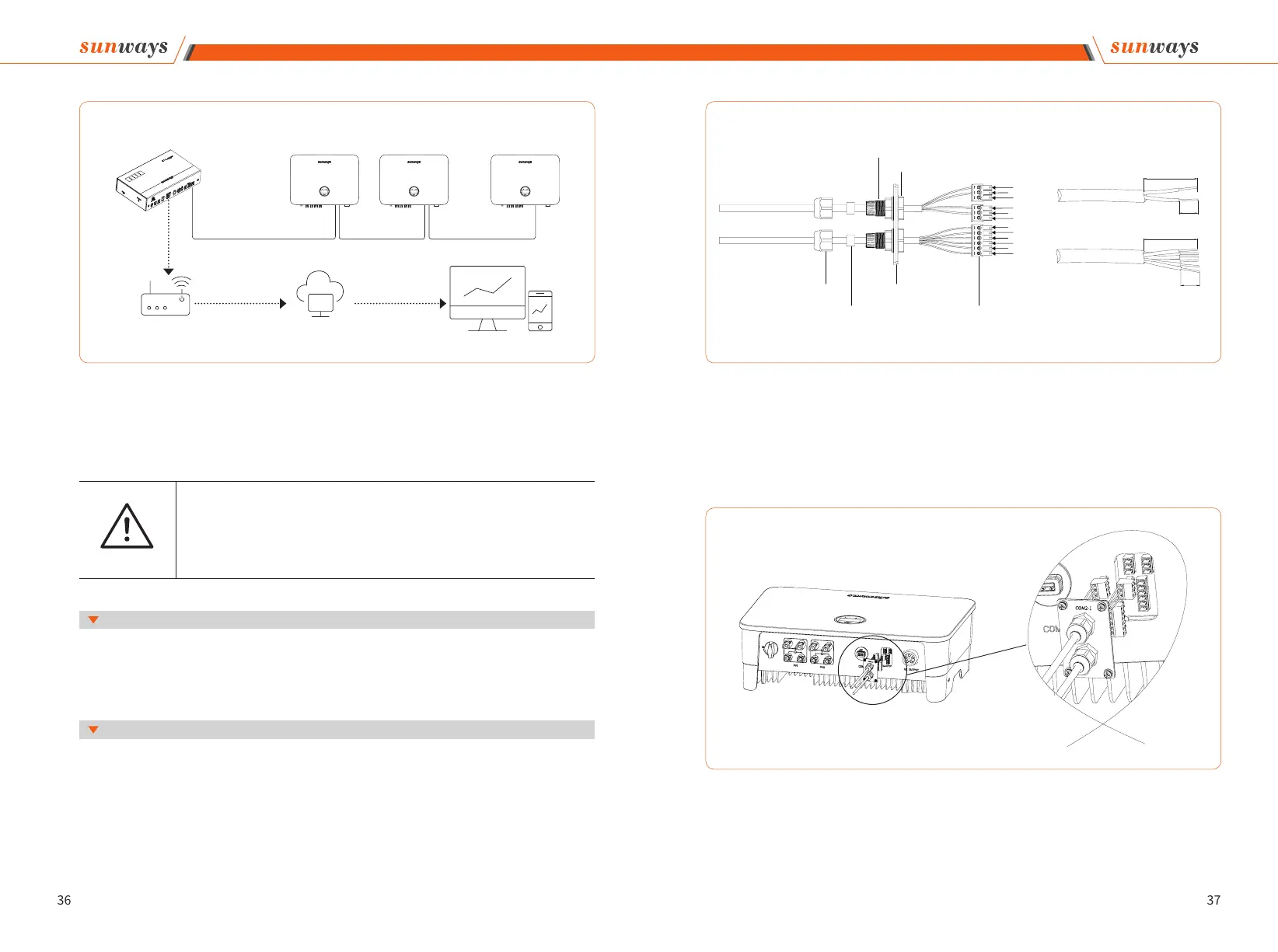
① Remove the COM2 plate in the bottom of the inverter with a cross screwdriver.
② Put the cable through the connector and connect to the terminal in the following or-
der: screw cap, sealing ring, insulator, metal plate, nut and 3/6pin connector, as shown in
Figure 4-28:
Figure 4-27
Attention
It is recommended to use the RS485 communication cable with a cross sectional area of
0.75-1.5mm2 and an outer diameter of 5mm-10mm.
RS485 cable requirements: Shielded twisted-pair cable or shielded twisted Ethernet ca-
ble.
4.7.3 Export limitation & control or power limit solution
4.7.4 Wiring Steps:
4 Installation
STT 4~25KTL
series inverter
STT 4~25KTL
series inverter
STT 4~25KTL
series inverter
Data logger
Sunways server
InternetInternet
LAN/WiFi
/GPRS RS485 RS485 RS485
Router
...
Figure 4-28
Figure 4-29
③ Insert the cable to the port in the 3/6pin connector and fasten with a screwdriver.
④ Insert the 3/6pin connector into the 3/6pin connecter inside the inverter, and screw the
COM2 plate back with a cross screwdriver, as shown in Figure 4-29:
4 Installation
20-25mm
1
3
3
1
2
4
6
2
2
1
3
5
Port 1
Port 2
Port 3
6mm
6mm
20-25mm
Screw cap
Sealing ring
Insulator ring
Metal plate
3/6pin connector
Nut



 To Next Page