Chapter 4: BIOS
4-9
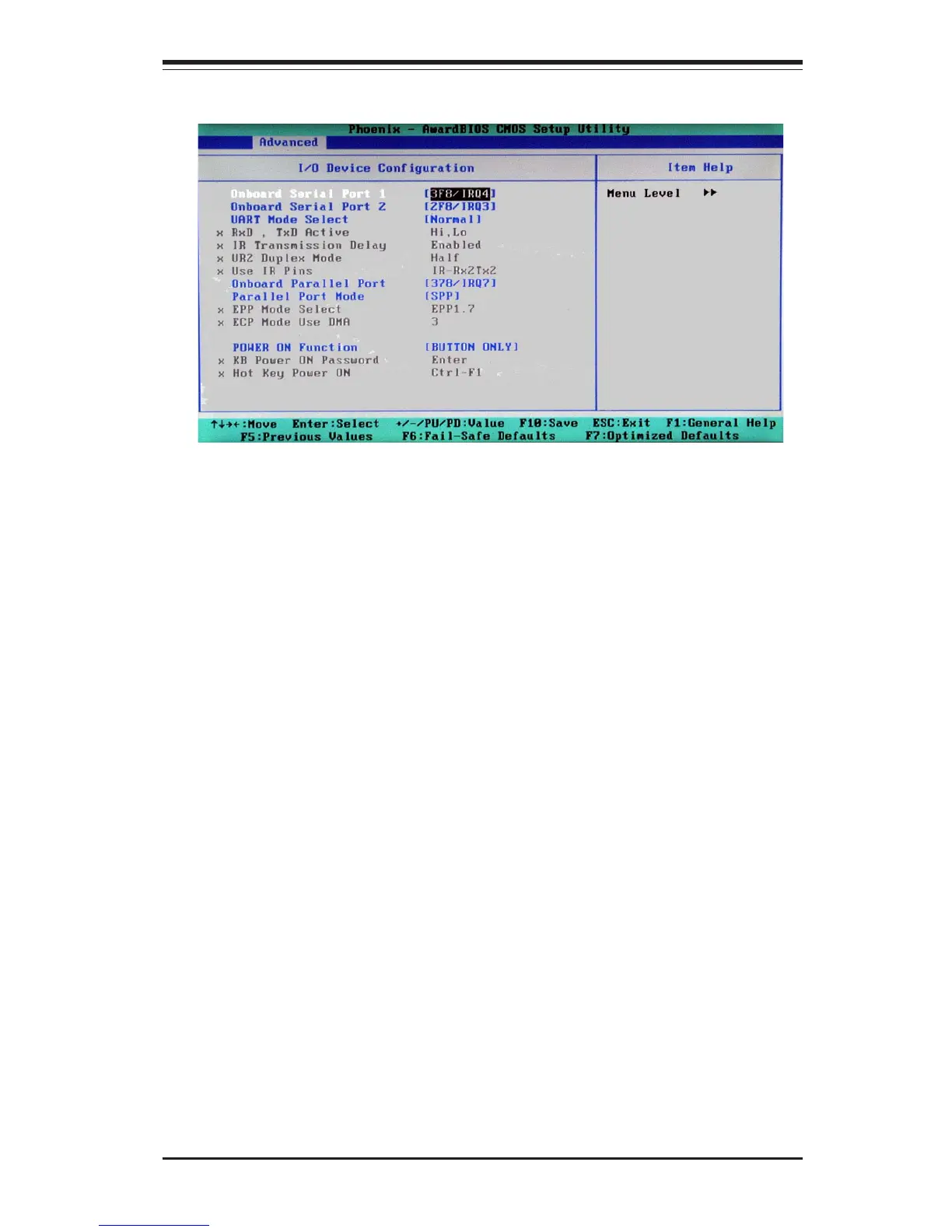
4-4.3 I/O Device Configuration
This setting allows the user to select the UART mode for the BIOS. The
options are "IrDA", "ASKIR" and "Normal."
RxD, TxD Active
This allows the user to change the settings for the "RxD, TxD Active"
function. The options are "Hi, Hi", "Hi, Lo", "Lo, Hi", and "Lo, Lo".
IR Transmission Delay
If "Enabled", the transmission of IR (infrared) signals will be delayed. The
settings are "Enabled" and "Disabled".
UR2 Duplex Mode
This setting sets the mode for the UR2 Duplex Mode. The options are
"Full" and "Half".
UART Mode Select
Onboard Serial Port1/Onboard Serial Port2
This setting allows the user to set the address and the corresponding IRQ
for Serial Port1 and Serial Port 2. The options are "Disabled" , "3F8/IRQ4",
"2F8/IRQ3", "3E8/IRQ4", "2E8/IRQ3", and "Auto". The default setting for
Serial Port1 is "3F8/IRQ4" and the default for Port 2 is "2F8/IRQ3".



 To Next Page