32
3.2 DHCP
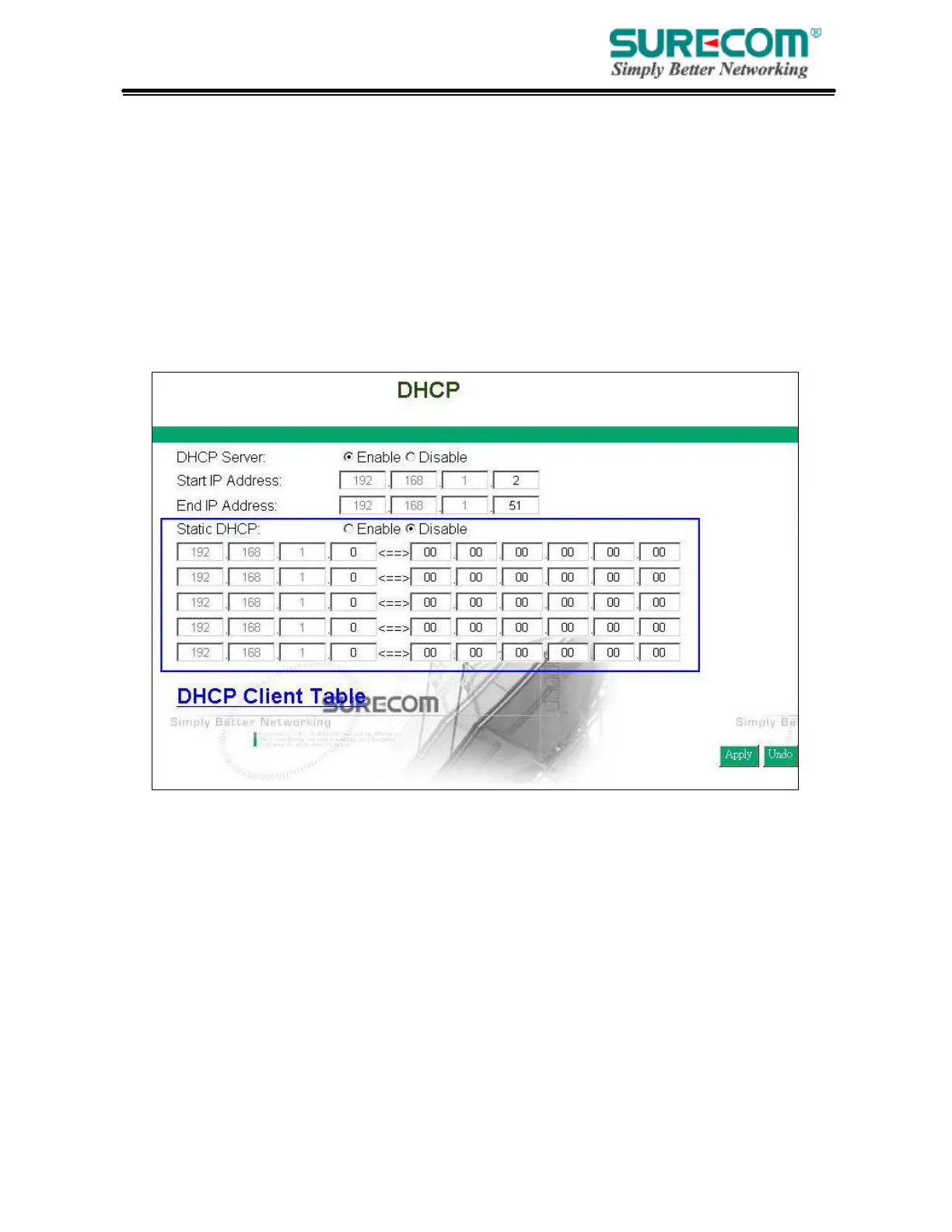
Unless you already have a DHCP server on your internal network, choose “Enable” from the
DHCP. A DHCP Server can automatically assign IP Address to each computer in your network.
It is highly recommended that you set your broadband router to act as a DHCP server. Be sure to set
your computers to be DHCP clients by setting their TCP/IP settings to “Obtain an IP Address
Automatically.” When you turn your computers on, they will automatically load the proper
TCP/IP settings provided by the router. The DHCP Server will automatically allocate an
unused IP address from the IP address pool to the requesting computer. You must specify the
starting and ending address of the IP address pool.
• DHCP Server: Select “Enable” to use the DHCP server option of the broadband router.
If you already have a DHCP server in your network, set the router’s DHCP option to “Disable”.
• Start IP Address/ End IP Address: Enter the starting/ Ending IP address for the DHCP server’s IP
assignment. Make sure the first three octets match the router’s IP address, i.e., 192.168.1.xxx. The value
must be located from 2 to 254.
• Static DHCP: If you need to specify your LAN clients to static IP addresses, you can enable this
function. And enter the LAN client’s IP address corresponding to its MAC address.



 To Next Page