SP91 User Manual
4 RTS
Outpu
t
1) When DTR/DSR control is selected , The signal indicates whether
the printer is busy. SPACE indicates that the printer get ready to
receive data , but MARK indicates that the printer is busy. Changing
the Memory Switch setting to be used as a signal for printer busy.
2)
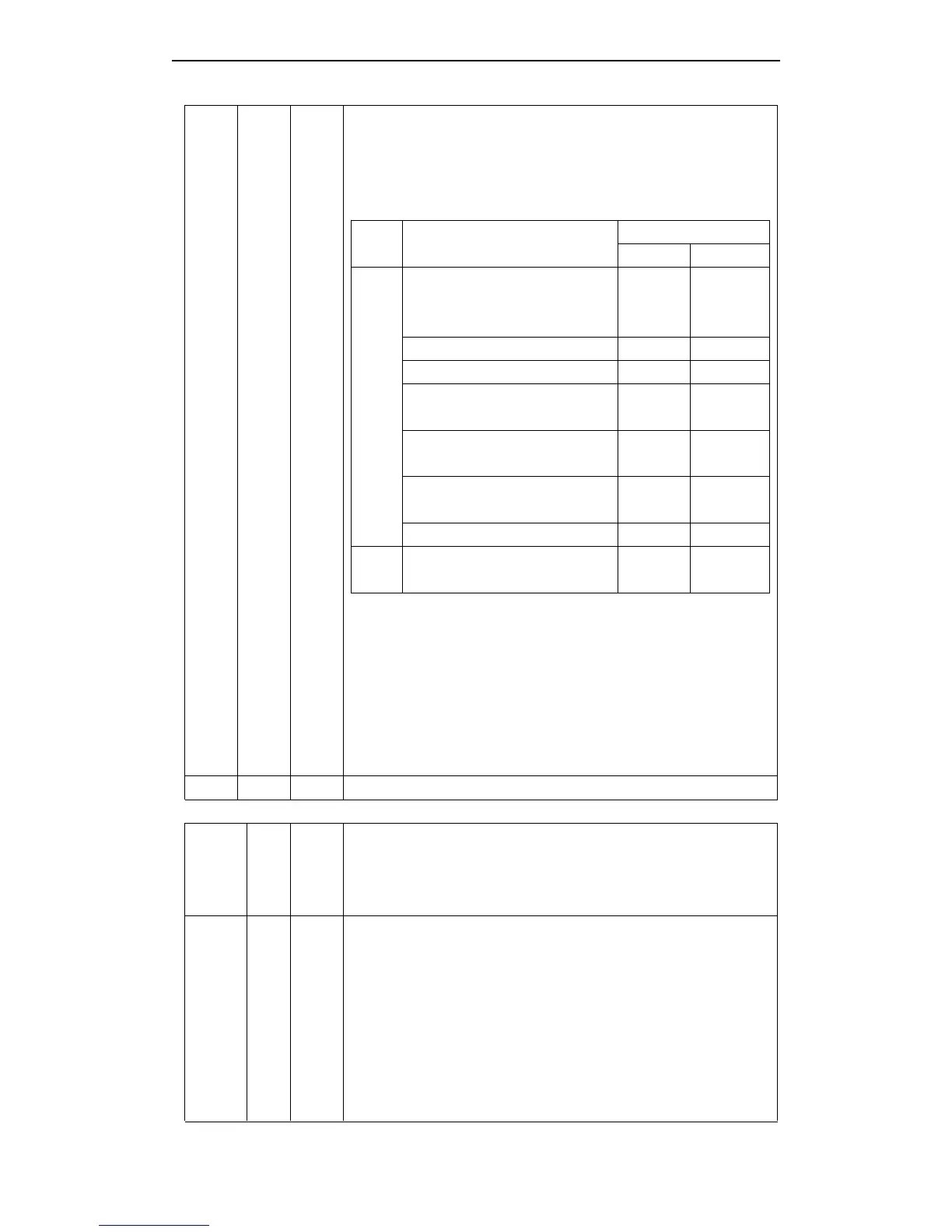
Printer Status
Memory SW1-3 Status
ON OFF
Offlin
e
1.During the period from when the
power is turned on to when the
printer is ready to receive data.
BUSY BUSY
2. During the self-test. BUSY BUSY
3. When the cover is open. — BUSY
4. During paper feeding using the
paper feed button.
— BUSY
5. When the printer stops
printingdue to a paper-end.
— BUSY
6. During macro executing
standby status.
— BUSY
7. When an error has occurred. — BUSY
8. When the receive buffer
becomes full.(*1)
BUSY BUSY
3) When XON/XOFF control is selected:
Signal indicates whether the printer is correctly connected and is
ready to receive data. SPACE indicates that the printer is ready to
receive data. The signal is always SPACE except in the following
cases :
· During the period from when the power is turned on to when the
printer is ready to receive data
· During the self-test
7 SG — Signal ground
Signal assignments and functions (continued)
Pin No.
Sign
al
Nam
e
Signal
Direct
ion
Function
6 DSR Input
This signal indicates whether the host computer can receive data.
SPACE indicates that the host computer can receive data, and MARK
indicats the host computer can ’ t receive the data.
When DTR/DSR control is selected, the printer transmits data after
confirming this signal ( except when transmitting data by DLE EOT and
GS a ) .
When XON/XOFF control is selected , the printer does not check
this signal.
Changing the DIP switch setting enables this signal to be used as a



 To Next Page