SP91 User Manual
LED bliks to indicate the macro execution ready state. ( see macro definition commands )
2 )
Alarm LED : Blue
Flashing : Paper out, Cover open, The temperature of print head is extremely high, Autocutter error,
another mechanism error.
Off : Printer is ready to go.
3 ) ALARM : Buzzer
Sound : Paper out, Cover open, The temperature of print head is extremely high, Autocuttererror,
Print the receipt under the back kitchen mode, another mechanism error.
Quiet : Printer is ready to go.
NOTES:
Only two times when printing each receipt under the back kitchen mode;
Other fault conditions, only 15s with sound then closing by it.
3.5
3.5
3.5
3.5 Roll
Roll
Roll
Roll Paper
Paper
Paper
Paper Cover
Cover
Cover
Cover
Cover button
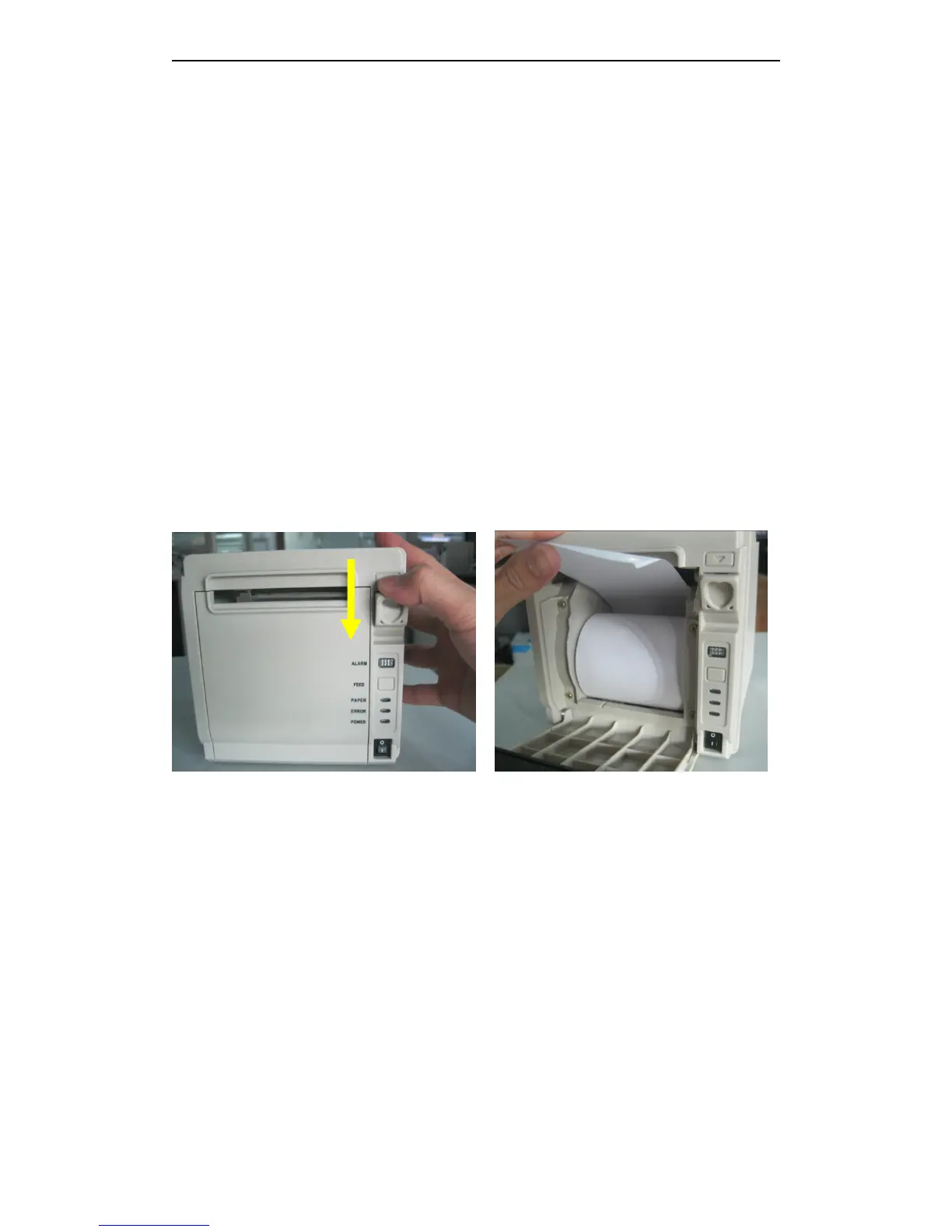
As the following picture , pointed out direction and push the button.
Open the paper cover Install the paper
3
3
3
3 . 6
6
6
6 Self-test
Self-test
Self-test
Self-test
Self-test that checks whether the printer is stable or not.
If
the self-test is correct, indicates that the
printer is stable except the interface what connect the host. Or it is unstable.
1) The printer has a self-test function that checks the followings:
· Print quality
· Inte r face type and its operate conditions
· Control software version
· DIP Switch settings
· Built-in character set
Select printer character
2) Starting the self-test
1 、 Firstly install the paper roll



 To Next Page