Need help?
Do you have a question about the SureShot AC110-V2PCC-1-D2 and is the answer not in the manual?
Essential safety guidelines to prevent damage, injury, and voiding the warranty.
Steps to power on the unit and allow it to reach operating temperature.
Instructions for correctly inserting the dairy bag and preparing the tube for dispensing.
Steps to prepare the dispenser and dairy bag for the calibration process.
Procedure for daily cleaning of the dispenser's exterior surfaces and button panel.
Instructions for daily removal and cleaning of the dispenser's catch tray.
Steps for cleaning product case, insert, and compartment when loading a new bag.
Procedure for monthly inspection and cleaning of the dispenser's door gasket.
Detailed steps for cleaning the valve assembly to ensure sanitation and accurate dispensing.
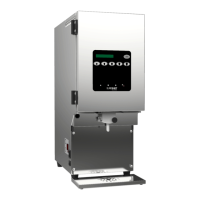
The IntelliShot 2.0 Refrigerated Dairy Dispenser (Model AC110-V2PCC-1-D2) is a specialized appliance designed for accurately dispensing refrigerated dairy products. It features a sleek, compact design with a front-facing dispense point and an intuitive button panel for operation. The device is intended for commercial use, ensuring precise and consistent dairy dispensing for various beverages.
The primary function of the IntelliShot 2.0 is to store and dispense refrigerated dairy products from 5-liter bags. It maintains the dairy at an optimal operating temperature, ensuring product quality and safety. The dispenser utilizes a valve assembly and a plunger mechanism to control the flow of dairy, allowing for precise shot quantities. A key feature is its calibration system, which accounts for variances in dairy products to maintain dispense accuracy over time. The device includes a display screen that provides operational feedback, such as product level, calibration status, and selected shot quantities. Notification lights alert users to important operational statuses.
Before first use, the dispenser requires careful setup. It must be placed on a horizontal surface and thoroughly cleaned. After plugging it in, the dispenser needs approximately 20 minutes to reach its operating temperature.
Loading product involves several steps to ensure proper function and dispense accuracy. First, the dispenser door is opened, and the empty product case is removed. A 5-liter dairy bag is then inserted into the product case, with the tube positioned towards the front opening. The bag's fitment and tube must exit the bottom front opening without being pulled or stretched to prevent leaks. The corners of the bag are slid into designated slots on the sides of the product case. The top ring of the bag's fitment is then secured into the product case opening, resting on the product case floor.
The valve insert, which is magnetic, is removed from the valve assembly by pushing in the plunger and pulling down. The product case with the dairy bag is then inserted into the product compartment, ensuring the tube faces out and is centered in the valve opening without twisting, kinking, or pinching. The valve insert is reinstalled by pushing in the plunger and sliding the insert back up into the valve assembly. To prevent spraying and ensure accuracy, the tube is cleared of product by pinching it below the valve and pushing the plunger a couple of times. Finally, the tube is carefully cut level with the bottom of the valve using sanitized, sharp scissors. After closing the dispenser door, any dispense button is pressed to confirm a full bag is loaded.
Dispensing product is straightforward: users simply press any button on the button panel. For example, to prepare a medium hot coffee or tea with two shots of product, the 2-shot quantity button is pressed. For a small iced coffee, the corresponding small iced coffee beverage type button is selected.
The dispenser provides a low product notification. When the dairy in the bag decreases to 1109 ml, the product level indicator begins counting down the number of remaining shots (1 shot = 11.09 ml). Once the product level reaches 330 ml (approximately 30 shots), the display will show "LOW," and the SureShot symbol will flash yellow, indicating that the bag needs to be replaced soon.
Calibration is a critical usage feature performed during initial setup and every 30 days thereafter, as indicated by a countdown feature. To prepare for calibration, users are advised to watch an instructional video and ensure a full, pre-chilled dairy bag is loaded with the tube cut correctly. After loading, the 3-shot button is pressed three times to remove air from the tube and allow the bag to settle. The calibration procedure involves entering the settings page by holding the settings button for one second, navigating to the calibration icon, and pressing the confirmation button. The display shows current calibration values and a countdown to the next scheduled calibration. To start, the user presses the confirmation button, sets a scale to grams, places an empty cup on the scale, zeros/tares it, and places the cup under the dispense point. The dispenser then performs four test dispenses. For each dispense, the user places the cup on the scale, adjusts the displayed number to match the actual weight, confirms the amount, discards the product, and re-zeros the scale before the next dispense. This process ensures the dispenser accurately measures and dispenses dairy. If calibration is performed on a partially filled bag (less than three-quarters full), it must be repeated after the next full dairy bag is loaded to maintain accuracy.
The IntelliShot 2.0 requires regular cleaning to maintain operational efficiency and sanitation. A recommended cleaning schedule outlines daily, "every time a new product bag is loaded," and monthly (or more frequently) tasks.
Daily cleaning includes the exterior and button panel. To prevent accidental dispensing during cleaning, the lock button is pressed and held until the display shows "LOCKED" and the SureShot symbol is solid yellow. Plastic exterior surfaces are wiped with a soft towel dampened with warm, soapy water, then with clean water, and finally dried to prevent water spotting. Stainless-steel surfaces are cleaned with a McDonald's approved stainless-steel cleaner applied to a sanitized towel, avoiding contact with the door or other plastic parts and ammonia-based cleaners. After cleaning, the lock button is held again to resume dispensing.
The catch tray also requires daily cleaning. It is pulled away from the dispenser, and its two parts (screen and tray) are separated. If a dishwasher is available, both parts can be cleaned on a full wash cycle. Otherwise, they are thoroughly rinsed with warm, clean water, washed in hot water (minimum 140°F/60°C) with a good quality cleaner, ensuring all corners and crevices are reached, then rinsed well with warm, clean water, sanitized, and air-dried. The parts are then reassembled and replaced on the dispenser, aligning the grooves with the front legs.
Every time a new dairy bag is loaded, the product case, product case insert, and product compartment must be inspected and cleaned. This involves opening the dispenser door, removing the product case, and separating the bag and insert. If a dishwasher is available, the product case and insert can be cleaned on a full wash cycle. Otherwise, they are thoroughly rinsed with warm, clean water, washed in hot water (minimum 140°F/60°C) with a good quality cleaner, rinsed well with warm, clean water, sanitized, and dried thoroughly. With the product case removed, the inside of the product compartment is sprayed with a McDonald's approved cleaner on a sanitized towel, wiped with warm, clean water, and dried. Finally, a full bag is loaded, and the dispenser door is closed.
Monthly, or more frequently as required, the door gasket and valve assembly need cleaning. For the door gasket, the dispenser door is opened, the gasket is inspected for cuts or gaps, and then wiped with a soft towel dampened with warm, soapy water, using a small brush for corners and crevices. It is then wiped with warm, clean water, sanitized, and dried before closing the door.
Cleaning the valve assembly, crucial for proper sanitation and accurate dispense amounts, requires disassembling it. Before starting, containers of warm, soapy wash water, warm, clean rinse water, and sanitizing agent are prepared. The dispenser is turned off, and the door is opened. The plunger is pushed in, and the valve insert is pulled down and out, then attached to the front panel magnetically for safekeeping. The plunger is then pulled straight out. The valve insert and plunger are cleaned, rinsed, and sanitized using the prepared solutions, then dried. The inside and outside of the valve block are wiped with a soft towel dampened with warm, clean, soapy water, using a small brush for corners and crevices as needed. After cleaning, the plunger is inserted, the product case and valve insert are reinstalled, the dispenser door is closed, and the dispenser is turned back on.
For additional assistance and training materials, including instructional videos, a QR code on the dispenser can be scanned to access the SureShot Solutions website.
 General
| Model | AC110-V2PCC-1-D2 |
|---|---|
| Category | Dispenser |
| Voltage | 110V |
| Power Source | Electric |
| Type | Automatic |

 To Next Page