22
2-1. Basic information before operation
COROLLA_HV(TMUK)_OEM_MM_(EE)
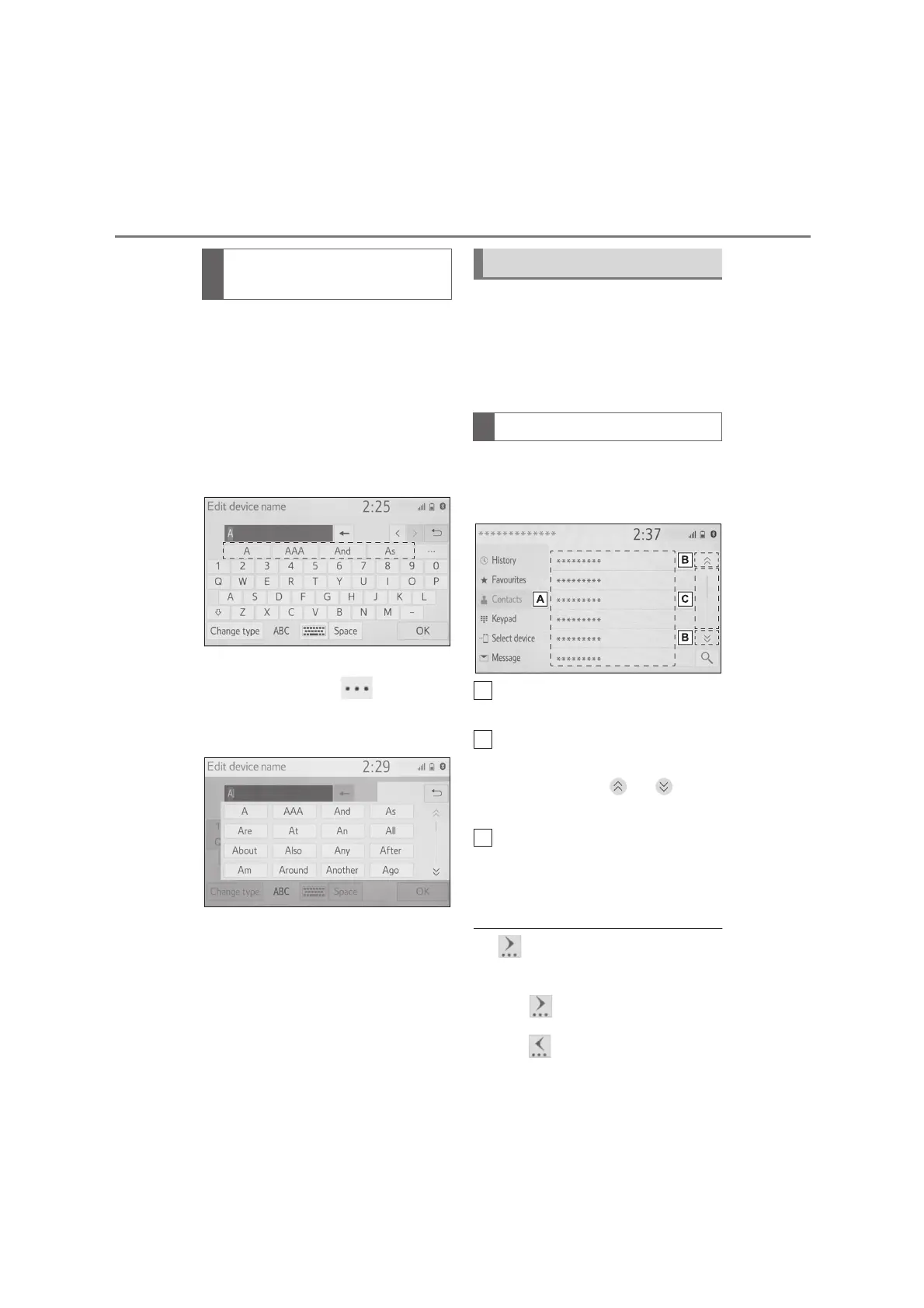
When text is input, the system pre-
dicts the text that may complete the
currently unconfirmed text and dis-
plays predictive replacement candi-
dates that match the beginning of
the text.
1 Input text.
2 Select the desired candidate.
To select a candidate that is not
displayed, select , and then
select the desired predictive
replacement candidate.
*
: These functions are not available in
some languages.
The list screen may be displayed
after entering characters. When a
list is displayed, use the appropri-
ate screen button to scroll through
the list.
When a list is displayed, use the
appropriate screen button to scroll
through the list.
To scroll up/down the list, flick
the list up/down.
Select to skip to the next or pre-
vious page.
Select and hold or to
scroll through the displayed list.
Indicates the position of the dis-
played entries in the entire list.
To scroll up/down pages, drag
the bar.
●
If appears to the right of an item
name, the complete name is too long
to display.
*1
• Select to scroll to the end of the
name.
• Select to move to the beginning of
Displaying predictive text
candidates
*
List screen
Scrolling list screen


 To Next Page