8
1-1. Basic function
COROLLA_HV(TMUK)_OEM_MM_(EE)
1-1.Basic function
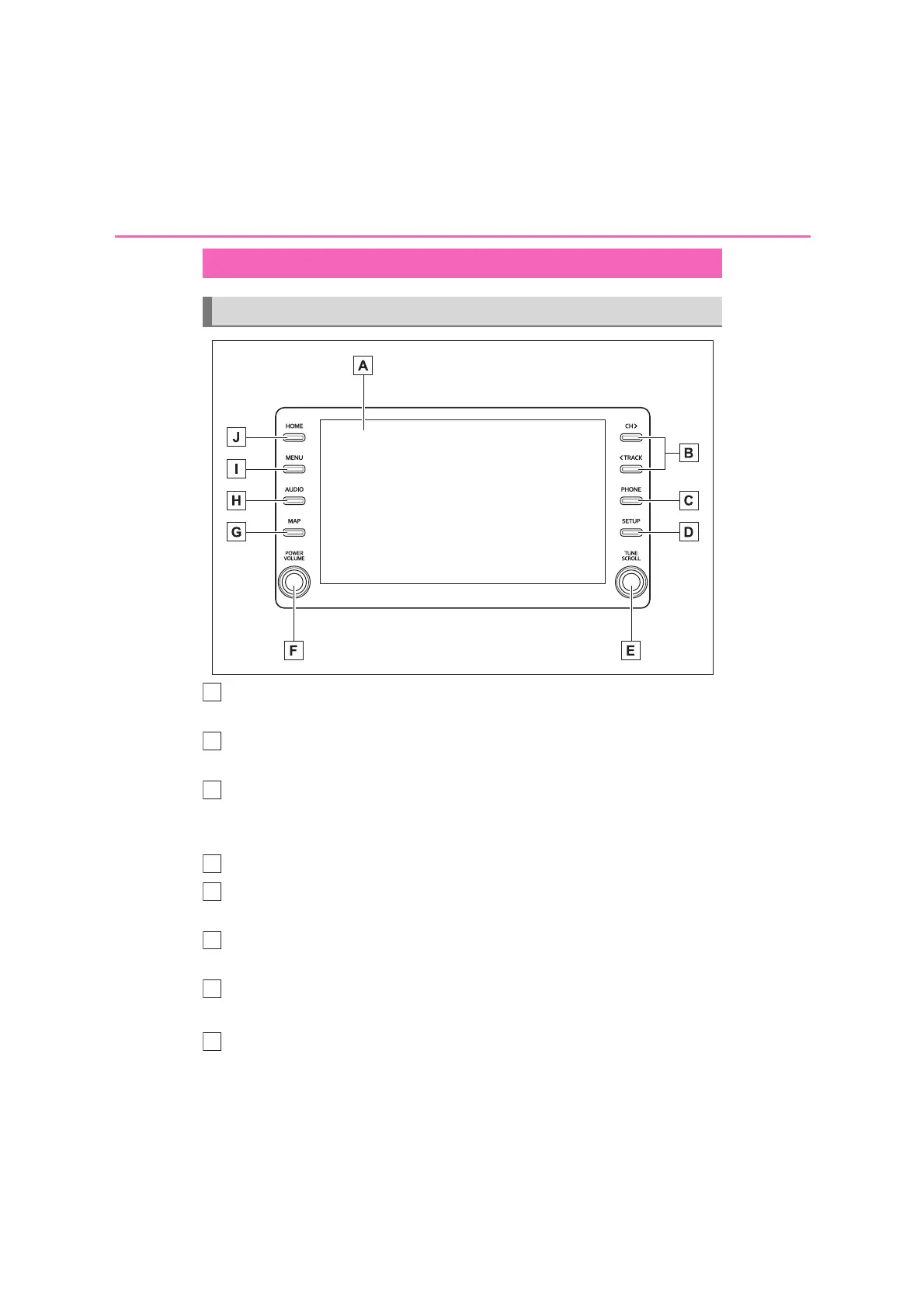
By touching the screen with your finger, you can control the selected
functions. (P.17, 18)
Press to seek up or down for a radio station or to access a desired
track/file. (P.62, 67, 69, 71, 72)
Press to access the Bluetooth
®
hands-free system. (P.106)
When an Apple CarPlay connection is established, press to display the
Phone app screen.
*1
(P. 41)
Press to display the “Setup” screen. (P.13)
Turn to change the radio station or skip to the next or previous track/file.
(P.62, 67, 69, 71, 72)
Press to turn the audio/visual system on and off, and turn it to adjust the
volume. Press and hold to restart the system. (P.16, 57)
When an Apple CarPlay/Android Auto connection is established, press
to display the Maps app screen.
*1, 2
Press to access the audio/visual system. (P.56, 57)
Buttons overview
Operations of each part
A
C
D
E
H


 To Next Page