90
4-1. Speech command system operation
COROLLA_HV(TMUK)_OEM_MM_(EE)
4-1.Speech command system operation
●
Voice recognition language can be
changed. P. 48
●
This function is compatible with the
following languages:
• English
• French
•German
• Spanish
• Italian
•Dutch
• Portuguese
•Polish
•Czech
•Danish
• Norwegian
•Swedish
•Finnish
•Russian
• Greek
• Turkish
•Flemish
■
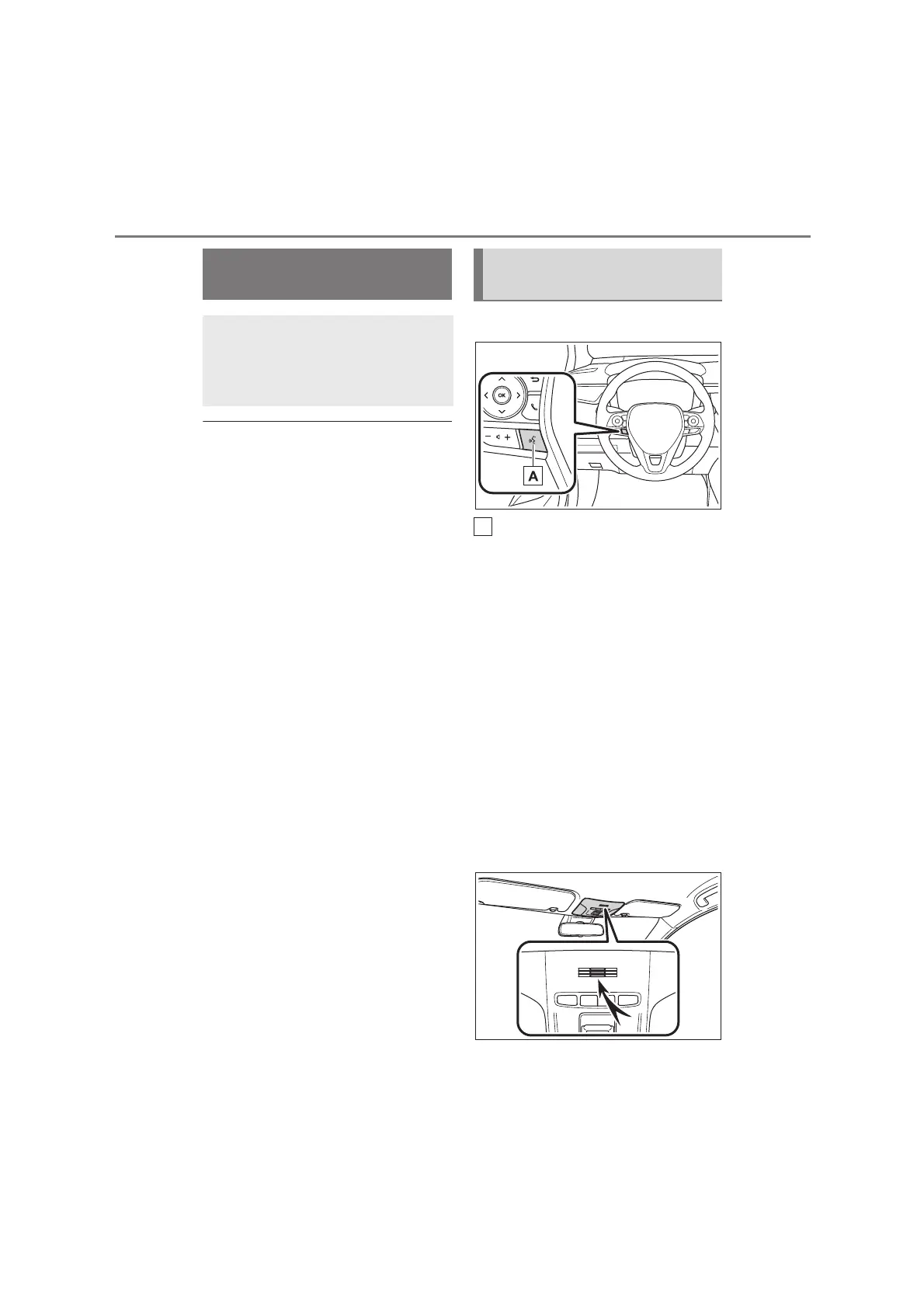
Steering switch
Talk switch
Speech command system:
• Press the talk switch to start the
speech command system. To cancel
speech command, press and hold the
talk switch.
When an Apple CarPlay/Android Auto
connection is established
*
:
• Press and hold the talk switch to start
Siri/Google Assistant. To cancel
Siri/Google Assistant, press the talk
switch.
• Press the talk switch to start the
speech command system.
*
: This function is not available in some
countries or areas.
■
Microphone
It is unnecessary to speak
Speech command sys-
tem
The speech command system
enables the radio, phone dial-
ing, etc. to be operated using
speech commands.
Using the speech command
system


 To Next Page