Back to top
14
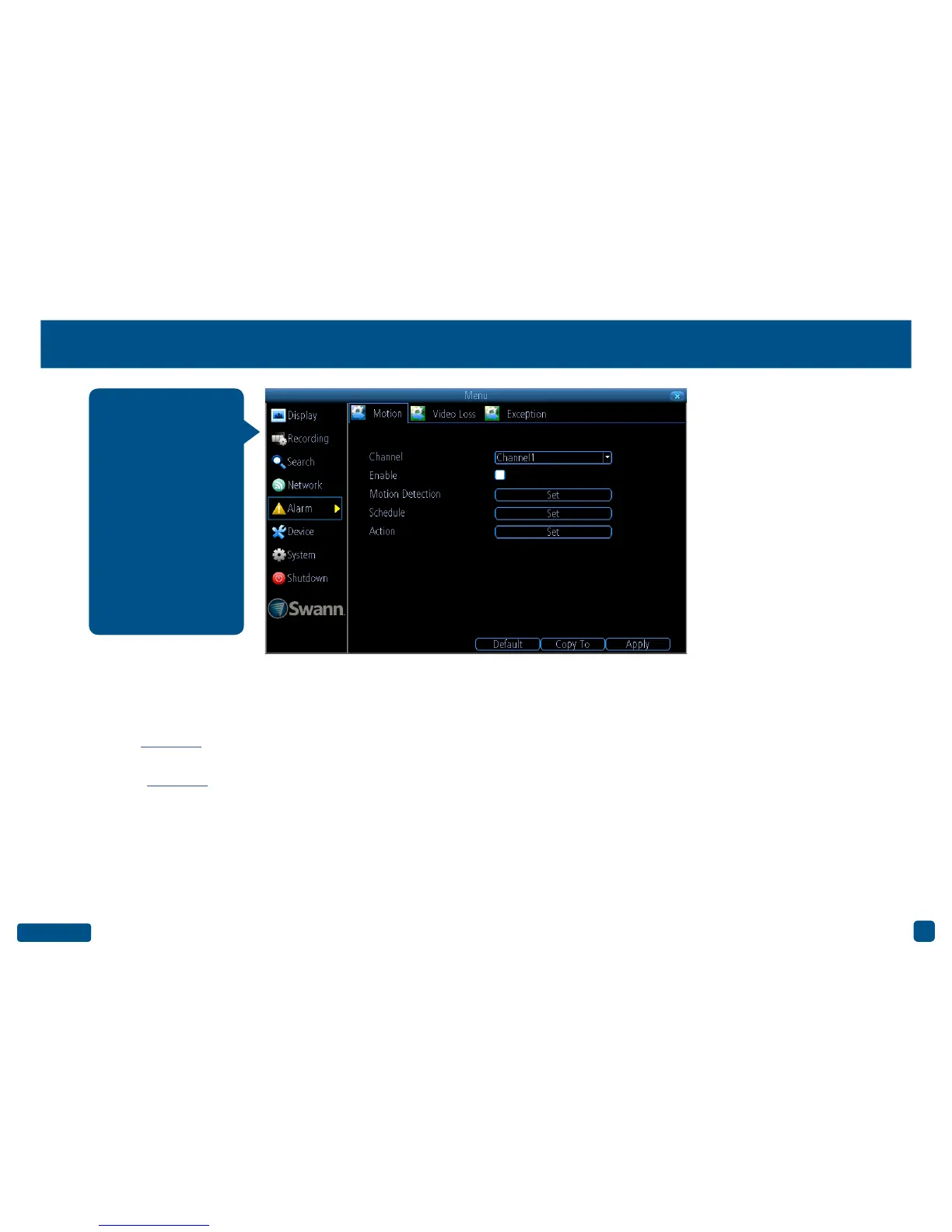
Alarm: Motion
Channel: Select a camera that you would like to configure.
Enable: Motion Detection is enabled by default.
Motion Detection: Click the “Set” button to change the default Motion
Detection area - Click here for more information.
Schedule: Click the “Set” button to change the default Motion Detection
alarm schedule - Click here for more information.
Action: Click the “Set” button to enable an audio warning, to send an
email and to trigger other cameras when motion is detected.
• Click the “Default” button to revert back to default settings.
• Use the “Copy to” button to apply all settings to the other cameras.
• Don’t forget to click “Apply” to save settings.
• Right-click the mouse to exit the Menu.
Whether you’re waiting
for an expected event,
hoping you don’t spot
an unwelcome visitor,
or just curious about
what happens when
you’re not around, Mo-
tion Detection can be
configured to alert you
and record video only
when it detects mo-
tion. Motion Detection
is enabled by default.


 To Next Page