Back to top
20
Device: PTZ
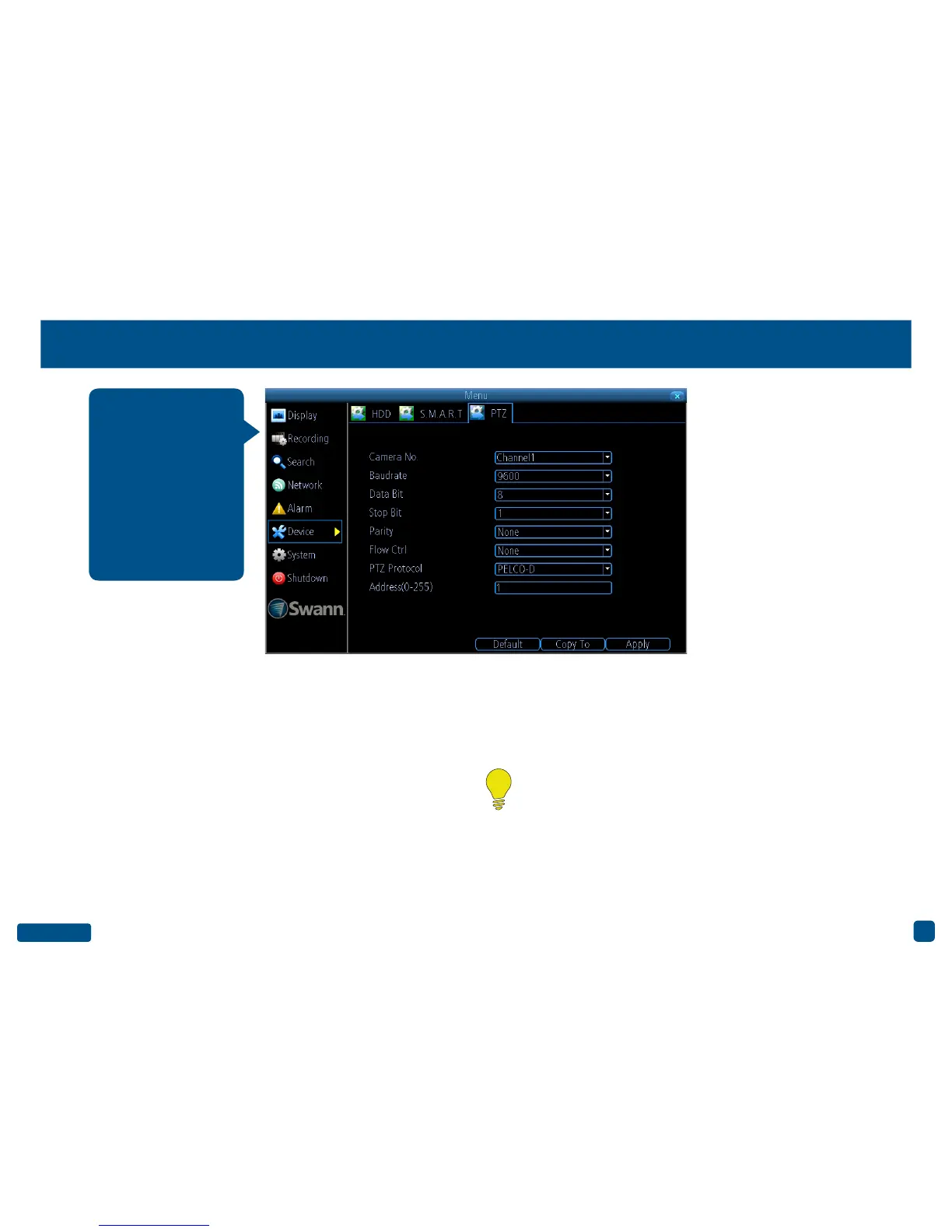
Camera No.: Select a camera that you would like to configure.
Baudrate: Most devices operate at 2400 or 9600.
Data Bit: Most devices operate at 8.
Stop Bit: Most devices operate at 1.
Parity: Most devices have the parity set to “None”.
Flow Ctrl: Most devices have the parity set to “None”.
PTZ Protocol: “PELCO-C, PELCO-D” and “PELCO-P” are popular cam-
era control protocols used in the CCTV industry. This ensures that any
PTZ camera you have purchased, will work with this DVR. For the best
result, we recommend using a Swann branded PTZ camera.
Address(0-255): The command address of the device you want to asso-
ciate with this channel.
• Click the “Default” button to revert back to default settings.
• Use the “Copy to” button to apply all settings to the other cameras.
• Don’t forget to click “Apply” to save settings.
• Right-click the mouse to exit the Menu.
If you have a PTZ cam-
era connected to your
DVR, use this menu to
configure settings for
your device. Please
consult the user man-
ual included with your
camera for specific
configuration instruc-
tions.
Please note: Don’t use Motion Detection on channels with a PTZ
camera connected. As a PTZ camera can pan, tilt & zoom, your
DVR will detect this as motion instead of a moving object.


 To Next Page